
 Fabric
 Quilt
QuiltGiới thiệu mod Adorn
Bạn đang tìm phiên bản NeoForge/Forge?
Adorn là một mod trang trí và nội thất, bổ sung nhiều khối trang trí, chẳng hạn như...
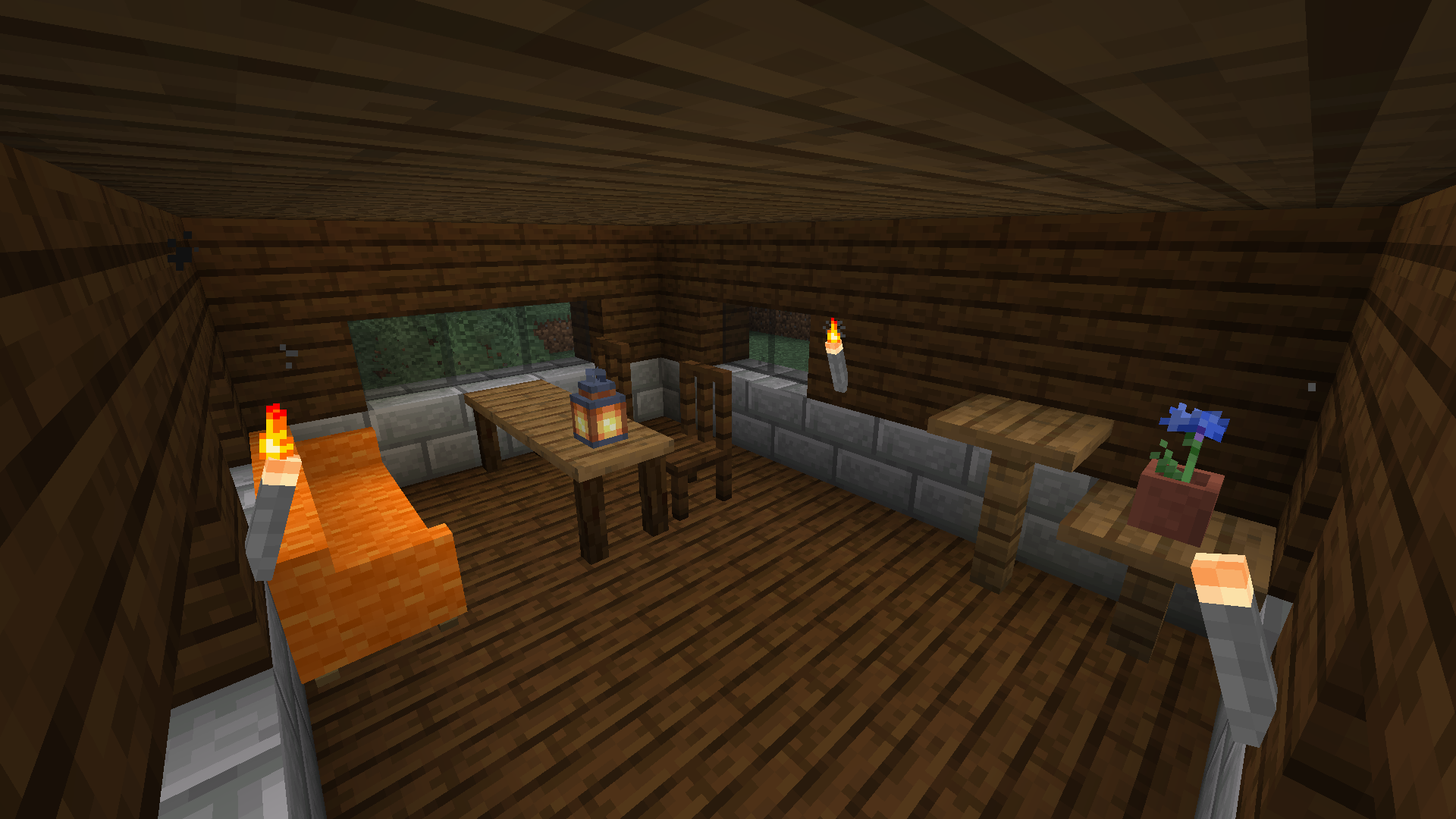
- Ghế và sofa! Bạn có thể ngồi và thư giãn trên chúng. Sofa cũng là một chỗ tuyệt vời để chợp mắt.
- Ngăn kéo! Vật chứa nhỏ hơn rương, nhưng là một món nội thất sang trọng hơn.
- Đuốc đá! Chúng được làm từ đá và là nguồn sáng tốt hơn đuốc gỗ.
- Khối nhà bếp! Bạn có thể trang trí nhà bếp của mình với quầy bếp, tủ và bồn rửa (Hoàn hảo cho các modpack kiểu kitchen sink!)
- Và nhiều thứ khác: bàn, kệ, hàng rào, ống khói...
Adorn bao gồm hỗ trợ đặc biệt cho các mod sau:
- BYG (các biến thể khối)
- Woods and Mires (các biến thể khối)
- Terrestria (các biến thể khối)
- Traverse (các biến thể khối)
- Cinderscapes (các biến thể khối)
- Biome Makeover (các biến thể khối)
- Promenade (các biến thể khối)
- Blockus (các biến thể khối gỗ)
- Tech Reborn (các biến thể khối)
- Lil Tater Reloaded (khoai tây năng lượng)
- Towelette (các khối có thể chứa chất lỏng)
- Mod Menu (màn hình cài đặt)
- Roughly Enough Items (xem công thức pha chế)
- EMI (xem công thức pha chế, cây công thức mặc định có sẵn; từ 3.6.0)
- DashLoader (lưu đệm mô hình với các thuộc tính trạng thái khối của Adorn)
Đừng báo lỗi trong phần bình luận trên CurseForge. Trình theo dõi lỗi của Adorn nằm trên GitHub.
Cách cài đặt Adorn
With Millida Launcher
Install Millida Launcher
The launcher is free: download it at millida.net/launcher and sign in with any nickname.
Click “Install” on this page
The launcher opens and installs the mod for Minecraft 1.14–26.2 on Fabric or Quilt automatically.
Launch the game
A profile with it appears in the launcher: click “Play”.
Manually
Install Fabric or Quilt
The loader must match the game version of the mod file, for example Minecraft 26.2. After installing it, a separate profile appears in your launcher.
Download the file for your version
In the version list above, pick the file Adorn-9.0.0+26.2-fabric.jar (2.7 MB) for your game version and loader.
Put it in the mods folder
The folder is inside .minecraft (Windows: %appdata%\.minecraft\mods). If it does not exist, create it.
Launch the loader profile
Open “Mods” in the main menu: Adorn should be in the list.
Phiên bản
Kèm phụ thuộc
| Minecraft | Loader | Tệp | Ngày | Hành động |
|---|---|---|---|---|
| 26.2 | Fabric, Quilt | Adorn 9.0.0 for 26.22.7 MB 6 | ||
| — | Fabric, Quilt | Adorn 7.0.0-c for Craftmine5.1 MB 3 | ||
| 1.14.4 | — | Adorn 1.2.0 for 1.14.41 MB | ||
| 1.14 | — | Adorn 0.1.3 for 1.14723 KB |
Câu hỏi thường gặp
Which Minecraft versions does Adorn work on?
There are files for 26.2, 1.14.4, 1.14. The newest is 26.2.
Is Adorn for Forge or Fabric?
There are files for Fabric: 26.2 and for Quilt: 26.2. There are no files for Forge or NeoForge: a mod for another loader will not start.
Does Adorn need other mods?
The author lists no required dependencies: the Fabric or Quilt loader is enough.
Where can I download Adorn safely?
On this page: the file Adorn-9.0.0+26.2-fabric.jar (2.7 MB) is stored on Millida’s server, with no link shorteners. SHA-1 checksum: 6c944be5e72fe239c3776d782badcf65f7f0464d.
Đánh giá
Hãy là người đầu tiên đánh giá Adorn


