
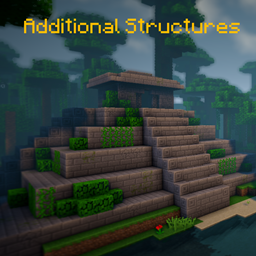
Additional Structures Mod cho Minecraft 1.20.1, 1.12.2
Thêm hơn 250 cấu trúc mới hòa nhập hoàn hảo vào thế giới của bạn!
 NeoForge
 Forge
Forge📖 Mô tả
Mod này thêm khoảng 250 công trình mới với kích thước nhỏ và vừa vào game để mở rộng thế giới của bạn!
- hỗ trợ các mod tạo quần xã sinh vật, như Terralith, Traverse, Biomes O' Plenty, Biome Bundle và nhiều mod khác!
- Tích hợp Mystcraft (MC 1.12)
- với các tùy chọn cấu hình để thay đổi giá trị xuất hiện của từng loại công trình! (MC 1.12)
- hoạt động với lệnh /locate
- có trình kiểm tra cập nhật
- các công trình khác nhau xuất hiện trong quần xã sinh vật gốc và quần xã sinh vật của mod ở overworld và the end!
- Datapack cấu hình
Muốn sửa đổi hoặc thay đổi một số giá trị công trình trên 1.18+? Đây là cách thực hiện!
Tại đây bạn có thể tìm thấy tất cả công trình của phiên bản hiện tại!
Bạn dùng Fabric hay Quilt? Vậy hãy dùng phiên bản này!
📷 Giới thiệu
🗃️ Phụ thuộc
Bắt buộc:
- Magma Core [≥ MC 1.21.5]
- Cung cấp mã và các tính năng cơ bản như trình kiểm tra cập nhật
- CurseForge | Modrinth
Được hỗ trợ:
- Mystcraft [MC 1.12]
- Đã thêm ký hiệu đặc trưng của các công trình AS
- CurseForge | Modrinth
- Antique Atlas [≥ MC 1.21]
- Đánh dấu bản đồ cho một số công trình trên bản đồ
- CurseForge | Modrinth
Cách cài đặt Additional Structures
With Millida Launcher
Install Millida Launcher
The launcher is free: download it at millida.net/launcher and sign in with any nickname.
Click “Install” on this page
The launcher opens and installs the mod for Minecraft 1.12–1.21.10 on Forge or NeoForge automatically.
Launch the game
A profile with it appears in the launcher: click “Play”.
Manually
Install Forge or NeoForge
The loader must match the game version of the mod file, for example Minecraft 1.21.10. After installing it, a separate profile appears in your launcher.
Download the file for your version
In the version list above, pick the file AdditionalStructures-1.21.10-(v.8.1.1-NEO).jar (1.5 MB) for your game version and loader.
Put it in the mods folder
The folder is inside .minecraft (Windows: %appdata%\.minecraft\mods). If it does not exist, create it.
Launch the loader profile
Open “Mods” in the main menu: Additional Structures should be in the list.
Minecraft 1.21.10 runs on Java 21: with a different Java version the game may close right after launch.
Phiên bản
Kèm phụ thuộc
| Minecraft | Loader | Tệp | Ngày | Hành động |
|---|---|---|---|---|
| 1.21.9 | NeoForge | AdditionalStructures v.8.1.1-NEO1.5 MB 1 | ||
| 1.20.2 | Forge | Additional Structures v.4.2.21.5 MB 24 | ||
| 1.12.1 | — | Additional Structures v.2.2.2782 KB 5 |
Câu hỏi thường gặp
Which Minecraft versions does Additional Structures work on?
There are files for 1.12–1.21.10, 12 versions in total. The newest is 1.21.10.
Is Additional Structures for Forge or Fabric?
There are files for Forge: 1.20–1.20.6 and for NeoForge: 1.21.9–1.21.10. There are no files for Fabric: a mod for another loader will not start.
Does Additional Structures need other mods?
The author lists no required dependencies: the Forge or NeoForge loader is enough.
Which Java does Additional Structures need?
Minecraft 1.21.10 runs on Java 21. If the game closes right after launch, the usual cause is the wrong Java version in the profile settings.
Where can I download Additional Structures safely?
On this page: the file AdditionalStructures-1.21.10-(v.8.1.1-NEO).jar (1.5 MB) is stored on Millida’s server, with no link shorteners. SHA-1 checksum: 05bfd35a858149e7e18e7eecd841f14dee9e504b.
Đánh giá
Hãy là người đầu tiên đánh giá Additional Structures


