

Accessories Mod cho Minecraft 1.20.1, 1.21.1
Một Mod Phụ kiện có thể mở rộng và dựa trên dữ liệu cho Minecraft
 Fabric
 NeoForge
 Forge
ForgeGiới thiệu mod Accessories
Accessories là một mod Phụ kiện Dựa trên Dữ liệu dành cho NeoForge và Fabric, chú trọng vào việc sử dụng API Chung cho cả hai nền tảng khi có thể.
Phong cách API của thư viện này dựa trên các tác phẩm của Curios và Trinkets, với sự ghi nhận dành cho cả TheIllusiveC4 và emilyploszaj vì công trình của họ về các mod Phụ kiện cho Minecraft.
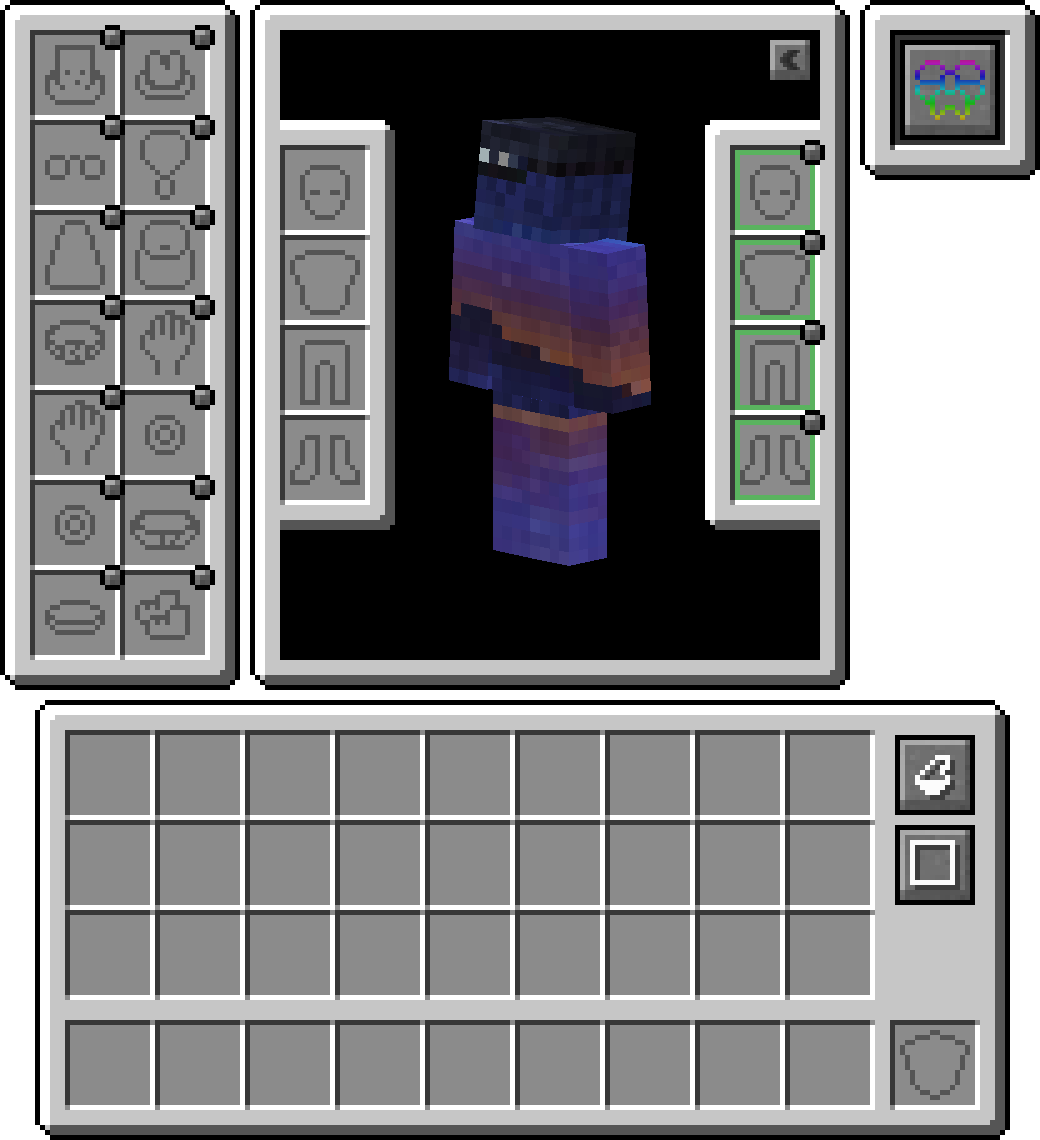
Tính năng
Hỗ trợ Elytra, Totem và Banner đi kèm
Theo mặc định, bạn có thể trang bị banner vào ô đầu hoặc ô áo choàng (đang phát triển) để khoe banner tùy chỉnh. Đối với elytra hoặc totem, bạn sẽ cần bật tính năng này trong config vì nó bị tắt theo mặc định.

Lớp Tương thích
Do các API hiện có như Trinket và Curios được sử dụng chủ yếu, bạn có thể cài đặt Lớp Tương thích Accessories để chúng hoạt động dưới Accessories nhằm mang lại trải nghiệm thống nhất

API Chuyển đổi Mô hình
Được cung cấp cho các nhà phát triển là một API biến đổi phù hợp dùng trong việc render các Accessories gốc, cho phép liên kết đúng với các bộ phận mô hình thực thể nhất định, từ đó hỗ trợ đúng cho các Resourcepack EMF như Fresh Animations, và có kế hoạch tương lai hỗ trợ các mod render khác như Figura.
Quản lý Phụ kiện đã Trang bị
Khả năng truy cập các thực thể đã được thuần hóa khác cho phép các mod khác có vật phẩm phụ kiện cho thú cưng hoặc vật cưỡi. Kết hợp với việc hữu ích cho chủ server để quản lý phụ kiện của người chơi khác nếu cần, mà không dùng đến các lệnh quản lý trực tiếp. Chỉ cần giữ shift và dùng 'Accessories Open Screen' trên bất kỳ thực thể nào (Nếu thuộc sở hữu, phải là chủ sở hữu) để mở màn hình, hoặc chạy lệnh /accessories edit nếu là OP.
Bổ sung API
Dưới đây là một số ví dụ về API được triển khai trong Accessories có thể hỗ trợ bạn phát triển mod:
- Hỗ trợ đầy đủ cho Accessories dựa trên NBT: Wiki
- Các sự kiện API hiện có cho Vật phẩm Trung lập Piglin, Mặt nạ Enderman, Điều chỉnh Looting, Điều chỉnh Fortune và Khả năng Đi trên Tuyết: Wiki
- API Ô riêng cho Phụ kiện Đặc thù của Mod: Wiki
Cách cài đặt Accessories
With Millida Launcher
Install Millida Launcher
The launcher is free: download it at millida.net/launcher and sign in with any nickname.
Click “Install” on this page
The launcher opens and installs the mod for Minecraft 1.20–1.21.1 on Fabric, Forge or NeoForge automatically, together with its dependencies: Cloth Config API, Fabric API, oωo (owo-lib).
Launch the game
A profile with it appears in the launcher: click “Play”.
Manually
Install Fabric, Forge or NeoForge
The loader must match the game version of the mod file, for example Minecraft 1.21.1. After installing it, a separate profile appears in your launcher.
Download the file for your version
In the version list above, pick the file accessories-fabric-1.1.0-beta.54+1.21.1.jar (1.1 MB) for your game version and loader.
Put it in the mods folder
The folder is inside .minecraft (Windows: %appdata%\.minecraft\mods). If it does not exist, create it. Required dependencies go there too: Cloth Config API, Fabric API, oωo (owo-lib).
Launch the loader profile
Open “Mods” in the main menu: Accessories should be in the list.
On a server
A server on Fabric, Forge or NeoForge
The mod only works on a server with the same loader and game version, for example 1.21.1.
File goes into the server’s mods folder
Stop the server, put the mod file into the mods folder and start the server again.
Use the “To server” button
On Millida Hosting, the button at the top of the page uploads the file to your server and restarts it for you.
Minecraft 1.21.1 runs on Java 21: with a different Java version the game may close right after launch.
Phiên bản
Kèm phụ thuộc
| Minecraft | Loader | Tệp | Ngày | Hành động |
|---|---|---|---|---|
| 1.20.1 | Fabric | 1.20.1751 KB 3 | ||
| 1.20.1 | Forge | 1.20.11 MB 36 | ||
| 1.21.1 | Fabric | 1.21.11.1 MB 13 | ||
| 1.21.1 | NeoForge | 1.21.11 MB 34 | ||
| 1.21 | NeoForge | 1.2110.3 MB 14 | — | |
| 1.20.1 | Fabric | 1.20.1751 KB 3 | — |
Yêu cầu để chạy
- Cloth Config APIbắt buộc
- Fabric APIbắt buộc
- oωo (owo-lib)bắt buộc
Nội dung cần nó
Câu hỏi thường gặp
Which Minecraft versions does Accessories work on?
There are files for 1.21.1, 1.21, 1.20.1, 1.20. The newest is 1.21.1.
Is Accessories for Forge or Fabric?
There are files for Fabric: 1.20–1.21.1, for Forge: 1.20–1.20.1 and for NeoForge: 1.21–1.21.1.
What does Accessories need to work?
Required: Cloth Config API, Fabric API, oωo (owo-lib). Without them the mod will not start: dependencies go into the same mods folder.
Does Accessories work on a server?
Yes. Accessories works both in singleplayer and on a server.
Which Java does Accessories need?
Minecraft 1.21.1 runs on Java 21. If the game closes right after launch, the usual cause is the wrong Java version in the profile settings.
Where can I download Accessories safely?
On this page: the file accessories-fabric-1.1.0-beta.54+1.21.1.jar (1.1 MB) is stored on Millida’s server, with no link shorteners. SHA-1 checksum: e1165f3d5b31d4296f932ec1bc428f2a832c5def.
Đánh giá
Hãy là người đầu tiên đánh giá Accessories


