

LinusMinus Bản dựng cho Minecraft 1.21, 26.3
Modpack này chỉ thêm một số mod tăng cường lối chơi và hiệu năng, mà không thêm bất kỳ khối hay cơ chế mới nào vào game.
- lượt xem
- 39 lượt xem
- Đã cập nhật
- Đã cập nhật 29.09.2026
- 1.21 — 26.3
 Fabric
- Máy khách và máy chủ
LinusMinus
This modpack has two goals:
- Enhance vanilla with quality of life mods while keeping the game save playable with vanilla
- Minimize security risks by minimizing mod count and only allowing open source mods. Thus, this pack will not add any performance mods.
Current Mods
- Inventory Profiles Next: Inventory sorting!
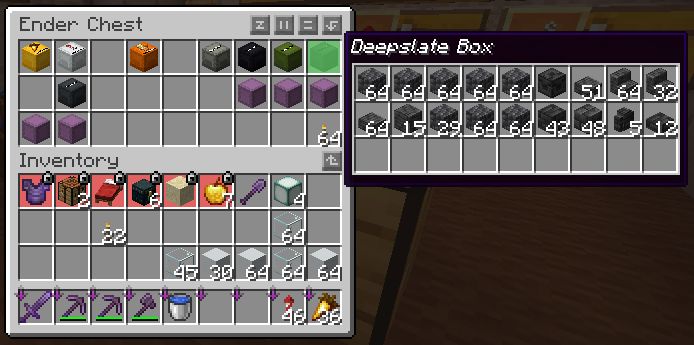
- Peek: Hover over shulker boxes in your inventory and see what they contain
- One World Folder: Allows you to access worlds from other minecraft instances
- Freecam: Move your camera without moving your body
Resourcepacks (can be enabled optionally):
- Energy Shaders: Vanilla Minecraft Shaderpack
- Alacrity: Medivial resourcepack
- 3D Default: Adds 3D models to some vanilla blocks.
Modpack updates
This modpack will always be updated to the newest Minecraft version.
Gallery and help
Some images and other stuff to show what this modpack offers
Inventory
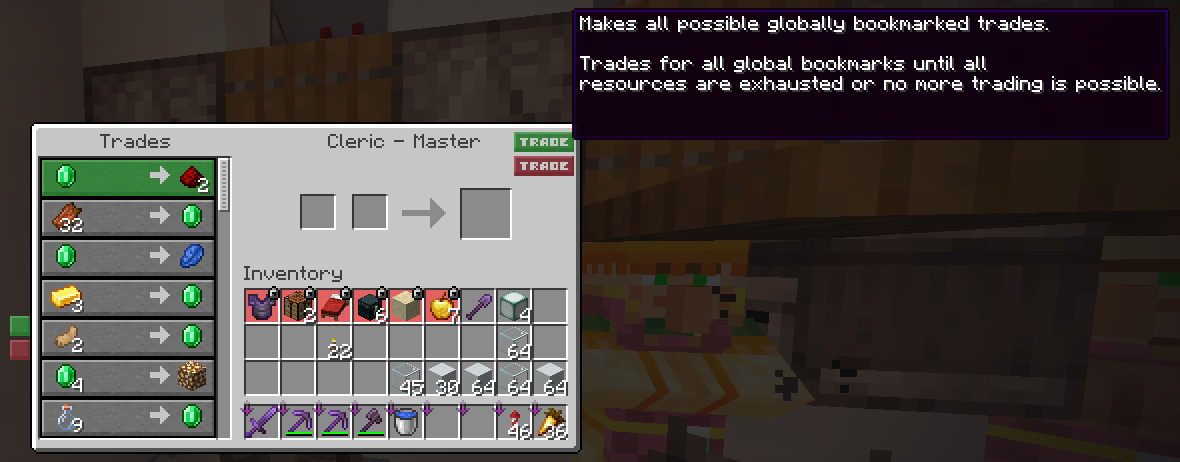
Villager trading
Cách cài đặt LinusMinus
With Millida Launcher
Install Millida Launcher
The launcher is free: download it at millida.net/launcher and sign in with any nickname.
Click “Install” on this page
The launcher opens and installs the modpack for Minecraft 1.21–26.3 on Fabric automatically.
Launch the game
A profile with it appears in the launcher: click “Play”.
Manually
Download the modpack archive
In the version list above, pick the file LinusMinus 26.3-1.mrpack (2 KB).
Import it into a launcher
A launcher that supports modpacks (Millida Launcher, Prism) takes the archive via “Add modpack”, then “From file”. No need to unpack it yourself.
Allocate memory
Modpacks need more memory than the plain game: set 4–6 GB in the profile settings.
On a server
Use the “To server” button
On Millida Hosting, the button at the top of the page uploads the file to your server and restarts it for you.
Invite friends: they install the same modpack
To join the server, every player needs the same modpack version.
Phiên bản
Kèm phụ thuộc
| Minecraft | Loader | Tệp | Ngày | Hành động |
|---|---|---|---|---|
| 26.3 | Fabric | 26.32.3 KB | ||
| 26.2 | Fabric | 26.26.5 KB | — | |
| 26.1 | Fabric | 26.1623 KB | — | |
| 1.21 | Fabric | 1.211.1 MB | — |
Yêu cầu để chạy
- Xaero's Minimapđã bao gồm
- More Cullingđã bao gồm
- 3D Defaultđã bao gồm
- BetterF3đã bao gồm
- Cloth Config APIđã bao gồm
- Sodiumđã bao gồm
- TCDCommons APIđã bao gồm
- Dependencyđã bao gồm
- MaLiLibđã bao gồm
- Fabric Language Kotlinđã bao gồm
- Dependencyđã bao gồm
- Energy Shaders Javađã bao gồm
- Dynamic FPSđã bao gồm
- Entity Cullingđã bao gồm
- Inventory Profiles Nextđã bao gồm
- Indiumđã bao gồm
- Fabric APIđã bao gồm
- Alacrityđã bao gồm
- Sodium Extrađã bao gồm
- Dependencyđã bao gồm
- Dependencyđã bao gồm
- MiniHUDđã bao gồm
- Freecamđã bao gồm
- Night Vision Shadersđã bao gồm
- Litematicađã bao gồm
- Mod Menuđã bao gồm
- Better Statistics Screenđã bao gồm
- Jade 🔍đã bao gồm
- Dependencyđã bao gồm
- libIPNđã bao gồm
- e4mcđã bao gồm
- Dependencyđã bao gồm
- LambDynamicLightsđã bao gồm
Đánh giá
Hãy là người đầu tiên đánh giá LinusMinus


