

Minecraft 1.20.1, 1.21.1 کے لیے Pix Android Boost بلڈ
ZalithLauncher/Fold Craft Launcher کے لیے آپٹیمائزیشن انٹیگریشن براہ کرم مسائل یا تجاویز کی اطلاع کے لیے QQ چینل PixABoost1798 پر جائیں۔
 Fabric
 NeoForge
 Forge
ForgePix Android Boost
Make Minecraft Run Smoothly on Your Phone
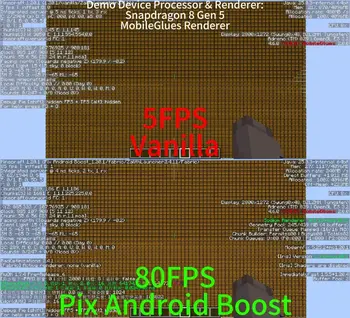
An optimization modpack built specifically for Android devices, designed to let mid-to-low-end phones run Minecraft smoothly without lag.

What It Does For You
- Boosts FPS & Reduces Lag – Enjoy buttery-smooth gameplay, even on older hardware
Mod Compatibility
Because this modpack is stuffed with a ton of mods, its compatibility is quite poor. As for what it's incompatible with, I can't really list them out—there are probably a lot. But don't worry, you can use the Lite version, which usually has better compatibility.

Notes
- 1.17+: Use MobileGlues MobileGL or ZinkKopper as renderer
- 1.16.5 and below: Use Krypton Wrapper, GL4ES Plus, or ZinkKopper as renderer
- ZinkKopper is not recommended on non-Adreno devices
- Crash reports caused by incorrect renderer configuration will not be supported
Pix Android Boost کیسے انسٹال کریں
With Millida Launcher
Install Millida Launcher
The launcher is free: download it at millida.net/launcher and sign in with any nickname.
Click “Install” on this page
The launcher opens and installs the modpack for Minecraft 1.12.2–26.3 on Fabric, Forge or NeoForge automatically.
Launch the game
A profile with it appears in the launcher: click “Play”.
Manually
Download the modpack archive
In the version list above, pick the file Pix Android Boost_26.3.mrpack (1.9 MB).
Import it into a launcher
A launcher that supports modpacks (Millida Launcher, Prism) takes the archive via “Add modpack”, then “From file”. No need to unpack it yourself.
Allocate memory
Modpacks need more memory than the plain game: set 4–6 GB in the profile settings.
On a server
Use the “To server” button
On Millida Hosting, the button at the top of the page uploads the file to your server and restarts it for you.
Invite friends: they install the same modpack
To join the server, every player needs the same modpack version.
ورژنز
ڈیپنڈنسیز کے ساتھ
| Minecraft | لوڈر | فائل | تاریخ | اقدامات |
|---|---|---|---|---|
| 1.12.2 | — | 1.12.2303 KB | ||
| 1.12.2 | — | 1.12.2303 KB | ||
| 1.20.1 | Fabric | 1.20.1387 KB | ||
| 1.21.1 | Fabric | 1.21.1533 KB | ||
| 1.21.1 | Fabric | 1.21.1533 KB | ||
| 1.20.1 | Forge | 1.20.18.2 MB | ||
| 1.21.1 | NeoForge | 1.21.12.5 MB | ||
| 1.21.1 | NeoForge | 1.21.12 MB |
چلانے کے لیے کیا درکار ہے
- Dependencyپہلے سے شامل
- Dependencyپہلے سے شامل
- Dependencyپہلے سے شامل
- Dependencyپہلے سے شامل
- Dependencyپہلے سے شامل
- Dependencyپہلے سے شامل
- Dependencyپہلے سے شامل
- Dependencyپہلے سے شامل
- Memory Leak Fixپہلے سے شامل
- Dependencyپہلے سے شامل
- Fzzy Configپہلے سے شامل
- Dependencyپہلے سے شامل
- Dependencyپہلے سے شامل
- Dependencyپہلے سے شامل
- Dependencyپہلے سے شامل
- (Sodium) Chlorideپہلے سے شامل
- Dependencyپہلے سے شامل
- Immersive Optimizationپہلے سے شامل
- Fabric Language Kotlinپہلے سے شامل
- Dependencyپہلے سے شامل
- Dependencyپہلے سے شامل
- Dependencyپہلے سے شامل
- Dependencyپہلے سے شامل
- Dependencyپہلے سے شامل
- Dependencyپہلے سے شامل
- Dependencyپہلے سے شامل
- Dependencyپہلے سے شامل
- Dependencyپہلے سے شامل
- VanillaIcecreamFixپہلے سے شامل
- Dependencyپہلے سے شامل
- TxniLibپہلے سے شامل
- Async Locatorپہلے سے شامل
- Kotlin for Forgeپہلے سے شامل
- Redirectedپہلے سے شامل
- Sodium Extrasپہلے سے شامل
- Dependencyپہلے سے شامل
- Dependencyپہلے سے شامل
- Dependencyپہلے سے شامل
- Dependencyپہلے سے شامل
- Dependencyپہلے سے شامل
- Dependencyپہلے سے شامل
- Dependencyپہلے سے شامل
- Architectury APIپہلے سے شامل
- Dependencyپہلے سے شامل
- Dependencyپہلے سے شامل
- More Cullingپہلے سے شامل
- Fleroviumپہلے سے شامل
- Dependencyپہلے سے شامل
- Async Loggerپہلے سے شامل
- ModernFix-mVUSپہلے سے شامل
- Dependencyپہلے سے شامل
- Entity Cullingپہلے سے شامل
- Lithiumپہلے سے شامل
- Forge Config API Portپہلے سے شامل
- Sodiumپہلے سے شامل
- Concurrent Chunk Management Engine (Fabric)پہلے سے شامل
- Very Many Players (Fabric)پہلے سے شامل
- GPUBoosterپہلے سے شامل
- Asyncپہلے سے شامل
- Dependencyپہلے سے شامل
- BadOptimizationsپہلے سے شامل
- FastEventپہلے سے شامل
- Dependencyپہلے سے شامل
- Palladiumپہلے سے شامل
- ScalableLuxپہلے سے شامل
- Cloth Config APIپہلے سے شامل
- Dependencyپہلے سے شامل
- Faster Iris Shadow Mapper [FISM]پہلے سے شامل
- Fabric APIپہلے سے شامل
- Dependencyپہلے سے شامل
- Dependencyپہلے سے شامل
- Dependencyپہلے سے شامل
- Particle Coreپہلے سے شامل
- Dependencyپہلے سے شامل
- ImmediatelyFastپہلے سے شامل
- Ceruleanپہلے سے شامل
- LightSpeedReپہلے سے شامل
- TT20 (TPS Fixer)پہلے سے شامل
- Alternate Currentپہلے سے شامل
- Gnetumپہلے سے شامل
- Iris Shadersپہلے سے شامل
- Dependencyپہلے سے شامل
- Better Block Entitiesپہلے سے شامل
- Kryptonپہلے سے شامل
- ToadLibپہلے سے شامل
- Structure Layout Optimizerپہلے سے شامل
- Optimized Block Entities [OBE]پہلے سے شامل
- Forgified Fabric APIپہلے سے شامل
- Starlight (Forge)پہلے سے شامل
- Krypton Renoپہلے سے شامل
- Embeddiumپہلے سے شامل
- ModernFixپہلے سے شامل
- FastSuiteپہلے سے شامل
- Dependencyپہلے سے شامل
- Dependencyپہلے سے شامل
- Exordiumپہلے سے شامل
- Ksyxisپہلے سے شامل
- Placeboپہلے سے شامل
- Resourceful Configپہلے سے شامل
- More Culling Extraپہلے سے شامل
- ThreadTweakپہلے سے شامل
- Sodium Options APIپہلے سے شامل
- Dependencyپہلے سے شامل
- Dependencyپہلے سے شامل
- Dependencyپہلے سے شامل
- Dependencyپہلے سے شامل
- Grapheneپہلے سے شامل
- Particle Cullingپہلے سے شامل
- Dependencyپہلے سے شامل
- Smart Particlesپہلے سے شامل
- Dependencyپہلے سے شامل
- Dependencyپہلے سے شامل
- Mod Menuپہلے سے شامل
- FerriteCoreپہلے سے شامل
ریویوز
Pix Android Boost کو ریٹ کرنے والے پہلے شخص بنیں


