

Minecraft 1.20.1 کے لیے Sodium Options API موڈ
بہتر categories مینو کے ساتھ Sodium آپشنز شامل کرنے کے لیے Config API
- ڈاؤن لوڈز
- 165 ڈاؤن لوڈز
- ویوز
- 452 ویوز
- اپ ڈیٹ شدہ
- اپ ڈیٹ شدہ 03.09.2026
- 1.20 — 1.20.1
 Forge
Forge- کلائنٹ
Sodium Options API موڈ کے بارے میں

یہ موڈ کراس پلیٹ فارم ایونٹس شامل کرتا ہے تاکہ Sodium/Embeddium آپشنز مینو کا انٹیگریشن شامل کیا جا سکے۔ مثال کے طور پر، آپ ایک ہی ایونٹ سے Forge پر Embeddium میں، 1.20.1 پر Fabric Sodium 0.5 میں، اور 1.21.1 پر Fabric/NeoForge Sodium 0.6 میں ایک آپشن صفحہ شامل کر سکتے ہیں:
OptionGUIConstruction.EVENT.register((pages) -> pages.add(new TestOptionPage()));
اگر آپ ایک عام صارف ہیں اور یہ موڈ پہلے سے کسی دوسرے Sodium ایڈآن کے لیے لائبریری کے طور پر انسٹال نہیں ہے، تو آپ اسے Reese's Options کے ساتھ انسٹال کر سکتے ہیں تاکہ بہتر کیٹیگری مینو حاصل ہو، جس میں ڈراپ ڈاؤن سپورٹ ہو تاکہ نیویگیٹ کرنا آسان ہو۔ یہ ان موڈز پر بھی اثر انداز ہوگا جو اس API کو استعمال نہیں کرتے اور براہ راست Sodium آپشنز میں انجیکٹ کرتے ہیں۔
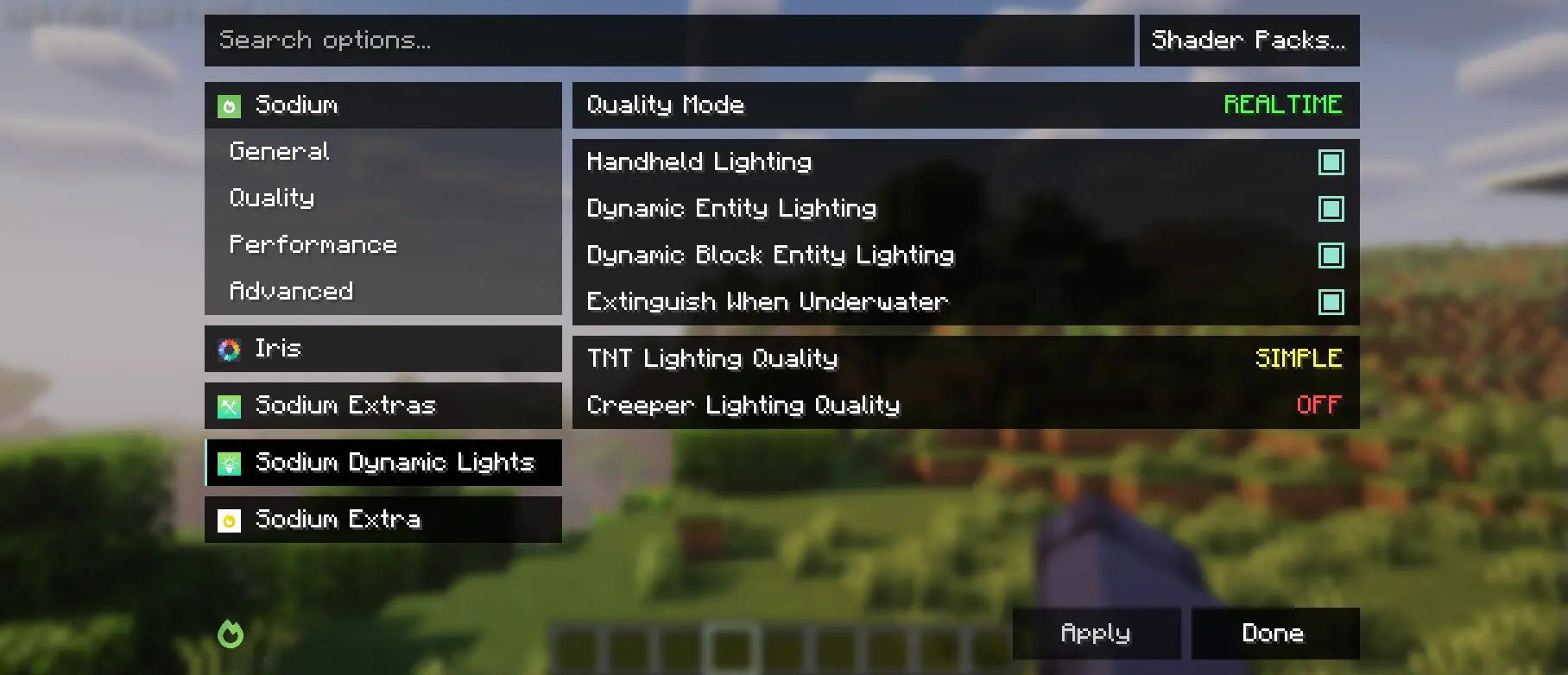
یہ موڈ جزوی طور پر Embeddium categories API اور options events کا فورک ہے، جس میں upstream Sodium کو سپورٹ کرنے کے لیے بھاری تبدیلیاں کی گئی ہیں۔ اگرچہ یہ Reese's Sodium Options مینو میں تبدیلیاں کرتا ہے، لیکن یہ مطابقت کی وجوہات کی بنا پر mixin کے ذریعے ایسا کرتا ہے، اس لیے آپ کو دونوں انسٹال کرنے ہوں گے۔
API کا استعمال
سب سے پہلے، آپ کو اس موڈ کو اپنے ڈیو ماحول میں شامل کرنا ہوگا، Curseforge یا Modrinth کے Maven ریلیز کا استعمال کرتے ہوئے۔
modImplementation("maven.modrinth:sodium-options-api:version")
پھر، یہ موڈ toni.sodiumoptionsapi.api میں تین ایونٹس فراہم کرتا ہے:
- OptionGUIConstruction.EVENT، جو GUI کنسٹرکٹر میں ایک بار کال ہوتا ہے، مکمل صفحات شامل کرنے کی اجازت دیتا ہے۔ غالباً یہی وہ ہے جو آپ چاہتے ہیں۔
- OptionPageConstruction.EVENT، جو ہر OptionPage کے لیے کال ہوتا ہے۔ اسے استعمال کریں اگر آپ پرفارمنس ٹیب میں ٹوگلز کا ایک گروپ شامل کرنا چاہتے ہیں یا اس جیسی کوئی چیز۔
- OptionGroupConstruction.EVENT، جو آپشنز کے ہر گروپ کے لیے کال ہوتا ہے۔ اسے استعمال کریں اگر آپ کسی موجودہ گروپ میں ایک واحد آپشن داخل کرنا چاہتے ہیں، یا vanilla والوں میں تبدیلی کرنا چاہتے ہیں۔
Sodium Options API کیسے انسٹال کریں
With Millida Launcher
Install Millida Launcher
The launcher is free: download it at millida.net/launcher and sign in with any nickname.
Click “Install” on this page
The launcher opens and installs the mod for Minecraft 1.20–1.20.1 on Forge automatically, together with its dependencies: Embeddium.
Launch the game
A profile with it appears in the launcher: click “Play”.
Manually
Install Forge
The loader must match the game version of the mod file, for example Minecraft 1.20.1. After installing it, a separate profile appears in your launcher.
Download the file for your version
In the version list above, pick the file sodiumoptionsapi-forge-1.0.10-1.20.1.jar (434 KB) for your game version.
Put it in the mods folder
The folder is inside .minecraft (Windows: %appdata%\.minecraft\mods). If it does not exist, create it. Required dependencies go there too: Embeddium.
Launch the loader profile
Open “Mods” in the main menu: Sodium Options API should be in the list.
Sodium Options API works on the player’s side only: there is no need to install it on a server.
Minecraft 1.20.1 runs on Java 17: with a different Java version the game may close right after launch.
ورژنز
ڈیپنڈنسیز کے ساتھ
| Minecraft | لوڈر | فائل | اقدامات |
|---|---|---|---|
| 1.20.1 | Forge | 1.20.1434 KB 164 |
چلانے کے لیے کیا درکار ہے
- Embeddiumلازمی
وہ مواد جسے اس کی ضرورت ہے
عمومی سوالات
Which Minecraft versions does Sodium Options API work on?
There are files for 1.20.1, 1.20. The newest is 1.20.1.
Is Sodium Options API for Forge or Fabric?
Only for Forge: 1.20–1.20.1. There are no files for Fabric or NeoForge: a mod for another loader will not start.
What does Sodium Options API need to work?
Required: Embeddium. Without it the mod will not start: dependencies go into the same mods folder.
Do I need to install Sodium Options API on a server?
No. Sodium Options API works on the player’s side only: there is no need to install it on a server.
Which Java does Sodium Options API need?
Minecraft 1.20.1 runs on Java 17. If the game closes right after launch, the usual cause is the wrong Java version in the profile settings.
Where can I download Sodium Options API safely?
On this page: the file sodiumoptionsapi-forge-1.0.10-1.20.1.jar (434 KB) is stored on Millida’s server, with no link shorteners. SHA-1 checksum: 7529fbf938787ed13a251cbf40936f8c29ec4b6c.
ریویوز
Sodium Options API کو ریٹ کرنے والے پہلے شخص بنیں


