

Shadify Ресурспак для Minecraft 1.20.1, 1.21.1
Видаляє затінення блоків і робить гру яскравішою
- завантажень
- 23 завантажень
- переглядів
- 100 переглядів
- Оновлено
- Оновлено 26.09.2026
- 1.18 — 26.3
 Ванільна гра
- Клієнт
Shadify
Shadify is a Minecraft resource pack designed to remove the dull block shading and make your world look bright and more alive If you’ve ever used the Simply No Shading mod, you’ll instantly recognize the effect but here, it’s done purely with a resource pack, meaning no mods required.
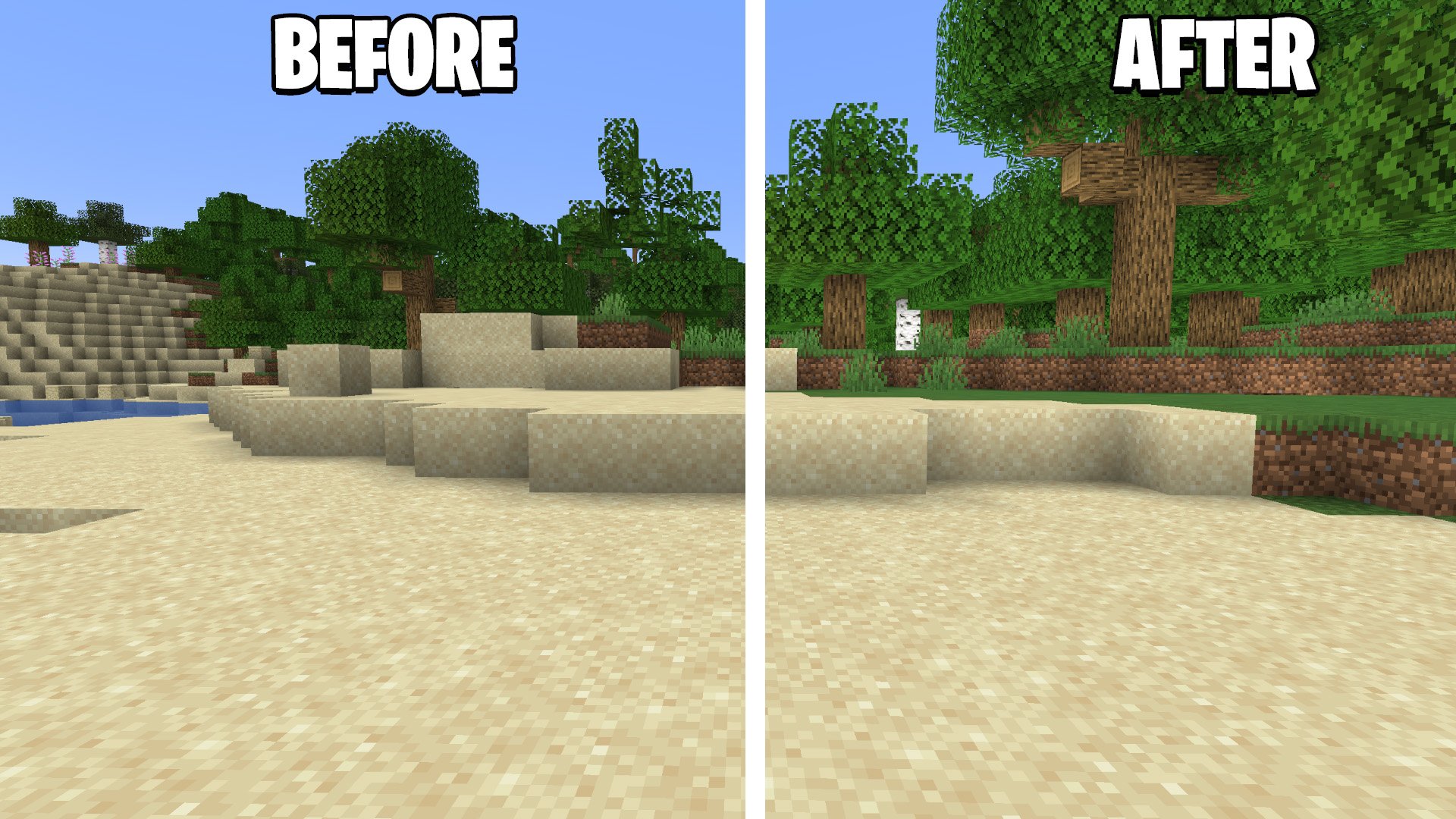
Feature Overview
- Removes block shading - Say goodbye to those dark corners and flat shadows.
- Brighter lighting - The game feels more alive
- Lightweight - Works smoothly without affecting performance.
- Compatible with all shaders - Can be used alongside visual shaders for unique effects.

Як встановити Shadify
With Millida Launcher
Install Millida Launcher
The launcher is free: download it at millida.net/launcher and sign in with any nickname.
Click “Install” on this page
The launcher opens and installs the resource pack for Minecraft 1.18–26.3 automatically.
Launch the game
A profile with it appears in the launcher: click “Play”.
Manually
Download the archive
Pick the file Shadify 26.3+.zip (245 KB) for your game version. No need to unpack it.
Put it in the resourcepacks folder
The easiest way: “Options”, then “Resource Packs”, then “Open Pack Folder”, and drag the archive there.
Enable the pack
In the same window, move the pack to the right-hand “Selected” column and click “Done”.
Версії
Із залежностями
| Minecraft | Завантажувач | Файл | Дата | Дії |
|---|---|---|---|---|
| 26.3 | — | 26.3245 КБ 9 | ||
| 26.2 | — | 26.2244 КБ 3 | ||
| 26.1.2 | — | 26.1.2244 КБ 1 | ||
| 1.21.11 | — | 1.21.11244 КБ 4 | ||
| 1.21.10 | — | 1.21.10244 КБ 1 | ||
| 1.20.6 | — | 1.20.6244 КБ 1 | ||
| 1.19.4 | — | 1.19.4244 КБ | ||
| 1.18.2 | — | 1.18.2244 КБ |
Відгуки
Станьте першим, хто оцінить Shadify



