
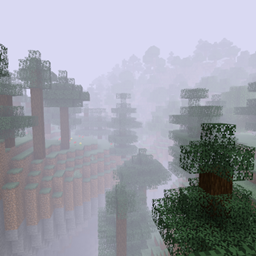
Fog Shaders Ресурспак для Minecraft 1.20.6
Використовує базові шейдери, щоб додати густий туман у ваш світ
Про ресурспак Fog Shaders
This resourcepack adds cool fog to your Minecraft world! It uses core shaders, something added in 1.17, so it's a little bit experimental. But I thought it looked cool and maybe other people would like it, so here it is for download. Make sure to set your graphics to Fabulous so the shader can take effect.
You can adjust the fog level by editing the "fogginess" variable in shaders/program/fog_depth.fsh.
Shader is loosely based on the depth_test shader by onnowhere. It's probably not compatible with Optifine shaders.
Як встановити Fog Shaders
With Millida Launcher
Install Millida Launcher
The launcher is free: download it at millida.net/launcher and sign in with any nickname.
Click “Install” on this page
The launcher opens and installs the resource pack for Minecraft 1.20.5–1.20.6 automatically.
Launch the game
A profile with it appears in the launcher: click “Play”.
Manually
Download the archive
Pick the file fog.zip (32 KB) for your game version. No need to unpack it.
Put it in the resourcepacks folder
The easiest way: “Options”, then “Resource Packs”, then “Open Pack Folder”, and drag the archive there.
Enable the pack
In the same window, move the pack to the right-hand “Selected” column and click “Done”.
Версії
Із залежностями
| Minecraft | Завантажувач | Файл | Дата | Дії |
|---|---|---|---|---|
| 1.20.5 | — | fog.zip31.8 КБ 1 |
Часті питання
Which Minecraft versions does Fog Shaders work on?
There are files for 1.20.6, 1.20.5. The newest is 1.20.6.
Where can I download Fog Shaders safely?
On this page: the file fog.zip (32 KB) is stored on Millida’s server, with no link shorteners. SHA-1 checksum: 94752f03d3675f7d44c8eeac68ae41f3a0b1f49b.
Відгуки
Станьте першим, хто оцінить Fog Shaders



