

Про плагін ServerShop-gui

Config | Shop Config | Commands&Permissions
ServerShop-gui is a shop system. It allows players to buy item from a defined item list. It uses a Inventory to display the shop GUI. This plugin requires latest version of Vault, other than that, just drop it in plugins (make sure you have Vault plus a supported economy plugin installed)
WARNING: BECAREFUL WHEN SELLING COMMANDS OR PERMISSIONS IF YOU MISS SPELL A PERMISSION NODE AND ADD ONE THAT DOESN'T EXIST, THE PLUGIN WILL RESET YOUR ITEMS.YML, SO HAVE A BACKUP OF YOUR ITEMS.YML
Features
- Put any Items you want in the Shop
- Configure Amount and Price
- Lightweight and simple to use Plugin
- Open the shop either with a right click on a defined Item or a command
- Multiple Shops
- Highly customizable
- Purchasable permissions nodes
- Purchasable player commands
- Purchasable console commands
- Custom Lore
- Enchantments
- Custom display names
Support&Questions
If you have any questions/bug reports or feature requests. Please click on Tickets on top, and create a new one. Thanks.
Usage
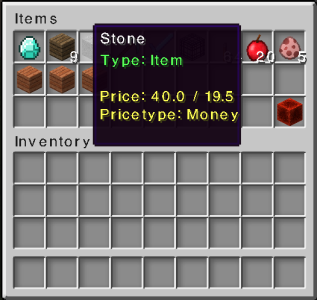
The Interface(GUI) This is a display of all current Items, you click an item to buy it.
Video Tutorial
Thanks to VariationVault for the Video (The video might be outdated)
Metrics Statistic Collection
Metrics is used to collect plugin statistics. Only data such as plugin version and players online is collected. If you do not wish for this data to be collected, disabled the feature in your config.yml (EnableMetrics = false)
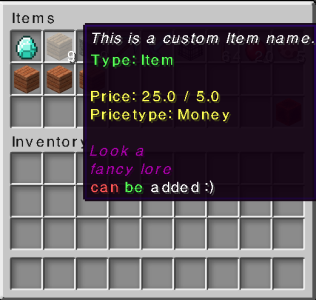
stock: '0': Type: Item Reward: Wood:1 Displayname: This is a custom Item name. lore:
- 'Look a '
- fancy lore
- '&ccan &abe &fadded :)'
Pricetype: Money Price: 25.0 Sell: 5.0 Amount: 9 '1': Type: Item Reward: Stone Pricetype: Money Price: 40.0 Sell: 19.5 Amount: 9 '2': Type: Item Reward: Diamond_sword Displayname: Sword of Fire Enchantments: FIRE_ASPECT:3;KNOCKBACK:40 Pricetype: Money Price: 25.0 Sell: -1 Amount: 1 '3': Type: Item Reward: Mob_Spawner Pricetype: Money Price: 500.125 Sell: 0.0 Amount: 1 '4': Type: Item Reward: Lever Pricetype: EXP Price: 5 Sell: 1 Amount: 64 '5': Type: Item Reward: Apple Pricetype: Money Price: 0 Sell: 0.0 Amount: 20 '6': Type: Command Reward: Wood:4 Pricetype: Money Displayname: Wood Reward lore:
- '&eThis is a new Feature '
- '&eIt will run multple commands'
- in this case give and a say announce!
Command: give %player% wood 64 Price: 50
Як встановити ServerShop-gui
A server on Paper or Spigot
The plugin runs on the server core for Minecraft 1.10–1.12; players do not need to install anything.
File goes into the plugins folder
Download the file ServerShop.jar (43 KB) and put it into the server’s plugins folder.
Restart the server
On startup the plugin creates its own settings folder in plugins.
Use the “To server” button
On Millida Hosting, the button at the top of the page uploads the file to your server and restarts it for you.
Minecraft 1.12 runs on Java 8: with a different Java version the game may close right after launch.
Версії
Із залежностями
| Minecraft | Завантажувач | Файл | Дата | Дії |
|---|---|---|---|---|
| 1.11 | — | ServerShop 2.543.1 КБ | ||
| 1.11 | — | ServerShop 2.243.1 КБ |
Часті питання
Which Minecraft versions does ServerShop-gui work on?
There are files for 1.12, 1.11, 1.10. The newest is 1.12.
Do players need to install ServerShop-gui?
No, the plugin goes only on the server, into the plugins folder: players do not need to download anything.
Which Java does ServerShop-gui need?
Minecraft 1.12 runs on Java 8. If the game closes right after launch, the usual cause is the wrong Java version in the profile settings.
Where can I download ServerShop-gui safely?
On this page: the file ServerShop.jar (43 KB) is stored on Millida’s server, with no link shorteners. SHA-1 checksum: dbb21cc7ecf698b7a00b58d61acc199f0c88da3a.
Відгуки
Станьте першим, хто оцінить ServerShop-gui



