

Menu Плагін для Minecraft 1.12
Простий у використанні інтерфейс, як chestcommand.
Про плагін Menu
Introduction
It's an easy-using UI for displaying data and handling data. For server administrators, you can use it to simplify your server's commands. For plugin developers, you can use it as your plugin's UI.
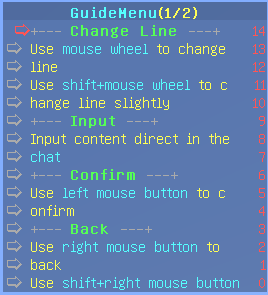
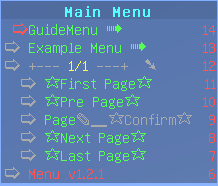
Quick Start Put the plugin in the plugins folder, restart your server. Then join server, inputting '/menu' in the game to open main menu. You will see the menu showing on the scoreboard. Besides, you will enter guide menu automatically on first joining menu.
Fetures not only show text, but also provide button, input and more... Simple Operation move up and down, input, confirm, back Web Editor edit menu config in a user-friendly way Params common params, page params, list params, cmd params, input params, meta params Page Support when passed player-name, it can show health, exp and more inf. of that player. List Support it can show list of online players Sub Menu expand to see extra operations Safe no risk of hack item High Customizable there're a lot of config options Language Support all language content is put in a language file Develop Api not only server administrators, but also designed for plugin developers
Stats
This menu plugin will send anonymous plugin usage data to
BStats and MCStats.
you can turn off it in config.yml.
Plugins Needed: Vault ProtocolLib PlaceholderAPI
Documents: for administrator: UsageDoc
for developer: JavaDoc | DevDoc
Tools: WebEditor | Menu.xsd
Languages:
(other than english)
简体中文 (version 2)
Project Website: Website
Plugins:
Some plugins that depend on this menu plugin:
Build
Videos:
QuickUsage:
ConfigWithXmlEditor:
ConfigWithWebEditor:
Contact: You are welcomed to PM me if you want to: report a bug make a suggestion
add a language file add a plugin that depends on this plugin add a server that use this plugin
Як встановити Menu
A server on Paper or Spigot
The plugin runs on the server core for Minecraft 1.8.3–1.12; players do not need to install anything.
File goes into the plugins folder
Download the file menu-1.3.1.jar (244 KB) and put it into the server’s plugins folder.
Restart the server
On startup the plugin creates its own settings folder in plugins.
Use the “To server” button
On Millida Hosting, the button at the top of the page uploads the file to your server and restarts it for you.
Minecraft 1.12 runs on Java 8: with a different Java version the game may close right after launch.
Версії
Із залежностями
| Minecraft | Завантажувач | Файл | Дата | Дії |
|---|---|---|---|---|
| 1.9 | — | menu-1.3.1.jar244 КБ |
Часті питання
Which Minecraft versions does Menu work on?
There are files for 1.12, 1.11, 1.10, 1.9, 1.8.3. The newest is 1.12.
Do players need to install Menu?
No, the plugin goes only on the server, into the plugins folder: players do not need to download anything.
Which Java does Menu need?
Minecraft 1.12 runs on Java 8. If the game closes right after launch, the usual cause is the wrong Java version in the profile settings.
Where can I download Menu safely?
On this page: the file menu-1.3.1.jar (244 KB) is stored on Millida’s server, with no link shorteners. SHA-1 checksum: 368aecf3ad60fb412566085b081f5202845222b3.
Відгуки
Станьте першим, хто оцінить Menu


