
JPanel - Minecraft Webpanel Плагін для Minecraft 1.10
JPanel — вебпанель на основі плагінів для Bukkit
JPanel - A plugin based web panel for Bukkit
What is this?
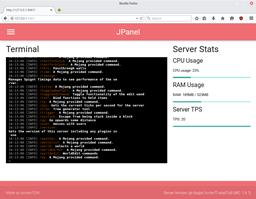
JPanel is a plugin based control panel for your minecraft server. It is viewable within a web browser, and does not require running any external web servers, or knowledge of PHP or databases. This plugin is in beta, and has a number of key features, including:
- A live view of the server console
- Live view of the server ram usage, cpu usage and ticks per second
- User permissions
- Modify player groups (requires vault)
- Easily kick or ban online players (not currently implemented in new player manager)
- Manage server files
- Passwords hashed with a salt
Before installing
THIS PLUGIN REQUIRES JAVA 8. ALSO BE AWARE IT'S STILL IN BUGS, AND THERE MIGHT BE BUGS OR INCOMPLETE FEATURES.
Installing
Since this plugin doesn't require anything else other than the Bukkit server, installation is extremely easy
- Put the plugin jar file in your plugins folder
- Restart the server
- Ensure that port 4567 are port forwarded (this can be tested with this tool here)
- In the server console, use /addlogin <username> <password> to add a user to the panel
- OPTIONAL: Stop the server and edit the config file to allow you access to the JPanel features
For developers
As of JPanel Beta 5, you can now add pages to the panel. For more information, please see the guide.
Commands
- /addlogin <username> <passsword> - allows you to add a user to a panel
- /passwd <username> <oldpassword> <newpassword> - change the password of a user
All commands can only be executed through the console, either via JPanel or a standard minecraft console.
HTTPS support
In the latest beta (Beta 6) I've added standalone https support! This requires some configuration.
First, you'll need to put a keystore file in the JPanel folder. You can either attempt to generate one using these instructions or download a premade keystore file from here. The pre-made keystore has an unsigned certificate that'll get you going with security warnings in most browsers, so isn't recommended unless you can't use an actual certificate.
Stop the server, and enter the name of the keystore file (with file extension) under keystore-name and the password for the keystore file under keystore-password in the JPanel config.yml. If you're using the premade keystore, use the password 'password' (ultra secure).
Restart the server, then access the panel normally except with https.
HTTPS should now be working!
Panel Permissions
- canEditFiles - allows a JPanel user to edit files
- canChangeGroups - allows a JPanel user to change the groups of a user
- canSendCommands - allows a JPanel user to send commands through the console
These are modified through the config file. Once modified, restart the server.
Non browser Clients
I'm developing a series of apps that you can use to access the panel. Currently, there is an app for windows 10.
- Windows 10 App - https://www.microsoft.com/en-us/store/apps/jpanel/9nblggh1rnm5 (source will be released later)
- Android app - coming soon!
- iPhone app - due to a lack of $99 a year, a Mac computer and a device to test on, this is unlikely to be coming any time soon
Source Code
All source code is avaliable on github, check it out!
Як встановити JPanel - Minecraft Webpanel
A server on Paper or Spigot
The plugin runs on the server core for Minecraft 1.8–1.10; players do not need to install anything.
File goes into the plugins folder
Download the file JPanel.jar (14 MB) and put it into the server’s plugins folder.
Restart the server
On startup the plugin creates its own settings folder in plugins.
Use the “To server” button
On Millida Hosting, the button at the top of the page uploads the file to your server and restarts it for you.
Minecraft 1.10 runs on Java 8: with a different Java version the game may close right after launch.
Версії
Із залежностями
| Minecraft | Завантажувач | Файл | Дата | Дії |
|---|---|---|---|---|
| 1.9 | — | JPanel Beta 713.8 МБ | ||
| 1.8.1 | — | JPanel ALPHA 45.8 МБ |
Часті питання
Which Minecraft versions does JPanel - Minecraft Webpanel work on?
There are files for 1.10, 1.9, 1.8.1, 1.8. The newest is 1.10.
Which Java does JPanel - Minecraft Webpanel need?
Minecraft 1.10 runs on Java 8. If the game closes right after launch, the usual cause is the wrong Java version in the profile settings.
Where can I download JPanel - Minecraft Webpanel safely?
On this page: the file JPanel.jar (14 MB) is stored on Millida’s server, with no link shorteners. SHA-1 checksum: b3b990cb371be3b2c05025124d9809f364742e56.
Відгуки
Станьте першим, хто оцінить JPanel - Minecraft Webpanel



