
Про плагін iLove
Show your love!
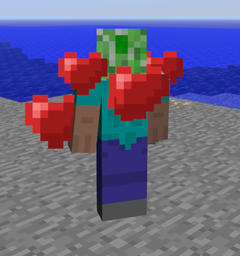
This plugin makes heart animation pop over players with a simple command.
WARNING: Particles MUST be ENABLED in your Minecraft client for you to see the hearts. (Particles option should NOT be "Minimal")
Features:
- Use command to show your affection!
How to use:
- /love [Player] [time]
- (time = 10 by default if not present)
- (player = yourself by default if not present)
- /love -1 makes love mode last until you logoff or manually stops.
Permissions (CaSe SeNsItIvE):
- "iLove.love" to use the command.
- "iLove.infinite" to use "/love -1".
- "iLove.target" to be able to target other players.
More info @ http://forums.bukkit.org/threads/63270/
Support the developer:
Як встановити iLove
A server on Paper or Spigot
The plugin runs on the server core; players do not need to install anything.
File goes into the plugins folder
Download the file iLove.jar (4 KB) and put it into the server’s plugins folder.
Restart the server
On startup the plugin creates its own settings folder in plugins.
Use the “To server” button
On Millida Hosting, the button at the top of the page uploads the file to your server and restarts it for you.
Версії
Із залежностями
| Minecraft | Завантажувач | Файл | Дата | Дії |
|---|---|---|---|---|
| — | — | iLove 1.1.03.9 КБ |
Часті питання
Do players need to install iLove?
No, the plugin goes only on the server, into the plugins folder: players do not need to download anything.
Where can I download iLove safely?
On this page: the file iLove.jar (4 KB) is stored on Millida’s server, with no link shorteners. SHA-1 checksum: b1555c6c78df5260768e624fceceec74089d92c9.
Відгуки
Станьте першим, хто оцінить iLove


