
BuildPortals Плагін для Minecraft 1.20.1
Player-buildable multi-world portals. NO commands necessary.
BuildPortals:
Player buildable multi-world portals without using commands
Updated for 1.20+!
-- New in version 2.3.0 --
- Supports 1.20+
- Extended support for teleporting many creature types
Supports:
- Multi-world portals
- Riding minecarts, boats, or animals through portals
- Sending Villagers and many other creatures through portals in minecarts, boats, or on leads
Use:
Once installed, any player can build a teleportation portal by doing:
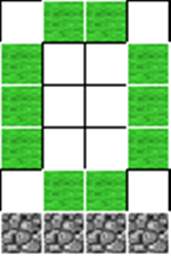
- Using a designated portal building material (Emerald Blocks by default) to make a nether-portal-like rectangle, with interior at least large enough for a player to walk through,
- Place an 'activator block' (any of Redstone blocks, Gold blocks or Diamond blocks by default) on each bottom block along the interior of the portal.
- Then build another portal where they would like to connect, placing matching 'activator block's in this portal.
Once two complete and like-activated portals are built, the plugin converts the portal interior (including activator blocks) to air and links the portals! Each portal can be built by any player, in any world.
Commands:
/BP version Check the version of the plugin you are using. /BP check Check whether you are currently standing in a portal. /BP SetMaterial You can change the portal frame material. This will convert all existing portals to the new material and also allow building new portals from the new named material. /BP ListMaterial List the configured portal material. /BP AddActivator You can add a new activator material. This allows activating portals with a new block. /BP RemoveActivator You can remove an activator material. This will disallow activating portals with the named material. /BP ListActivators This will list all currently configured activator materials.
Permissions:
buildportals.*:
description: Gives access to editing portal and activator materials (and misc. commands). default: op
buildportals.listmaterial:
description: Gives access to view the portal material. default: true
buildportals.listactivators:
description: Give access to view the activator material list. default: true
buildportals.activate:
description: Allows activating a new portal. default: true
buildportals.teleport:
description: Allows using a portal. default: true
For more, see Commands & Permissions.
Interested in what's coming up? Planned Future Updates
Source code available at: https://github.com/jusdino/BuildPortals
Feeling generous? DONATE!
Як встановити BuildPortals
A server on Paper or Spigot
The plugin runs on the server core for Minecraft 1.20–1.20.1; players do not need to install anything.
File goes into the plugins folder
Download the file BuildPortals-2.3.0.jar (79 KB) and put it into the server’s plugins folder.
Restart the server
On startup the plugin creates its own settings folder in plugins.
Use the “To server” button
On Millida Hosting, the button at the top of the page uploads the file to your server and restarts it for you.
Minecraft 1.20.1 runs on Java 17: with a different Java version the game may close right after launch.
Версії
Із залежностями
| Minecraft | Завантажувач | Файл | Дата | Дії |
|---|---|---|---|---|
| 1.20 | — | BuildPortals v2.3.0 - Extended Entity Support79 КБ | ||
| 1.20 | — | Pre-release: v2.2.0-SNAPSHOT39.8 КБ | ||
| 1.20 | — | Pre-release for 1.2039.8 КБ |
Відгуки
Станьте першим, хто оцінить BuildPortals


