

BattleShops Плагін для Minecraft 1.5.1
Повна система магазину для Minecraft з використанням віддалених скринь і табличок
About
A fully functional shop system for bukkit. BattleShops adds functionality not found in current shop systems. Most importantly, in my opinion; 1) the current quantity of items being bought/sold is always current and displayed on the sign; 2) You can place your chests anywhere you want, they don't have to be right next to the sign. So you can keep all of your shop chests at your base, but have a public facing sign store.
Backwards compatible with ChestShop
This plugin was designed to replace ChestShop, which means you can use all of your old Admin Signs, and players can use their old signs. The only thing to move over is for players to link their chests with their signs, click them with a redstone torch, and for admins to click their admin signs with a redstone torch.

Examples
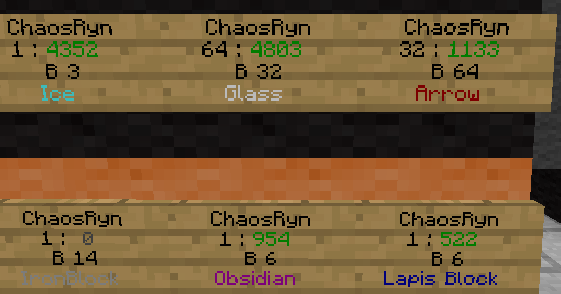
The number to the right of the quantity to buy/sell is the Amount of items remaining.
Amount remaining Colors
- Gold F : Chest is full of items and can't be sold to.
- Green <quantity> : Current amount of items.
- Gray 0 : Shop does not have enough items in stock to buy.
- Gray U : Sign is not linked to a chest
Functionality
- Buy/Sell from signs
- Remaining quantity is displayed on the sign
- Full/Empty is displayed on the sign
- Allow selling from any chest to any sign selling that item
- Share your chests with other players
- buy and sell multiples
- Show player transactions
- Show shop transactions
- Admin shops
- Colored Text on Signs
- Use common names for items such as Pink Wool
- DB backend
Permissions
- For players to create shops they must have the perm shop.create
- For admin usage you must have the permission shop.admin
Requirements
Vault
Tutorial
Usage Source
Help
You can post here or you can ask me questions in real time on irc when I'm on. You can usually find me in the rooms battleplugins, or bukkit in irc.esper.net.
Most Recent Version
BattleShops v3.1.5
Як встановити BattleShops
A server on Paper or Spigot
The plugin runs on the server core for Minecraft 1.2.5–1.5.1; players do not need to install anything.
File goes into the plugins folder
Download the file BattleShops.jar (349 KB) and put it into the server’s plugins folder.
Restart the server
On startup the plugin creates its own settings folder in plugins.
Use the “To server” button
On Millida Hosting, the button at the top of the page uploads the file to your server and restarts it for you.
Minecraft 1.5.1 runs on Java 8: with a different Java version the game may close right after launch.
Версії
Із залежностями
| Minecraft | Завантажувач | Файл | Дата | Дії |
|---|---|---|---|---|
| 1.5.1 | — | BattleShops_v3.4.6.8349 КБ |
Часті питання
Which Minecraft versions does BattleShops work on?
There are files for 1.5.1, 1.2.5. The newest is 1.5.1.
Do players need to install BattleShops?
No, the plugin goes only on the server, into the plugins folder: players do not need to download anything.
Which Java does BattleShops need?
Minecraft 1.5.1 runs on Java 8. If the game closes right after launch, the usual cause is the wrong Java version in the profile settings.
Where can I download BattleShops safely?
On this page: the file BattleShops.jar (349 KB) is stored on Millida’s server, with no link shorteners. SHA-1 checksum: bfdcab6867757e7f4d8773d134451a8adf773b87.
Відгуки
Станьте першим, хто оцінить BattleShops


