
- завантажень
- 1 завантажень
- переглядів
- 16 переглядів
- Оновлено
- Оновлено 17.10.2026
- 1.12.2 — 1.16.5
 Forge
Forge
Про мод Woot
УВАГА:
1.15/1.16 підтримує Patchouli для внутрішньоігрового довідника
1.12 підтримує Guide-API для внутрішньоігрового довідника
Список змін
Список змін 1.16 https://github.com/Ipsis/Woot/blob/1.16.x/CHANGELOG.md
Список змін 1.15 https://github.com/Ipsis/Woot/blob/1.15.x/CHANGELOG.md
Список змін 1.12 https://github.com/Ipsis/Woot/wiki/Woot-Changelog-1.12
Огляд моду від RGSha
Усі ми бували в Minecraft - будували ферму мобів.
Усе зводиться до одного й того самого.
- Заспавнити мобів
- Убити мобів
- Зібрати досвід і лут
- Впоратися з величезною кількістю заспавнених сутностей
Woot робить усе трохи інакше ..... він не спавнить жодного моба у світі .... ЩО?!
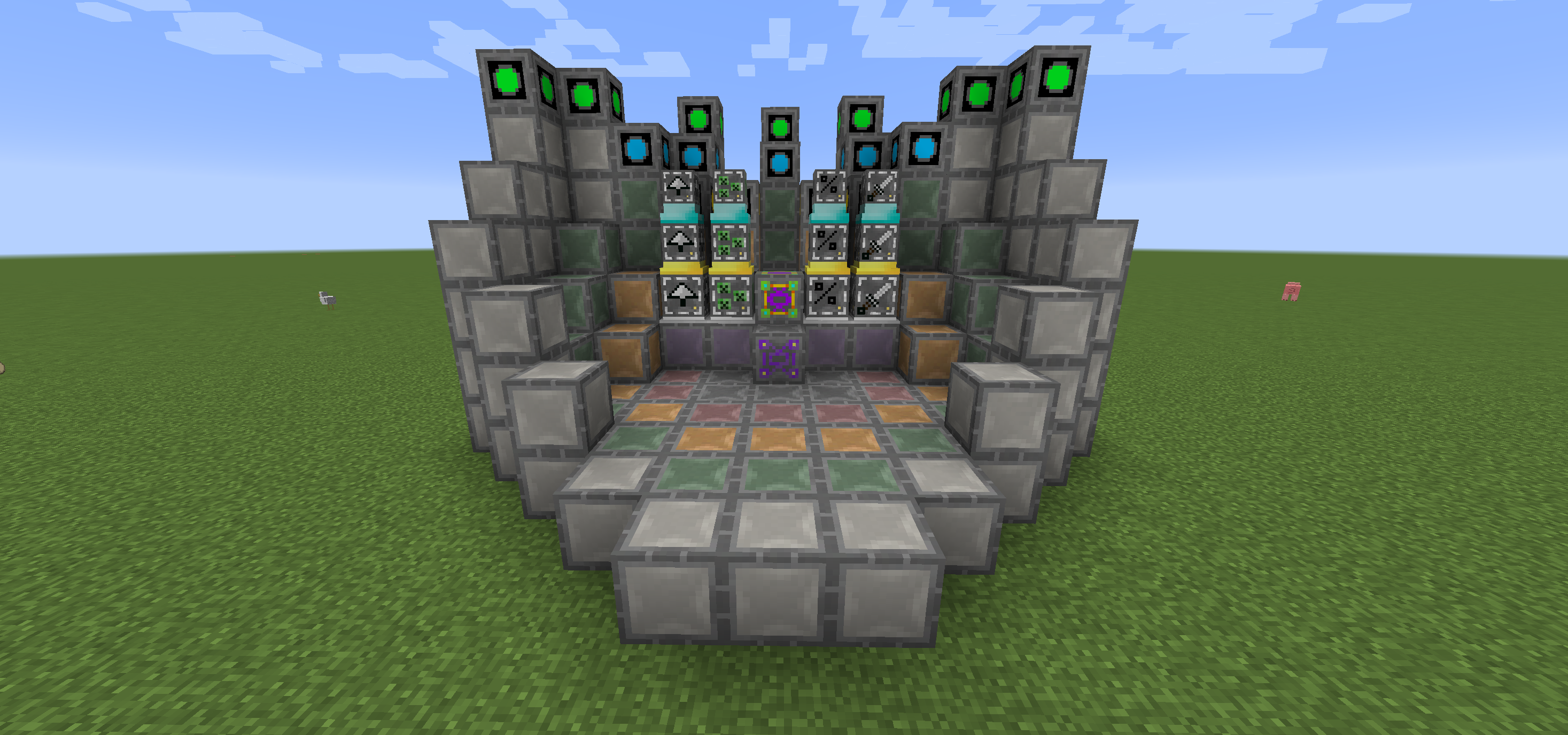
У Woot ви будуєте свою фабрику, а потім програмуєте її на вибраного моба. Потім ви даєте їй трохи енергії та інвентар, щоб складати туди весь лут, який згенерував би моб.
Існує кілька рівнів фабрики для обробки мобів вищого рівня. Тож так, вам потрібна велика фабрика, щоб заспавнити Wither!
Щоб трохи полегшити життя, є блок макета, який показує, куди потрібно поставити всі блоки в багатоблоці кожного рівня.
Ви також можете покращити свою фабрику, щоб отримати додаткові переваги, усі з яких споживають додаткову енергію.
- Looting I/II/III - застосовує looting до вбивств мобів
- Rate I/II/III - спавнить мобів швидше
- Mass I/II/III - спавнить більше мобів
- Decapitate I/II/III - підвищує шанс випадіння голови
- XP I/II/III - генерує уламки досвіду
- Efficiency I/II/III - робить вашу фабрику трохи дешевшою щодо енергії
- BloodMagic I/II/III - генерація Life Essence через ритуал
https://github.com/Ipsis/Woot/wiki
http://www.minecraftforum.net/forums/mapping-and-modding/minecraft-mods/2659457-woot-the-alternative-mob-factory

Як встановити Woot
With Millida Launcher
Install Millida Launcher
The launcher is free: download it at millida.net/launcher and sign in with any nickname.
Click “Install” on this page
The launcher opens and installs the mod for Minecraft 1.12.2–1.16.5 on Forge automatically.
Launch the game
A profile with it appears in the launcher: click “Play”.
Manually
Install Forge
The loader must match the game version of the mod file, for example Minecraft 1.16.5. After installing it, a separate profile appears in your launcher.
Download the file for your version
In the version list above, pick the file woot-1.16.5-1.0.8.4.jar (1.1 MB) for your game version.
Put it in the mods folder
The folder is inside .minecraft (Windows: %appdata%\.minecraft\mods). If it does not exist, create it.
Launch the loader profile
Open “Mods” in the main menu: Woot should be in the list.
Minecraft 1.16.5 runs on Java 8: with a different Java version the game may close right after launch.
Версії
Із залежностями
| Minecraft | Завантажувач | Файл | Дата | Дії |
|---|---|---|---|---|
| 1.16.5 | Forge | woot-1.16.5-1.0.8.4.jar1.1 МБ 1 | ||
| 1.16.2 | Forge | woot-1.16.2-1.0.0.0.jar903 КБ | ||
| 1.15.2 | — | woot-1.15.2-1.1.1.0.jar888 КБ | ||
| 1.12.2 | — | woot-1.12.2-1.4.11.jar859 КБ | ||
| 1.12.2 | — | woot-1.12.2-0.0.10.jar741 КБ |
Часті питання
Which Minecraft versions does Woot work on?
There are files for 1.16.5, 1.16.4, 1.16.2, 1.15.2, 1.12.2. The newest is 1.16.5.
Is Woot for Forge or Fabric?
Only for Forge: 1.16.2–1.16.5. There are no files for Fabric or NeoForge: a mod for another loader will not start.
Does Woot need other mods?
The author lists no required dependencies: the Forge loader is enough.
Which Java does Woot need?
Minecraft 1.16.5 runs on Java 8. If the game closes right after launch, the usual cause is the wrong Java version in the profile settings.
Where can I download Woot safely?
On this page: the file woot-1.16.5-1.0.8.4.jar (1.1 MB) is stored on Millida’s server, with no link shorteners. SHA-1 checksum: 271c86303514ca621fecfe41d1e6688e156738b8.
Відгуки
Станьте першим, хто оцінить Woot


