

Tool Stats Мод для Minecraft 1.16.5, 26.3
Надає додаткову інформацію в підказках для предметів
 NeoForge
 Fabric
 Forge
ForgeПро мод Tool Stats
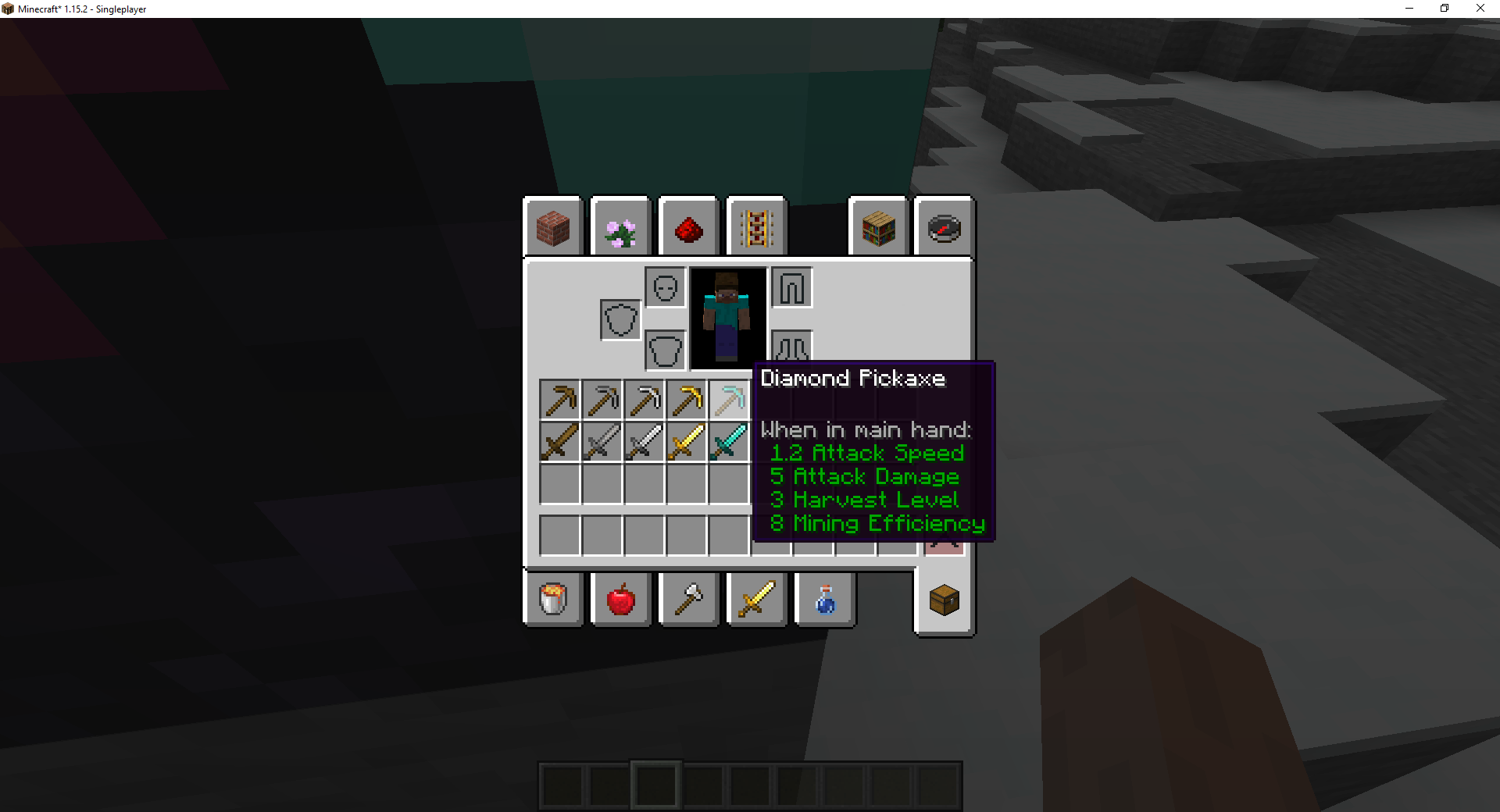
Цей мод додає додаткові характеристики інструментів до підказки для різного спорядження в Minecraft. Мод можна налаштовувати, що дозволяє вимкнути певні частини інформації.
Поточні функції
- Рівень видобутку (лише для рівневих предметів, як-от кайло)
- Ефективність видобутку (лише для рівневих предметів, як-от кайло)
- Здатність до зачарування (показується на всіх предметах, які можна зачарувати, у вікні столу зачарування)
- Міцність інструменту (показується на інструментах, коли вони пошкоджені)
Подобається мод і хочете підтримати мене?
- Стежте за мною в Twitter
- Приєднуйтеся до мого Discord
- Підтримайте на Patreon
- Завітайте на мій вебсайт
Логотип від Lorc на Game Icons, ліцензовано за CC By 3.0.
Цей проєкт спонсорує Nodecraft. Використайте код DARKHAX, щоб отримати 30% знижки на перший місяць обслуговування!
Як встановити Tool Stats
With Millida Launcher
Install Millida Launcher
The launcher is free: download it at millida.net/launcher and sign in with any nickname.
Click “Install” on this page
The launcher opens and installs the mod for Minecraft 1.16.5–26.3 on Fabric, Forge or NeoForge automatically, together with its dependencies: Fabric API, Prickle, Bookshelf.
Launch the game
A profile with it appears in the launcher: click “Play”.
Manually
Install Fabric, Forge or NeoForge
The loader must match the game version of the mod file, for example Minecraft 26.3. After installing it, a separate profile appears in your launcher.
Download the file for your version
In the version list above, pick the file ToolStats-neoforge-MC26.3-26.3.0.1.jar (23 KB) for your game version and loader.
Put it in the mods folder
The folder is inside .minecraft (Windows: %appdata%\.minecraft\mods). If it does not exist, create it. Required dependencies go there too: Fabric API, Prickle, Bookshelf.
Launch the loader profile
Open “Mods” in the main menu: Tool Stats should be in the list.
On a server
A server on Fabric, Forge or NeoForge
The mod only works on a server with the same loader and game version, for example 26.3.
File goes into the server’s mods folder
Stop the server, put the mod file into the mods folder and start the server again.
Use the “To server” button
On Millida Hosting, the button at the top of the page uploads the file to your server and restarts it for you.
Версії
Із залежностями
| Minecraft | Завантажувач | Файл | Дата | Дії |
|---|---|---|---|---|
| 26.3 | NeoForge | 26.322.8 КБ | ||
| 26.3 | Fabric | 26.323.3 КБ 3 | ||
| 26.1 | Fabric | 26.123 КБ | — | |
| 1.16.5 | Forge | 1.16.510.4 КБ | — |
Що потрібно для запуску
- Fabric APIобов'язково
- Prickleобов'язково
- Bookshelfобов'язково
Часті питання
Which Minecraft versions does Tool Stats work on?
There are files for 26.3, 26.1.2, 26.1.1, 26.1, 1.16.5. The newest is 26.3.
Is Tool Stats for Forge or Fabric?
There are files for Fabric: 26.1–26.3, for Forge: 1.16.5 and for NeoForge: 26.3.
What does Tool Stats need to work?
Required: Fabric API, Prickle, Bookshelf. Without them the mod will not start: dependencies go into the same mods folder.
Does Tool Stats work on a server?
Yes. Tool Stats works both in singleplayer and on a server.
Where can I download Tool Stats safely?
On this page: the file ToolStats-neoforge-MC26.3-26.3.0.1.jar (23 KB) is stored on Millida’s server, with no link shorteners. SHA-1 checksum: 5e56b7354fbe9a095ca8daa8b27bb37b69114945.
Відгуки
Станьте першим, хто оцінить Tool Stats


