
Tool Replacement Мод для Minecraft 26.2
Мод, який автоматично замінює зламані інструменти на новий з інвентарю.
 Forge
Forge Fabric
 Quilt
Quilt
Tool Replacement
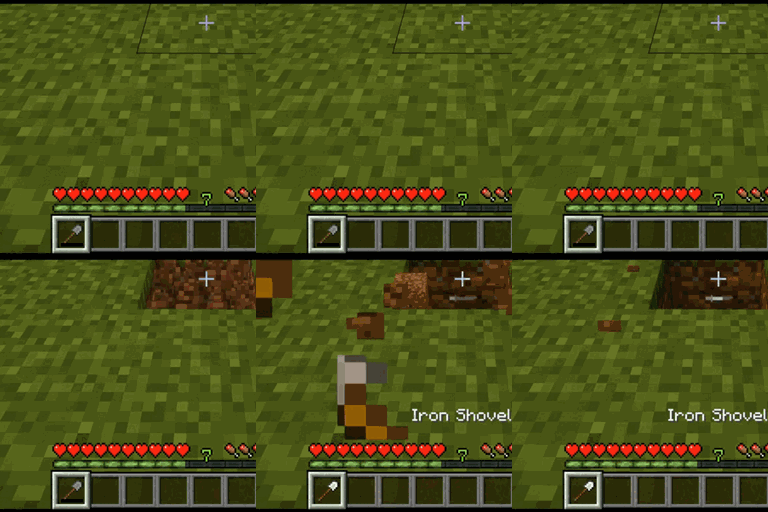
Tool Replacement is a lightweight quality-of-life mod that automatically replaces broken tools with another matching tool from your inventory.
Instead of stopping in the middle of mining, digging, farming, or combat to manually select another tool, the mod searches your inventory and equips a replacement automatically.
Features
- Automatically replaces tools when they break
- Searches your inventory for a suitable replacement
- Keeps you working without manually switching tools
- Supports different material tiers of the same tool type
- Lightweight and simple with no unnecessary systems
- Works automatically without requiring any keybinds
Supported Tools
Tool Replacement supports the following tool types:
- Pickaxes
- Axes
- Shovels
- Hoes
- Swords
For example, if your Iron Pickaxe breaks and you have a Diamond Pickaxe somewhere in your inventory, the Diamond Pickaxe can automatically be moved into your hand.
How It Works
When the tool you are currently using breaks, Tool Replacement checks your inventory for another tool of the same type.
The first compatible replacement it finds is automatically equipped into your hand, allowing you to continue without interruption.
Different materials are supported, so the replacement does not need to be made from the same material as the broken tool.
Modded Tool Support
The mod includes support for detecting compatible modded tools where possible.
Tools that correctly use Minecraft's standard tool tags should work automatically.
Як встановити Tool Replacement
With Millida Launcher
Install Millida Launcher
The launcher is free: download it at millida.net/launcher and sign in with any nickname.
Click “Install” on this page
The launcher opens and installs the mod for Minecraft 26.1–26.2 on Fabric, Forge or Quilt automatically.
Launch the game
A profile with it appears in the launcher: click “Play”.
Manually
Install Fabric, Forge or Quilt
The loader must match the game version of the mod file, for example Minecraft 26.2. After installing it, a separate profile appears in your launcher.
Download the file for your version
In the version list above, pick the file ToolReplacement-1.7.0.jar (5 KB) for your game version and loader.
Put it in the mods folder
The folder is inside .minecraft (Windows: %appdata%\.minecraft\mods). If it does not exist, create it.
Launch the loader profile
Open “Mods” in the main menu: Tool Replacement should be in the list.
Версії
Із залежностями
| Minecraft | Завантажувач | Файл | Дата | Дії |
|---|---|---|---|---|
| 26.1 | Fabric, Quilt | ToolReplacement-1.9.0.jar13.3 КБ | ||
| 26.2 | Forge | ToolReplacement-1.7.0.jar4.9 КБ |
Відгуки
Станьте першим, хто оцінить Tool Replacement


