

Sodium Options Mod Compat для Minecraft 1.20.1, 1.21.1
Додає сумісність з різними модами через Sodium Options API
 Fabric
 NeoForge
 Forge
Про мод Sodium Options Mod Compat

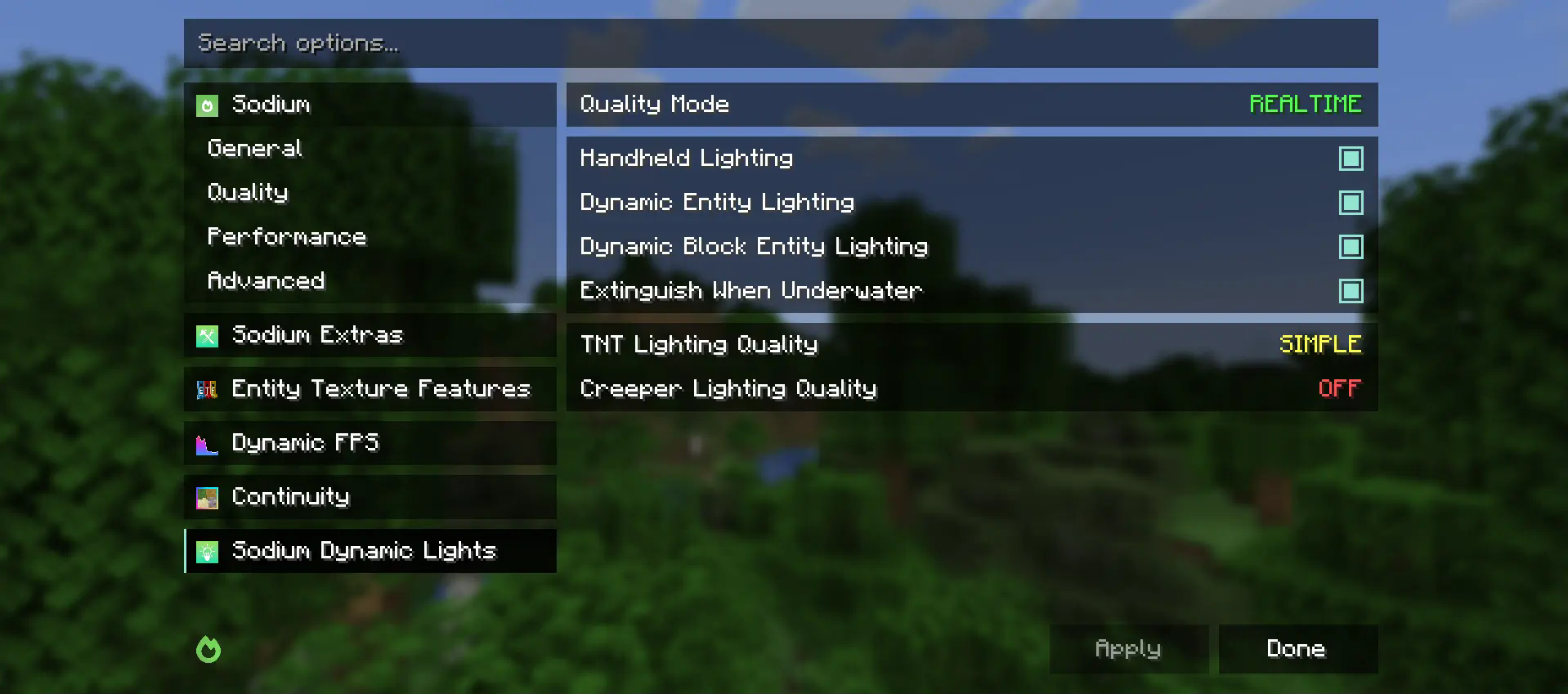
Sodium Options Mod Compat додає відеоналаштування Sodium для різних модів, які їх не мають.
Наразі сумісність мають такі моди:
- Entity Texture Features
- Entity Model Features
- DynamicFPS
- Continuity (нативно на Fabric та через Connector на Forge)
Цей мод частково є портом EmbeddiumUI з додатковою підтримкою модів і портований для використання кросплатформного Sodium Options API для підтримки таких версій:
- Embeddium на Forge
- Fabric Sodium 0.5 на 1.20.1
- Fabric/NeoForge Sodium 0.6 на 1.21.1
Якщо у вас є пропозиція щодо пов'язаного з рендерингом моду, який ви хотіли б бачити доданим до відеоналаштувань Sodium, будь ласка, створіть Github Issue із запитом на функцію.
Як встановити Sodium Options Mod Compat
With Millida Launcher
Install Millida Launcher
The launcher is free: download it at millida.net/launcher and sign in with any nickname.
Click “Install” on this page
The launcher opens and installs the mod for Minecraft 1.20–1.21.4 on Fabric, Forge or NeoForge automatically, together with its dependencies: Sodium Options API, Fabric API.
Launch the game
A profile with it appears in the launcher: click “Play”.
Manually
Install Fabric, Forge or NeoForge
The loader must match the game version of the mod file, for example Minecraft 1.21.4. After installing it, a separate profile appears in your launcher.
Download the file for your version
In the version list above, pick the file sodiumoptionsmodcompat-fabric-1.0.0-1.21.4.jar (846 KB) for your game version and loader.
Put it in the mods folder
The folder is inside .minecraft (Windows: %appdata%\.minecraft\mods). If it does not exist, create it. Required dependencies go there too: Sodium Options API, Fabric API.
Launch the loader profile
Open “Mods” in the main menu: Sodium Options Mod Compat should be in the list.
Sodium Options Mod Compat works on the player’s side only: there is no need to install it on a server.
Minecraft 1.21.4 runs on Java 21: with a different Java version the game may close right after launch.
Версії
Із залежностями
| Minecraft | Завантажувач | Файл | Дата | Дії |
|---|---|---|---|---|
| 1.21.1 | Fabric | 1.21.1832 КБ 3 | ||
| 1.20.1 | Fabric | 1.20.1591 КБ | ||
| 1.21.1 | NeoForge | 1.21.1176 КБ 27 | ||
| 1.20.1 | Forge | 1.20.1177 КБ 35 | ||
| 1.21.4 | Fabric | 1.21.4846 КБ 6 | ||
| 1.21.1 | NeoForge | 1.21.1177 КБ 1 | ||
| 1.20.1 | Fabric | 1.20.1592 КБ | ||
| 1.21.4 | NeoForge | 1.21.4177 КБ 1 |
Що потрібно для запуску
- Sodium Options APIобов'язково
- Fabric APIобов'язково
Часті питання
Which Minecraft versions does Sodium Options Mod Compat work on?
There are files for 1.21.4, 1.21.1, 1.20.1, 1.20. The newest is 1.21.4.
Is Sodium Options Mod Compat for Forge or Fabric?
There are files for Fabric: 1.20–1.21.4, for Forge: 1.20–1.20.1 and for NeoForge: 1.21.1–1.21.4.
What does Sodium Options Mod Compat need to work?
Required: Sodium Options API, Fabric API. Without them the mod will not start: dependencies go into the same mods folder.
Do I need to install Sodium Options Mod Compat on a server?
No. Sodium Options Mod Compat works on the player’s side only: there is no need to install it on a server.
Which Java does Sodium Options Mod Compat need?
Minecraft 1.21.4 runs on Java 21. If the game closes right after launch, the usual cause is the wrong Java version in the profile settings.
Where can I download Sodium Options Mod Compat safely?
On this page: the file sodiumoptionsmodcompat-fabric-1.0.0-1.21.4.jar (846 KB) is stored on Millida’s server, with no link shorteners. SHA-1 checksum: 9c5ab3b6ba0e096567b60b0c5c74b8e570205da9.
Відгуки
Станьте першим, хто оцінить Sodium Options Mod Compat


