

Productive Trees Мод для Minecraft 1.20.1, 1.21.1
Породи дерев, які можна розводити
 NeoForge
 Forge
ForgeПро мод Productive Trees
Представляємо мод 'Productive Trees' для Minecraft — духовний спадкоємець міні-гри з розведення дерев із Forestry. З цим модом ви тепер можете займатися мистецтвом розведення дерев, що дозволяє вам перехресно запилювати різні види дерев і вирощувати унікальні гібридні сорти. Минули дні, коли доводилося будувати з деревини нудних старих ванільних дерев, адже тепер доступна колекція з понад 160 нових унікальних наборів деревини.
З Productive Trees ви маєте силу стратегічно схрещувати дерева, щоб отримувати красиві типи деревини. Експериментуйте з різними комбінаціями, щоб відкривати й розблоковувати безліч захопливих можливостей. Уявіть, що ви збираєте врожай з дерева, яке не лише дає рідкісну деревину, а й приносить смачні фрукти чи горіхи!
Удосконалюйте свої навички лісівництва, створюйте власні унікальні види дерев і перетворюйте свій ігровий світ на квітучу екосистему вирощених на замовлення див. Завантажте мод Productive Trees сьогодні та вирушайте в подорож деревної інновації у безмежних піксельних ландшафтах Minecraft.
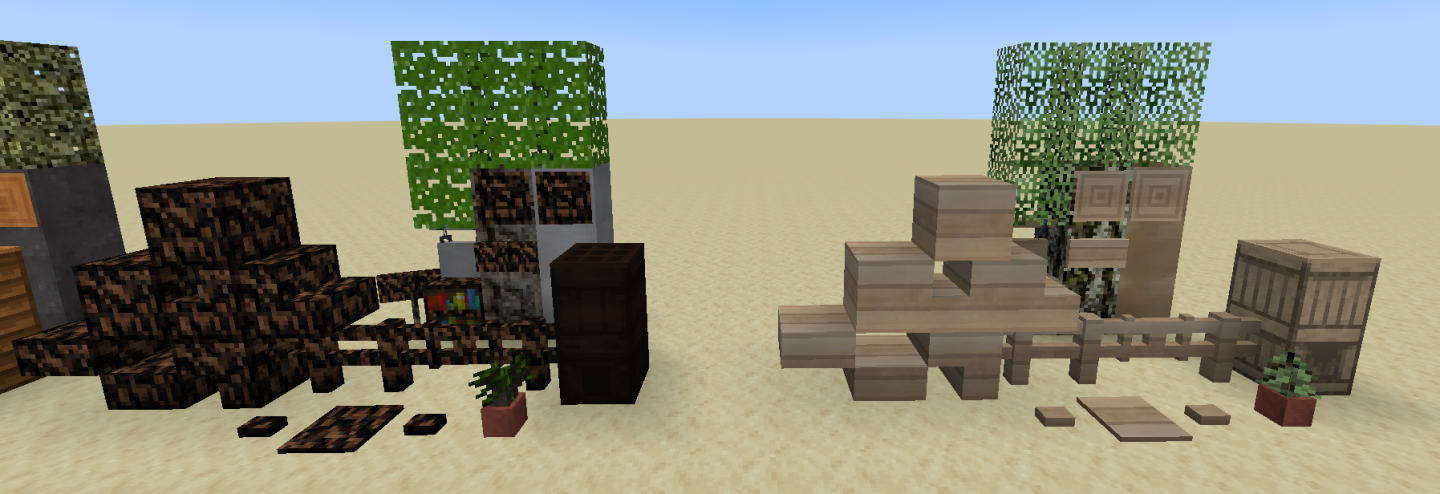
Цей мод перебуває в бета-версії і ще не завершений. Серед помітних відсутніх речей — особливості дерев (як вони виглядають, коли виростають).
Є сервер Discord, якщо вам потрібна допомога або ви хочете зазирнути й похвалити текстури.
"Стільки деревини, що вам доведеться звернутися по медичну допомогу" - анонім
Як встановити Productive Trees
With Millida Launcher
Install Millida Launcher
The launcher is free: download it at millida.net/launcher and sign in with any nickname.
Click “Install” on this page
The launcher opens and installs the mod for Minecraft 1.20.1–1.21.1 on Forge or NeoForge automatically.
Launch the game
A profile with it appears in the launcher: click “Play”.
Manually
Install Forge or NeoForge
The loader must match the game version of the mod file, for example Minecraft 1.21.1. After installing it, a separate profile appears in your launcher.
Download the file for your version
In the version list above, pick the file productivetrees-1.21.1-1.1.1.jar (13 MB) for your game version and loader.
Put it in the mods folder
The folder is inside .minecraft (Windows: %appdata%\.minecraft\mods). If it does not exist, create it.
Launch the loader profile
Open “Mods” in the main menu: Productive Trees should be in the list.
Minecraft 1.21.1 runs on Java 21: with a different Java version the game may close right after launch.
Версії
Із залежностями
| Minecraft | Завантажувач | Файл | Дата | Дії |
|---|---|---|---|---|
| 1.21.1 | NeoForge | productivetrees-1.21.1-1.1.1.jar13.4 МБ 2 | ||
| 1.21.1 | NeoForge | productivetrees-1.21.1-0.6.0.jar3.2 МБ | ||
| 1.20.1 | NeoForge, Forge | productivetrees-1.20.1-0.2.6.jar14 МБ | ||
| 1.20.1 | NeoForge, Forge | productivetrees-1.20.1-0.1.0.jar13.3 МБ |
Часті питання
Which Minecraft versions does Productive Trees work on?
There are files for 1.21.1, 1.20.1. The newest is 1.21.1.
Is Productive Trees for Forge or Fabric?
There are files for Forge: 1.20.1 and for NeoForge: 1.20.1–1.21.1. There are no files for Fabric: a mod for another loader will not start.
Does Productive Trees need other mods?
The author lists no required dependencies: the Forge or NeoForge loader is enough.
Which Java does Productive Trees need?
Minecraft 1.21.1 runs on Java 21. If the game closes right after launch, the usual cause is the wrong Java version in the profile settings.
Where can I download Productive Trees safely?
On this page: the file productivetrees-1.21.1-1.1.1.jar (13 MB) is stored on Millida’s server, with no link shorteners. SHA-1 checksum: 33b7f304e4e13297fdbbef4822f8b178d73868cc.
Відгуки
Станьте першим, хто оцінить Productive Trees


