

Pickup Notifications Мод для Minecraft 26.3
Показує спливаючі сповіщення, коли ви підбираєте предмети.
 Forge
Forge Fabric
 Quilt
Quilt NeoForge
Про мод Pickup Notifications
Show popup notifications when you pick up items. Shows the items stripped of all unique data (enchantments, name, condition) and shows the raw item icon and name. As of 2.0.0, notifications will also be shown for experience orbs!
Starting with 1.1.0, the mod is required on both the server and client for multiplayer servers.
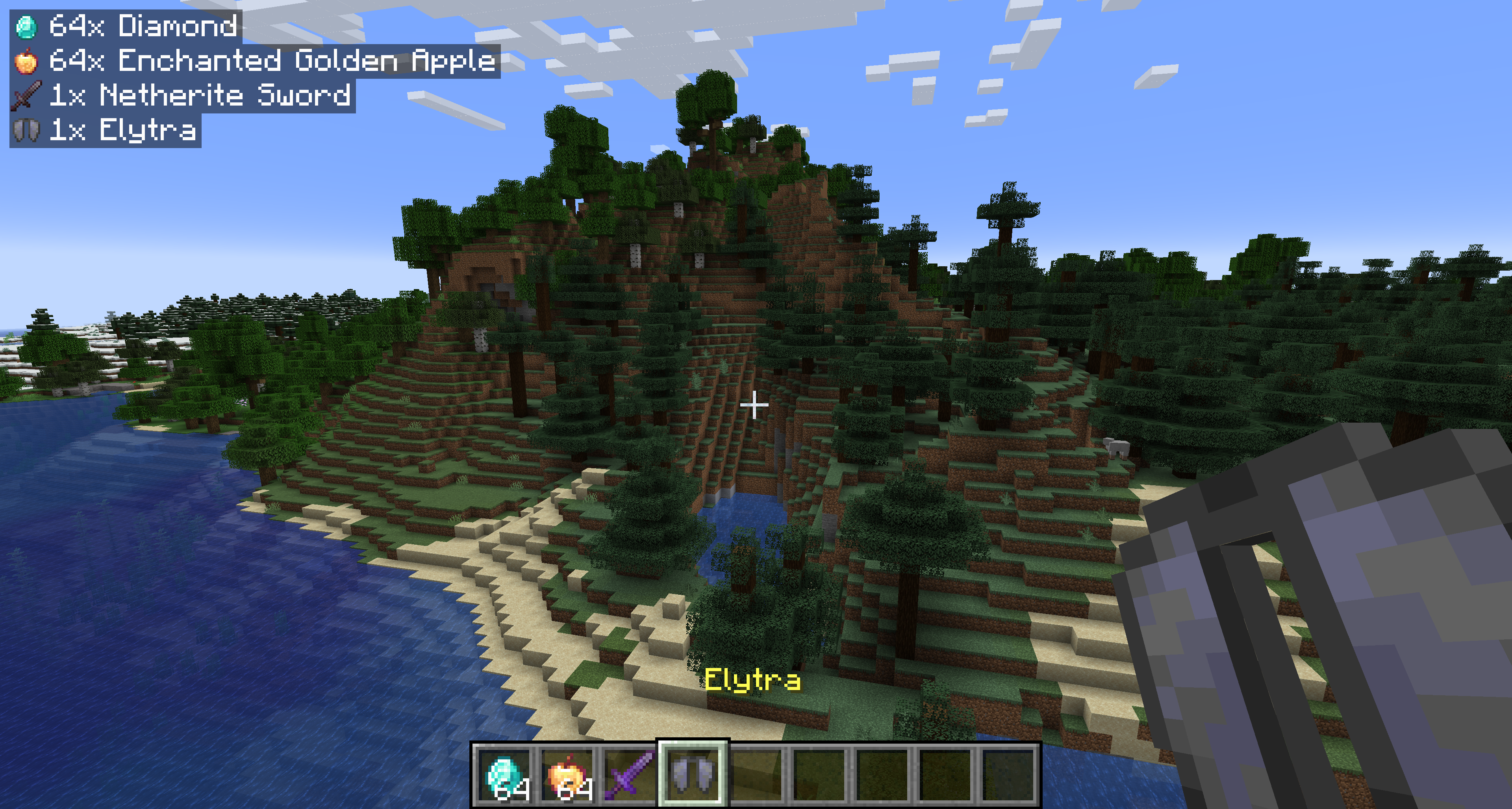
Configuration — pickupnotifications.toml
You can configure the behavior of the mod from the pickupnotifications.toml file within your config folder. If you have ModMenu installed, you can also access the configuration through the UI in ModMenu's mod list!
modEnabled: true|false - Simple toggle for the mod! Set to false to disable.
trackExperience: true|false - Whether to show notifications for experience orb pickups. Set to false to disable. (2.0.0+ only)
guiAlignment: "top_left"|"top_right"|"bottom_left"|"bottom_right" - Where to position the notifications.
guiOffset: "(,)" - The amount to offset the notifications from the edge of the screen.
guiScale: Decimal - Scale to render notifications at.
maxNotifications: Integer - How many notifications can be on the screen at a time. Additional notifications will be queued up and shown once there is room.
iconAlignment: "outside"|"inside"|"left"|"right" - Whether the item icons should appear on the 'left' or 'right' of notifications, always on the 'outside' (left for left-aligned, right for right-aligned), or always on the 'inside' of notifications.
showUniqueInfo: true|false - Whether to show custom names, rarity, and enchantments in the notifications.
renderBackground: true|false - Whether to render the background behind notifications.
backgroundOpacity: Decimal - Opacity of the notification background color.
renderShadow: true|false - Whether to render text shadow in notifications.
Version 1.2.4
guiOffsetX: Integer - The amount to offset the notifications from the side of the screen.
guiOffsetY: Integer - The amount to offset the notifications from the top or bottom of the screen.
Links
Also on CurseForge · Source on GitHub · Report an issue
Як встановити Pickup Notifications
With Millida Launcher
Install Millida Launcher
The launcher is free: download it at millida.net/launcher and sign in with any nickname.
Click “Install” on this page
The launcher opens and installs the mod for Minecraft 26.1–26.3 on Fabric, Forge, NeoForge or Quilt automatically, together with its dependencies: Fabric API.
Launch the game
A profile with it appears in the launcher: click “Play”.
Manually
Install Fabric, Forge, NeoForge or Quilt
The loader must match the game version of the mod file, for example Minecraft 26.3. After installing it, a separate profile appears in your launcher.
Download the file for your version
In the version list above, pick the file pickupnotifications-forge-3.0.1+26.3.jar (855 KB) for your game version and loader.
Put it in the mods folder
The folder is inside .minecraft (Windows: %appdata%\.minecraft\mods). If it does not exist, create it. Required dependencies go there too: Fabric API.
Launch the loader profile
Open “Mods” in the main menu: Pickup Notifications should be in the list.
On a server
A server on Fabric, Forge, NeoForge or Quilt
The mod only works on a server with the same loader and game version, for example 26.3.
File goes into the server’s mods folder
Stop the server, put the mod file into the mods folder and start the server again.
Use the “To server” button
On Millida Hosting, the button at the top of the page uploads the file to your server and restarts it for you.
Версії
Із залежностями
| Minecraft | Завантажувач | Файл | Дата | Дії |
|---|---|---|---|---|
| 26.3 | Forge | 26.3855 КБ 4 | ||
| 26.3 | Fabric, Quilt | 26.3853 КБ 8 | ||
| 26.3 | NeoForge | 26.3853 КБ | ||
| 26.2 | Fabric, Quilt | 26.2819 КБ 3 | ||
| 26.2 | NeoForge | 26.2818 КБ | ||
| 26.2 | Forge | 26.2820 КБ 4 | ||
| 26.1.2 | Fabric, Quilt | 26.1.2818 КБ | ||
| 26.1.2 | NeoForge | 26.1.2818 КБ |
Що потрібно для запуску
- Fabric APIобов'язково
Часті питання
Is Pickup Notifications for Forge or Fabric?
There are files for Fabric: 26.1–26.3, for Forge: 26.2–26.3, for NeoForge: 26.1–26.3 and for Quilt: 26.1–26.3.
What does Pickup Notifications need to work?
Required: Fabric API. Without it the mod will not start: dependencies go into the same mods folder.
Does Pickup Notifications work on a server?
Yes. Pickup Notifications works both in singleplayer and on a server.
Where can I download Pickup Notifications safely?
On this page: the file pickupnotifications-forge-3.0.1+26.3.jar (855 KB) is stored on Millida’s server, with no link shorteners. SHA-1 checksum: d5f66334ca82eedacc83cd41939350f7cb831021.
Відгуки
Станьте першим, хто оцінить Pickup Notifications


