

Particle Effects Мод для Minecraft 1.20.1, 1.21.1
Візуальний мод, який додає унікальні текстуровані частинки для кожного ефекту у ванільному Minecraft!
 NeoForge
 Fabric
 Forge
Forge💬 Опис
Particle Effects — це простий візуальний клієнтський мод, який додає унікальні текстуровані частинки для кожного ефекту у ванільному Minecraft! Також працює в мультиплеєрі ^^

✨ Частинки
Тут ви можете побачити всі унікальні частинки для кожного ефекту:
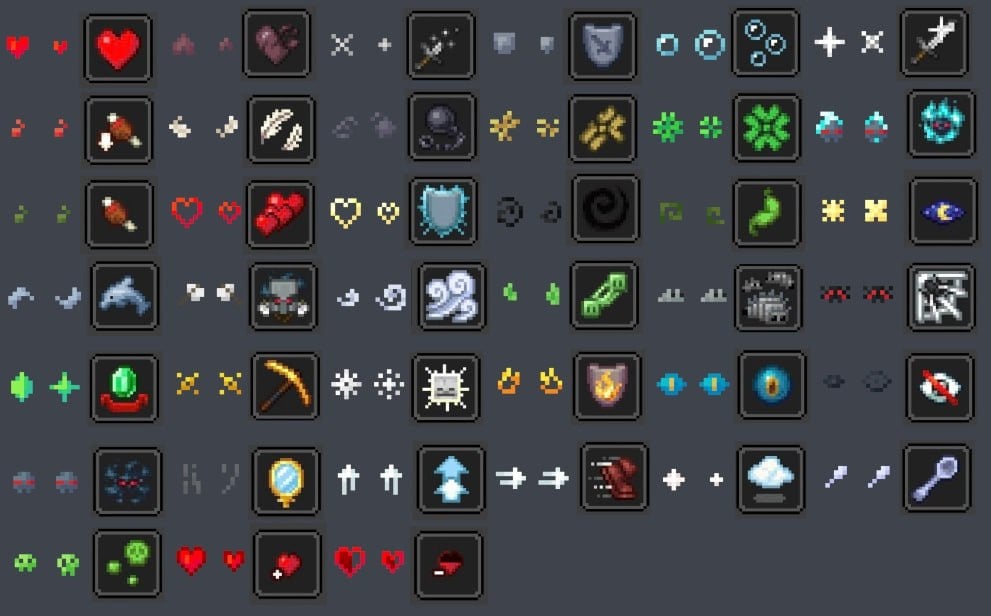
🌟 Ресурспаки
Також є кілька ресурспаків, які трохи змінюють вигляд частинок з оригінального моду.
- Particles Updated від zed1ker
- Updated Particles від Timofeii7547
- Bare Bones x Particle Effects від Dezert3

Як встановити Particle Effects
With Millida Launcher
Install Millida Launcher
The launcher is free: download it at millida.net/launcher and sign in with any nickname.
Click “Install” on this page
The launcher opens and installs the mod for Minecraft 1.20.1–26.3 on Fabric, Forge or NeoForge automatically, together with its dependencies: Fabric API.
Launch the game
A profile with it appears in the launcher: click “Play”.
Manually
Install Fabric, Forge or NeoForge
The loader must match the game version of the mod file, for example Minecraft 26.3. After installing it, a separate profile appears in your launcher.
Download the file for your version
In the version list above, pick the file ParticleEffects-1.6.0+26.3+neoforge.jar (304 KB) for your game version and loader.
Put it in the mods folder
The folder is inside .minecraft (Windows: %appdata%\.minecraft\mods). If it does not exist, create it. Required dependencies go there too: Fabric API.
Launch the loader profile
Open “Mods” in the main menu: Particle Effects should be in the list.
Particle Effects works on the player’s side only: there is no need to install it on a server.
Версії
Із залежностями
| Minecraft | Завантажувач | Файл | Дата | Дії |
|---|---|---|---|---|
| 1.20.1 | Forge | 1.20.1491 КБ 32 | ||
| 26.3 | NeoForge | 26.3304 КБ 3 | ||
| 26.2 | NeoForge | 26.2304 КБ 1 | ||
| 26.2 | NeoForge | 26.2304 КБ 3 | ||
| 1.21.11 | NeoForge | 1.21.11304 КБ 6 | ||
| 1.21.1 | NeoForge | 1.21.1303 КБ 38 | ||
| 26.3 | Fabric | 26.3307 КБ 156 | ||
| 26.2 | Fabric | 26.2308 КБ 58 |
Що потрібно для запуску
- YetAnotherConfigLib (YACL)необов'язково
- Fabric APIобов'язково
- Mod Menuнеобов'язково
Контент, що його потребує
Часті питання
Which Minecraft versions does Particle Effects work on?
There are files for 1.20.1–26.3, 8 versions in total. The newest is 26.3.
Is Particle Effects for Forge or Fabric?
There are files for Fabric: 26.2–26.3, for Forge: 1.20.1 and for NeoForge: 1.21.1–26.3.
What does Particle Effects need to work?
Required: Fabric API. Without it the mod will not start: dependencies go into the same mods folder. Optional: YetAnotherConfigLib (YACL), Mod Menu.
Do I need to install Particle Effects on a server?
No. Particle Effects works on the player’s side only: there is no need to install it on a server.
Where can I download Particle Effects safely?
On this page: the file ParticleEffects-1.6.0+26.3+neoforge.jar (304 KB) is stored on Millida’s server, with no link shorteners. SHA-1 checksum: 02c8dc2c2a3ae5761513b10d02526a3b940f6dc3.
Відгуки
Станьте першим, хто оцінить Particle Effects


