

Minerally Мод для Minecraft 1.20.1, 1.19.2
Розширює типи руд у Minecraft! Рудні купи, кристали, жеоди та мінеральні породи.
- переглядів
- 10 переглядів
- Оновлено
- Оновлено 01.10.2026
- 1.19 — 1.21
 Fabric
- Сервер
Про мод Minerally
Minerally
Mod adds ore piles, crystals, geodes and mineral rocks!

Which need to be mined several times, except for mineral rocks/geodes.
Generated in caves, in deepslate caves and in the Nether.
Crystals:
Rocks:
Ore Piles:
Geodes:
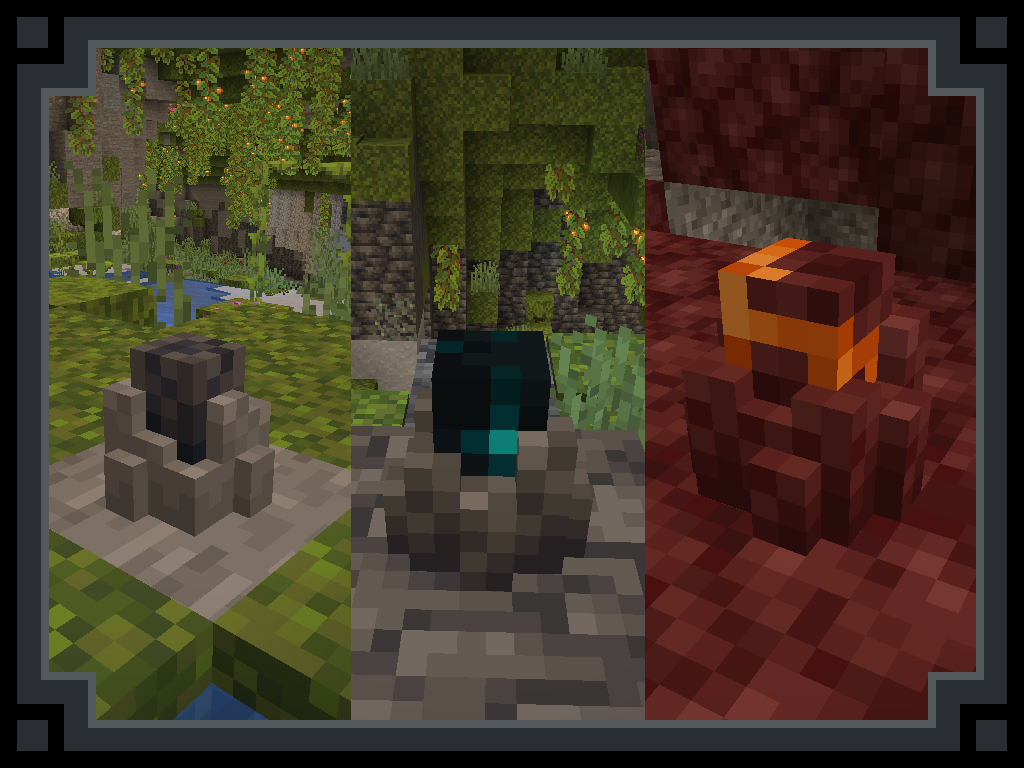
Crystal Showcase:
(ore piles will work the same)
#Future:
- Add ore piles (iron, gold, copper, coal) and maybe more crystals (redstone, lapis).
- And small stones of these ores.
- Support for other ore mods |maybe|
- 1.20 Port.
Requires Fabric Api

Як встановити Minerally
With Millida Launcher
Install Millida Launcher
The launcher is free: download it at millida.net/launcher and sign in with any nickname.
Click “Install” on this page
The launcher opens and installs the mod for Minecraft 1.19–1.21 on Fabric automatically, together with its dependencies: Fabric API.
Launch the game
A profile with it appears in the launcher: click “Play”.
Manually
Install Fabric
The loader must match the game version of the mod file, for example Minecraft 1.21. After installing it, a separate profile appears in your launcher.
Download the file for your version
In the version list above, pick the file minerally-1.21-1.21.jar (243 KB) for your game version.
Put it in the mods folder
The folder is inside .minecraft (Windows: %appdata%\.minecraft\mods). If it does not exist, create it. Required dependencies go there too: Fabric API.
Launch the loader profile
Open “Mods” in the main menu: Minerally should be in the list.
On a server
A server on Fabric
The mod only works on a server with the same loader and game version, for example 1.21.
File goes into the server’s mods folder
Stop the server, put the mod file into the mods folder and start the server again.
Use the “To server” button
On Millida Hosting, the button at the top of the page uploads the file to your server and restarts it for you.
Minecraft 1.21 runs on Java 21: with a different Java version the game may close right after launch.
Версії
Із залежностями
| Minecraft | Завантажувач | Файл | Дата | Дії |
|---|---|---|---|---|
| 1.20.2 | Fabric | 1.20.2297 КБ | ||
| 1.20.2 | Fabric | 1.20.2297 КБ | ||
| 1.21 | Fabric | 1.21243 КБ | ||
| 1.20.2 | Fabric | 1.20.2273 КБ | ||
| 1.20.2 | Fabric | 1.20.2273 КБ | ||
| 1.20.2 | Fabric | 1.20.2271 КБ | ||
| 1.19.2 | Fabric | 1.19.2271 КБ | ||
| 1.20.2 | Fabric | 1.20.2269 КБ |
Що потрібно для запуску
- Fabric APIобов'язково
Часті питання
Which Minecraft versions does Minerally work on?
There are files for 1.19–1.21, 7 versions in total. The newest is 1.21.
Is Minerally for Forge or Fabric?
Only for Fabric: 1.19–1.21. There are no files for Forge or NeoForge: a mod for another loader will not start.
What does Minerally need to work?
Required: Fabric API. Without it the mod will not start: dependencies go into the same mods folder.
Do players need to install Minerally?
No. Minerally works on the server side: it is installed on the server only, and players do not need to download anything.
Which Java does Minerally need?
Minecraft 1.21 runs on Java 21. If the game closes right after launch, the usual cause is the wrong Java version in the profile settings.
How do I download Minerally?
With Millida Launcher: it installs Minerally into a modpack by itself, for the right game version and loader. The launcher is free.
Відгуки
Станьте першим, хто оцінить Minerally


