

JadeColonies Мод для Minecraft 1.20.1, 1.21.1
Доповнення Jade для MineColonies та Domum Ornamentum
 NeoForge
 Forge
ForgeПро мод JadeColonies
This is an addon for Jade that adds support for MineColonies and Domum Ornamentum. Note that you don't need both of these; it will adapt to whichever you have installed.
Even when installed, you can use Jade's plugin config menu to turn on or off each of these features as needed.
For multiplayer, most of these will work when JadeColonies is only installed on the client, but there are a few features that will only work if also installed on the server.
Domum Ornamentum
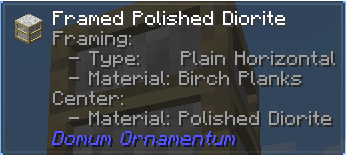
Materials
When enabled, this will display the variant type and materials used by DO blocks when looking at them in-world, as they would appear on the item tooltip -- this helps you make more of something that you like (or alter part of it as you go), especially if you don't have access to "pick block" in creative mode.
MineColonies
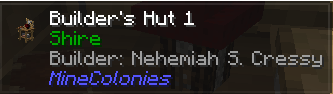
Building Name (Server-Side)
The building name and level are shown instead of the regular block name, when looking at the hut block. If you've given the building a custom name, that will appear first, with the default name just below.
When looking at a Decoration Controller block, it will display the blueprint path.
Building Pack (Server-Side)
The style pack that the building belongs to will be shown when you're looking at the hut block.
List Citizens
The citizens assigned to a building are listed when looking at the hut block. This includes both residents and workers.
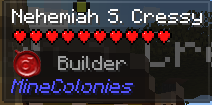
Colonist Info
When looking at a colonist, their gender and job are shown.
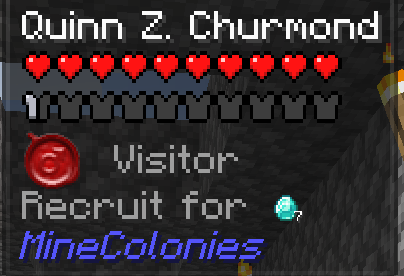
Visitor Recruit Cost
When looking at a visitor, it will show the items they will demand if you try to recruit them.
Як встановити JadeColonies
With Millida Launcher
Install Millida Launcher
The launcher is free: download it at millida.net/launcher and sign in with any nickname.
Click “Install” on this page
The launcher opens and installs the mod for Minecraft 1.20.1–1.21.1 on Forge or NeoForge automatically.
Launch the game
A profile with it appears in the launcher: click “Play”.
Manually
Install Forge or NeoForge
The loader must match the game version of the mod file, for example Minecraft 1.21.1. After installing it, a separate profile appears in your launcher.
Download the file for your version
In the version list above, pick the file jadecolonies-1.21.1-1.6.1.jar (66 KB) for your game version and loader.
Put it in the mods folder
The folder is inside .minecraft (Windows: %appdata%\.minecraft\mods). If it does not exist, create it.
Launch the loader profile
Open “Mods” in the main menu: JadeColonies should be in the list.
Minecraft 1.21.1 runs on Java 21: with a different Java version the game may close right after launch.
Версії
Із залежностями
| Minecraft | Завантажувач | Файл | Дата | Дії |
|---|---|---|---|---|
| 1.21.1 | NeoForge | jadecolonies-1.21.1-1.6.1.jar66.2 КБ 10 | ||
| 1.20.1 | Forge | JadeColonies-1.20.1-1.4.3.jar65.9 КБ 13 |
Часті питання
Is JadeColonies for Forge or Fabric?
There are files for Forge: 1.20.1 and for NeoForge: 1.21.1. There are no files for Fabric: a mod for another loader will not start.
Does JadeColonies need other mods?
The author lists no required dependencies: the Forge or NeoForge loader is enough.
Which Java does JadeColonies need?
Minecraft 1.21.1 runs on Java 21. If the game closes right after launch, the usual cause is the wrong Java version in the profile settings.
Where can I download JadeColonies safely?
On this page: the file jadecolonies-1.21.1-1.6.1.jar (66 KB) is stored on Millida’s server, with no link shorteners. SHA-1 checksum: 699bb29540ebdd8f139d012d45570db197fd2680.
Відгуки
Станьте першим, хто оцінить JadeColonies


