
Improved Signs Мод для Minecraft 26.3
Покращення для ваших вивісок і рамок на вашому сервері Fabric/Quilt. Наскрізні вивіски, збереження тексту вивісок, копіювання вивісок та багато іншого!
- переглядів
- 8 переглядів
- Оновлено
- Оновлено 18.10.2026
- 1.19 — 26.3
 Fabric
Про мод Improved Signs
This mod is only for Fabric/Quilt Servers(or Single-Player) and requires Fabric API or Quilted Fabric API
Actively maintained versions: 26.2, 1.21.1
Features
- Sign & Item Frame Passthrough: Access chests, shulker boxes, barrels, etc behind signs by right-clicking the sign
- Interact with Item Frames normally by shift(sneak) + right-click
- enableFrameReachExtension matches the reach on item frames to the reach on blocks, so passthrough works from as far away as clicking the chest itself. Uses and attacks on any other entity are still rejected past vanilla reach, so it grants no melee advantage. Off by default.
- Item Frames Share Blocks - Item Frames can hang in the same space as a block that isn't a full block, such as a trapdoor, instead of popping off after a few seconds. Off by default
- Invisible Item Frames - Use Amethyst Shards to turn item frames invisible
- You can configure it to use Glass Panes instead
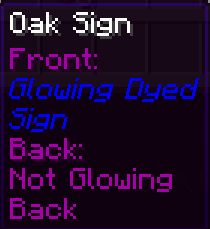
- Signs Retain - Breaking a sign will retain that sign's text, color and glowing. Put the sign in a crafting window to reset it
- Sign Copy - Right-clicking a sign with a sign(or stack of signs)w in your hand will copy the text to the held signs
- Tooltip text for Sign Copy and Retain is generated server-side, no client-side mod required
- Stop Sign editor from opening when placing new signs. Off by default
- All features are configurable in config/improvedsigns.json5
Shout-outs
- Pillowsledder for creating the excellent icons!
- Original Sign Retain functionality merged from umollu's Sign Retain
- Girafi for the idea for Passthrough Signs. Find their original mod for Forge here
- MeeniMc for contributing several version updates
- Jarva for many contributions to the mod
- Everyone else that has contributed
Як встановити Improved Signs
With Millida Launcher
Install Millida Launcher
The launcher is free: download it at millida.net/launcher and sign in with any nickname.
Click “Install” on this page
The launcher opens and installs the mod for Minecraft 1.19–26.3 on Fabric automatically.
Launch the game
A profile with it appears in the launcher: click “Play”.
Manually
Install Fabric
The loader must match the game version of the mod file, for example Minecraft 26.3. After installing it, a separate profile appears in your launcher.
Download the file for your version
In the version list above, pick the file improved-signs-1.8.0+mc26.3.jar (65 KB) for your game version.
Put it in the mods folder
The folder is inside .minecraft (Windows: %appdata%\.minecraft\mods). If it does not exist, create it.
Launch the loader profile
Open “Mods” in the main menu: Improved Signs should be in the list.
Версії
Із залежностями
| Minecraft | Завантажувач | Файл | Дата | Дії |
|---|---|---|---|---|
| 26.3 | Fabric | Improved Signs 1.7.1 for Minecraft 26.265.1 КБ | ||
| 1.19 | — | Better Signs & Frames 0.8.453.9 КБ |
Часті питання
Which Minecraft versions does Improved Signs work on?
There are files for 26.3, 1.19. The newest is 26.3.
Is Improved Signs for Forge or Fabric?
Only for Fabric: 26.3. There are no files for Forge or NeoForge: a mod for another loader will not start.
Does Improved Signs need other mods?
The author lists no required dependencies: the Fabric loader is enough.
Where can I download Improved Signs safely?
On this page: the file improved-signs-1.8.0+mc26.3.jar (65 KB) is stored on Millida’s server, with no link shorteners. SHA-1 checksum: 6e1163e28ab394d0c154d3ca9d9d501c7fea6020.
Відгуки
Станьте першим, хто оцінить Improved Signs


