

Evil Beetroot Мод для Minecraft 1.20.1
Додає бурякових ворогів і соковиті бурякові предмети
- переглядів
- 12 переглядів
- Оновлено
- Оновлено 04.10.2026
- 1.20.1
 Fabric
- Клієнт і сервер
Evil Beetroot
Mobs
- Small Beetroot - summoned randomly when harvesting beetroots, 20% Sentient Beetroot drop
- Beetroot Boss - summon by killing 20 Small Beetroots or eating the Sentient Beetroot
- Beetroot Phantom - spawns randomly when harvesting beetroots after defeating the Boss, 40% Sentient Beetroot drop, gains resistance and doesn't burn in sunlight

Items
- Sentient Beetroot - summons the Beetroot Boss upon consumption
- Beetroot Heart - 50% drop from the Boss, use to permanently gain an extra heart once
- Beetroot Diamond - craftable from a Diamond, Sentient Beetroot and a Beetroot Heart. Used for making Beetroot tools.
Beetroot Tools
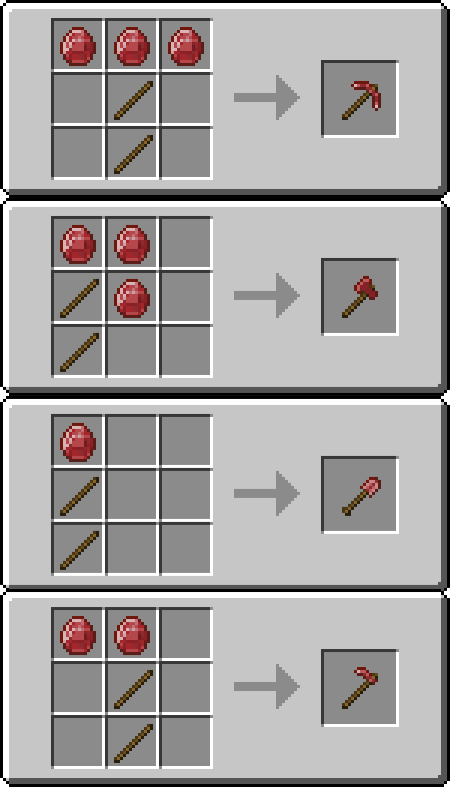
- Pickaxe
- Axe
- Shovel
- Hoe
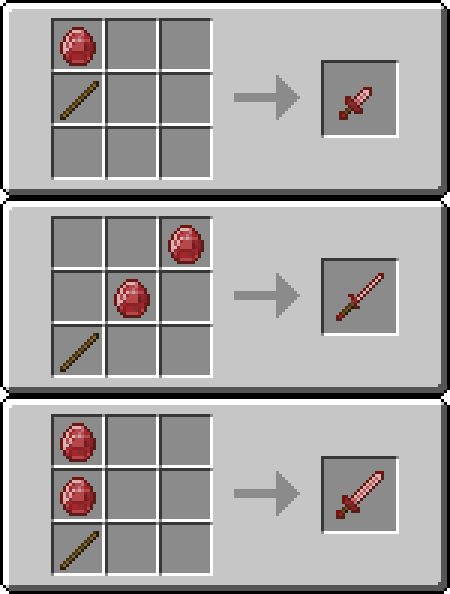
- Dagger: low damage, high attack speed
- Rapier: medium damage, medium attack speed
- Claymore: high damage, low attack speed
- Beetroot Armor
Abilities:
- Auto-Repair with beetroots from the inventory (10 durability per beetroot).
- Mining Tools have a 10% Chance to restore hunger points and give saturation points upon breaking a block.
- Sword variants restore 1 hp on hit.
- Weapons use custom attack animations and have modified attack range if Better Combat is installed.
Mining Tool Recipes
Weapon Recipes
Requirements
- Fabric Language Kotlin
- Fabric API
Як встановити Evil Beetroot
With Millida Launcher
Install Millida Launcher
The launcher is free: download it at millida.net/launcher and sign in with any nickname.
Click “Install” on this page
The launcher opens and installs the mod for Minecraft 1.20.1 on Fabric automatically, together with its dependencies: Fabric Language Kotlin.
Launch the game
A profile with it appears in the launcher: click “Play”.
Manually
Install Fabric
The loader must match the game version of the mod file, for example Minecraft 1.20.1. After installing it, a separate profile appears in your launcher.
Download the file for your version
In the version list above, pick the file evil_beetroot-0.14.4.jar (153 KB) for your game version.
Put it in the mods folder
The folder is inside .minecraft (Windows: %appdata%\.minecraft\mods). If it does not exist, create it. Required dependencies go there too: Fabric Language Kotlin.
Launch the loader profile
Open “Mods” in the main menu: Evil Beetroot should be in the list.
On a server
A server on Fabric
The mod only works on a server with the same loader and game version, for example 1.20.1.
File goes into the server’s mods folder
Stop the server, put the mod file into the mods folder and start the server again.
Use the “To server” button
On Millida Hosting, the button at the top of the page uploads the file to your server and restarts it for you.
Minecraft 1.20.1 runs on Java 17: with a different Java version the game may close right after launch.
Версії
Із залежностями
| Minecraft | Завантажувач | Файл | Дата | Дії |
|---|---|---|---|---|
| 1.20.1 | Fabric | 1.20.1153 КБ | ||
| 1.20.1 | Fabric | 1.20.1151 КБ | ||
| 1.20.1 | Fabric | 1.20.1112 КБ | ||
| 1.20.1 | Fabric | 1.20.1112 КБ | ||
| 1.20.1 | Fabric | 1.20.177.1 КБ | ||
| 1.20.1 | Fabric | 1.20.176.3 КБ | ||
| 1.20.1 | Fabric | 1.20.175.8 КБ |
Що потрібно для запуску
- Fabric Language Kotlinобов'язково
Відгуки
Станьте першим, хто оцінить Evil Beetroot


