
Construction Sticks Мод для Minecraft 1.20.1, 1.21.1
Палички, які полегшують будівництво
 NeoForge
 Forge
ForgeПро мод Construction Sticks
Construction Sticks дозволяють розміщувати кілька блоків одночасно, до 1024 за раз, продовжуючи вашу споруду в напрямку, куди ви дивитеся. Ви можете покращити свою палицю, щоб посилити її можливості, роблячи будівництво швидшим і ефективнішим.
Палиці
Існує п'ять різних рівнів Construction Sticks: Wood, Copper, Iron, Diamond і Netherite. Кожен рівень пропонує покращену міцність і можливості розміщення блоків, і його можна додатково покращити за допомогою шаблонів.
Міцність палиці Макс. блоків Покращувана Angel Distance Макс. блоків (Destroy)
Wood 59 3 Так 1 1
Copper 131 9 Так 2 3
Iron 250 27 Так 4 9
Diamond 1561 128 Так 8 25
Netherite 2031 1024 Так 16 81
Шаблони покращення
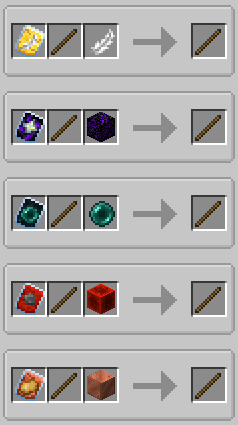
Шаблони додають спеціальні покращення до ваших Construction Sticks. Щоб застосувати шаблон, поєднайте палицю, шаблон і додатковий предмет у Smithing Table.
Доступні шаблони:
- Angel: Розміщує блоки позаду тих, на які ви дивитеся, або в повітрі.
- Destruction: Швидко й ефективно видаляє блоки.
- Unbreakable: Прибирає витрату міцності, дозволяючи нескінченне розміщення блоків.
- Battery: Дозволяє палиці використовувати RF замість міцності.
Додаткові функції
- Shulker Boxes, Bundles та інші контейнери: Використовуйте їх як джерела будівельних блоків.
- Розміщення з другої руки: Розміщуйте блоки з другої руки замість тієї, на яку ви дивитеся.
Відмова від відповідальності
Це форк оригінального моду ConstructionWand, який має ліцензію MIT. Його було змінено, щоб додати нові функції та покращення, зокрема нові рівні, шаблони та функціональність. Оригінальний мод створив Theta-Dev.
Потрібен сервер? Отримайте 20% знижки на перший місяць, використавши промокод "mrbysco"
Якщо маєте питання, долучайтеся до мого Discord.
Хочете підтримати нас?
-Mrbysco
-ShyNieke
Як встановити Construction Sticks
With Millida Launcher
Install Millida Launcher
The launcher is free: download it at millida.net/launcher and sign in with any nickname.
Click “Install” on this page
The launcher opens and installs the mod for Minecraft 1.20.1–26.1.2 on Forge or NeoForge automatically.
Launch the game
A profile with it appears in the launcher: click “Play”.
Manually
Install Forge or NeoForge
The loader must match the game version of the mod file, for example Minecraft 26.1.2. After installing it, a separate profile appears in your launcher.
Download the file for your version
In the version list above, pick the file ConstructionSticks-26.1.2-3.2.1.jar (264 KB) for your game version and loader.
Put it in the mods folder
The folder is inside .minecraft (Windows: %appdata%\.minecraft\mods). If it does not exist, create it.
Launch the loader profile
Open “Mods” in the main menu: Construction Sticks should be in the list.
Версії
Із залежностями
| Minecraft | Завантажувач | Файл | Дата | Дії |
|---|---|---|---|---|
| 26.1.2 | NeoForge | ConstructionSticks-26.1.2-3.2.1.jar264 КБ | ||
| 1.21.1 | NeoForge | ConstructionSticks-1.21.1-1.5.0.jar259 КБ 4 | ||
| 1.20.1 | Forge, NeoForge | ConstructionSticks-1.20.1-1.2.7.jar253 КБ 5 | ||
| 1.20.1 | Forge, NeoForge | ConstructionSticks-1.20.1-1.2.6.jar253 КБ | ||
| 1.21.1 | NeoForge | ConstructionSticks-1.21.1-1.0.0.jar189 КБ |
Часті питання
Which Minecraft versions does Construction Sticks work on?
There are files for 26.1.2, 1.21.1, 1.20.1. The newest is 26.1.2.
Is Construction Sticks for Forge or Fabric?
There are files for Forge: 1.20.1 and for NeoForge: 1.20.1–26.1.2. There are no files for Fabric: a mod for another loader will not start.
Does Construction Sticks need other mods?
The author lists no required dependencies: the Forge or NeoForge loader is enough.
Where can I download Construction Sticks safely?
On this page: the file ConstructionSticks-26.1.2-3.2.1.jar (264 KB) is stored on Millida’s server, with no link shorteners. SHA-1 checksum: 145147e476b514d63faaaf2801421f22bc68eb0d.
Відгуки
Станьте першим, хто оцінить Construction Sticks


