
CompatLayer Мод для Minecraft 1.11.2
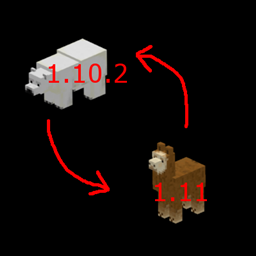
Compatibility layer to help make mods compatible between 1.10 and 1.11
Про мод CompatLayer
This small mod/library has some tools that can help to make mods binary compatible between 1.10 and 1.11. If you make sure you use the api in this mod correctly it is possible to make a mod jar that runs on both versions.
A few things that you should do in addition to what this library does:
- Make all resource names (lang files, model names, json files, texture files, ...) lower case in your 1.10.2 version. Add a FMLMissingMapping event handler to take care old worlds load
- Mod id should be lowercase too
- Replace tileEntity.worldObj with tileEntity.getWorld()
- Replace entityPlayer.worldObj with entityPlayer.getEntityWorld()
This is alpha. It is likely things are not complete yet.
Wiki for more information: https://github.com/McJty/compatlayer/wiki
Tutorial for modders: http://modwiki.temporal-reality.com/mw/index.php?title=CompatLayer-1.11
Maven for 1.10.2: http://jenkins.k-4u.nl/view/McJty/job/Compatlayer%201.10/
Maven for 1.11: http://jenkins.k-4u.nl/view/McJty/job/Compatlayer%201.11/
Як встановити CompatLayer
With Millida Launcher
Install Millida Launcher
The launcher is free: download it at millida.net/launcher and sign in with any nickname.
Click “Install” on this page
The launcher opens and installs the mod for Minecraft 1.11–1.11.2 automatically.
Launch the game
A profile with it appears in the launcher: click “Play”.
Manually
Download the file for your version
In the version list above, pick the file compatlayer-1.11.2-0.3.1.jar (40 KB) for your game version.
Put it in the mods folder
The folder is inside .minecraft (Windows: %appdata%\.minecraft\mods). If it does not exist, create it.
Launch the loader profile
Open “Mods” in the main menu: CompatLayer should be in the list.
Minecraft 1.11.2 runs on Java 8: with a different Java version the game may close right after launch.
Версії
Із залежностями
| Minecraft | Завантажувач | Файл | Дата | Дії |
|---|---|---|---|---|
| 1.11.2 | — | compatlayer-1.11.2-0.3.1.jar39.8 КБ | ||
| 1.11 | — | compatlayer-1.11-0.0.39beta.jar27.3 КБ | ||
| 1.11 | — | compatlayer-1.11-0.0.33alpha.jar24.7 КБ |
Часті питання
Which Minecraft versions does CompatLayer work on?
There are files for 1.11.2, 1.11. The newest is 1.11.2.
Which Java does CompatLayer need?
Minecraft 1.11.2 runs on Java 8. If the game closes right after launch, the usual cause is the wrong Java version in the profile settings.
Where can I download CompatLayer safely?
On this page: the file compatlayer-1.11.2-0.3.1.jar (40 KB) is stored on Millida’s server, with no link shorteners. SHA-1 checksum: d233cd213052094aa6d7a311a8363b217afd3e20.
Відгуки
Станьте першим, хто оцінить CompatLayer


