
Cobblemon Party Extras Мод для Minecraft 1.21.1
Покращує екран команди/огляду Cobblemon за допомогою підказок і аналізатора команди, а також показує рухи, яких може навчитися покемон
 NeoForge
 Fabric
Про мод Cobblemon Party Extras
I grant permission to anyone seeking to add my mod to a modpack
Cobblemon Party Extras
Enhances the Cobblemon party/summary screen with tooltips and a team analyzer, also shows a pokemons learnable moves.
Features
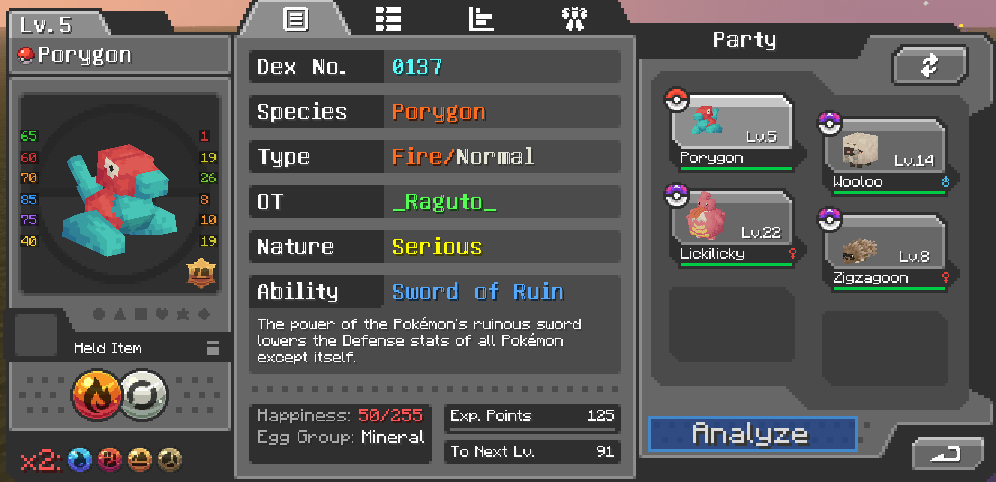
Summary Screen Enhancements:
- Ability tooltips with hidden ability and possible abilities
- Nature tooltips showing stat changes
- Pokemon tooltips showing classification (Legendary, Mythical, Paradox, etc.) and form info
- Type tooltips showing full matchups (x4, x2, x½, x¼, x0 immunities)
- Weakness icons below the type display (x4 and x2 categorized)
- Type-colored text for Pokemon types
Move Screen Enhancements:
- Move tooltips with power, accuracy, description
- Categorized move swap screen displaying possible moves (Level-Up, Egg, TM)
- Future moves shown greyed out with level requirements
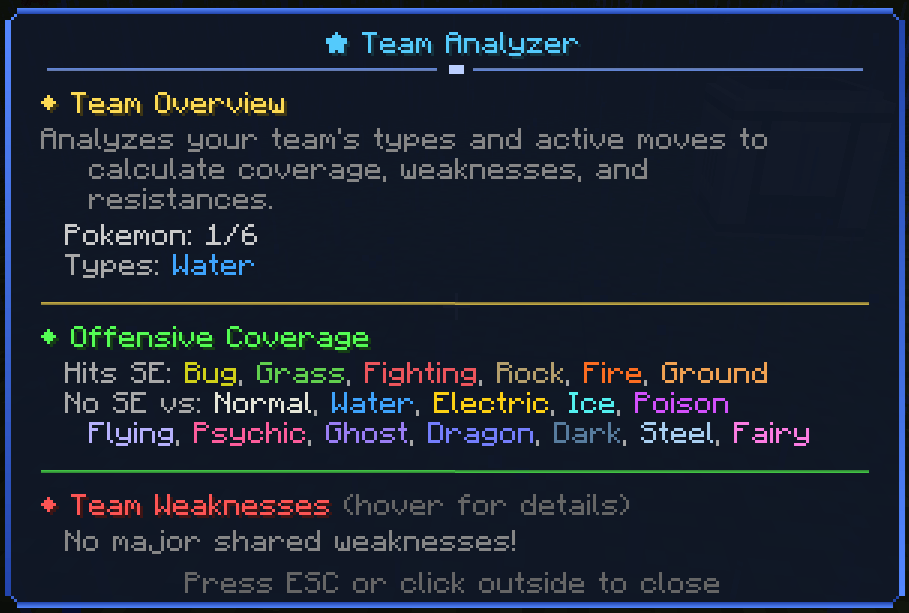
Team Analyzer:
- Full team analysis accessible via "Analyze" button
- Offensive coverage analysis
- Shared weaknesses with hover tooltips showing which Pokemon are weak
- Team resistances and immunities
- Suggestions for team improvement
Fully compatible with fakemon as well!
Як встановити Cobblemon Party Extras
With Millida Launcher
Install Millida Launcher
The launcher is free: download it at millida.net/launcher and sign in with any nickname.
Click “Install” on this page
The launcher opens and installs the mod for Minecraft 1.21.1 on Fabric or NeoForge automatically.
Launch the game
A profile with it appears in the launcher: click “Play”.
Manually
Install Fabric or NeoForge
The loader must match the game version of the mod file, for example Minecraft 1.21.1. After installing it, a separate profile appears in your launcher.
Download the file for your version
In the version list above, pick the file cobblemon_party_extras-neoforge-1.8.15.jar (388 KB) for your game version and loader.
Put it in the mods folder
The folder is inside .minecraft (Windows: %appdata%\.minecraft\mods). If it does not exist, create it.
Launch the loader profile
Open “Mods” in the main menu: Cobblemon Party Extras should be in the list.
Minecraft 1.21.1 runs on Java 21: with a different Java version the game may close right after launch.
Версії
Із залежностями
| Minecraft | Завантажувач | Файл | Дата | Дії |
|---|---|---|---|---|
| 1.21.1 | NeoForge | Cobblemon Party Extras 1.8.15-NeoForge388 КБ 1 | ||
| 1.21.1 | Fabric | Cobblemon Party Extras 1.8.15-Fabric385 КБ 4 |
Відгуки
Станьте першим, хто оцінить Cobblemon Party Extras


