
- переглядів
- 25 переглядів
- Оновлено
- Оновлено 18.10.2026
- 1.21.4
 Forge
Forge
Про мод CobbleForDays
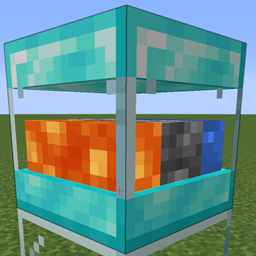
Ось простий генератор кругляку. Доступно 5 рівнів, якщо хтось захоче додати кілька версій.
Це було створено переважно як окремий блок, щоб допомогти серверам. Мати один тікаючий TE набагато продуктивніше, ніж купу та генерацію кругляку у світі.
Але користуйтеся як захочете.
Кожен рівень має налаштування, які можна редагувати у файлі конфігурації сервера.
[server.1]
Максимальна кількість предметів для зберігання у внутрішньому буфері.
Діапазон: > 1
max = 64
Кількість предметів, що генеруються за кожне оновлення.
Діапазон: > 1
count = 1
Кількість тіків між кожним оновленням генерації.
Діапазон: > 1 interval = 40
Встановіть true, щоб увімкнути автоматичне надсилання до інвентарів над цим блоком.
pushes = true
Дякуємо Drullkus за створення гарної моделі для них.
Це стандартні рецепти, але, очевидно, їх можна редагувати в пакетах даних.
Як встановити CobbleForDays
With Millida Launcher
Install Millida Launcher
The launcher is free: download it at millida.net/launcher and sign in with any nickname.
Click “Install” on this page
The launcher opens and installs the mod for Minecraft 1.21.4 on Forge automatically.
Launch the game
A profile with it appears in the launcher: click “Play”.
Manually
Install Forge
The loader must match the game version of the mod file, for example Minecraft 1.21.4. After installing it, a separate profile appears in your launcher.
Download the file for your version
In the version list above, pick the file CobbleForDays-1.14.1.jar (49 KB) for your game version.
Put it in the mods folder
The folder is inside .minecraft (Windows: %appdata%\.minecraft\mods). If it does not exist, create it.
Launch the loader profile
Open “Mods” in the main menu: CobbleForDays should be in the list.
Minecraft 1.21.4 runs on Java 21: with a different Java version the game may close right after launch.
Версії
Із залежностями
| Minecraft | Завантажувач | Файл | Дата | Дії |
|---|---|---|---|---|
| 1.21.4 | Forge | CobbleForDays-1.14.1.jar49.4 КБ |
Часті питання
Which Minecraft versions does CobbleForDays work on?
Only Minecraft 1.21.4: there are no files for other versions.
Is CobbleForDays for Forge or Fabric?
Only for Forge: 1.21.4. There are no files for Fabric or NeoForge: a mod for another loader will not start.
Does CobbleForDays need other mods?
The author lists no required dependencies: the Forge loader is enough.
Which Java does CobbleForDays need?
Minecraft 1.21.4 runs on Java 21. If the game closes right after launch, the usual cause is the wrong Java version in the profile settings.
Where can I download CobbleForDays safely?
On this page: the file CobbleForDays-1.14.1.jar (49 KB) is stored on Millida’s server, with no link shorteners. SHA-1 checksum: 5268375f91bf686fe063c4855c65317c92bc4555.
Відгуки
Станьте першим, хто оцінить CobbleForDays


