
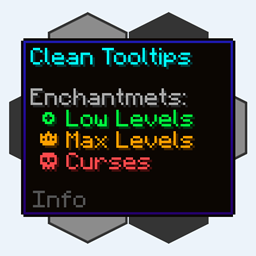
Clean Tooltips Мод для Minecraft 1.20.1, 1.21.10
Покращення підказок шляхом створення чистого та послідовного вигляду! Підказка про міцність та інше!
 NeoForge
 Fabric
 Forge
ForgeПро мод Clean Tooltips
Clean Tooltips
Чи відчували ви, що стандартні підказки можна було б трохи прикрасити? Тоді це саме те, що ви шукаєте.
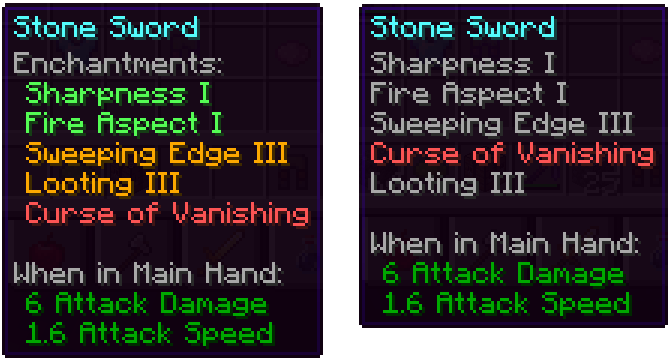
Головним чином мод переробляє спосіб відображення зачарувань у підказці:
- тепер вони мають власну підкатегорію "Enchantents:"
- кольорове кодування, щоб легше розрізняти хороші зачарування (зелений) і прокляття (червоний)
- зачарування максимального рівня відображатимуться золотим кольором
- прокляття завжди розташовані внизу списку
З встановленим модом: Без встановленого моду (Vanila):
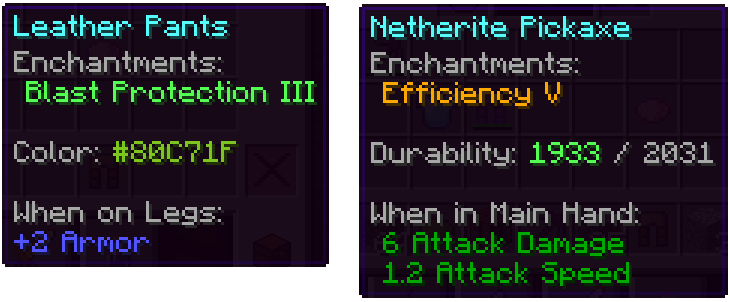
Крім цього, інші частини також були покращені:
- кольорова смуга на пофарбованих предметах тепер насправді показує використаний колір
- пошкоджені предмети показують свою залишкову міцність у підказці
У нас є набагато більше ідей щодо того, як можна покращити підказки в майбутніх оновленнях. Окрім додавання нових функцій, наступні оновлення також додадуть багато можливостей налаштування.
Як встановити Clean Tooltips
With Millida Launcher
Install Millida Launcher
The launcher is free: download it at millida.net/launcher and sign in with any nickname.
Click “Install” on this page
The launcher opens and installs the mod for Minecraft 1.20.1–1.21.10 on Fabric, Forge or NeoForge automatically.
Launch the game
A profile with it appears in the launcher: click “Play”.
Manually
Install Fabric, Forge or NeoForge
The loader must match the game version of the mod file, for example Minecraft 1.21.10. After installing it, a separate profile appears in your launcher.
Download the file for your version
In the version list above, pick the file clean_tooltips-1.1-neoforge-1.21.10.jar (24 KB) for your game version and loader.
Put it in the mods folder
The folder is inside .minecraft (Windows: %appdata%\.minecraft\mods). If it does not exist, create it.
Launch the loader profile
Open “Mods” in the main menu: Clean Tooltips should be in the list.
Minecraft 1.21.10 runs on Java 21: with a different Java version the game may close right after launch.
Версії
Із залежностями
| Minecraft | Завантажувач | Файл | Дата | Дії |
|---|---|---|---|---|
| 1.21.10 | NeoForge | clean_tooltips-1.1-neoforge-1.21.10.jar24.4 КБ | ||
| 1.21.10 | Fabric | clean_tooltips-1.1-fabric-1.21.10.jar23.1 КБ 2 | ||
| 1.20.1 | Forge | clean_tooltips-1.0-forge-1.20.1.jar25.8 КБ 1 |
Часті питання
Which Minecraft versions does Clean Tooltips work on?
There are files for 1.21.10, 1.20.1. The newest is 1.21.10.
Is Clean Tooltips for Forge or Fabric?
There are files for Fabric: 1.21.10, for Forge: 1.20.1 and for NeoForge: 1.21.10.
Does Clean Tooltips need other mods?
The author lists no required dependencies: the Fabric, Forge or NeoForge loader is enough.
Which Java does Clean Tooltips need?
Minecraft 1.21.10 runs on Java 21. If the game closes right after launch, the usual cause is the wrong Java version in the profile settings.
Where can I download Clean Tooltips safely?
On this page: the file clean_tooltips-1.1-neoforge-1.21.10.jar (24 KB) is stored on Millida’s server, with no link shorteners. SHA-1 checksum: 594541adddbc0d20e2361a8fef21b5ed960c2588.
Відгуки
Станьте першим, хто оцінить Clean Tooltips


