
Chisel Chipped Integration Мод для Minecraft 1.20.1, 1.21.1
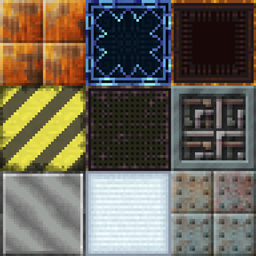
Додає блоки з моду chisel.
 NeoForge
 Forge
ForgeПро мод Chisel Chipped Integration
Оригінальні текстури з моду Chisel!
Якщо ви знайдете будь-які помилки, повідомте про них у багтрекері!
Для отримання додаткової інформації/огляду зверніться до Chisel Wiki.
Щодо запитів на різні блоки, будь ласка, перегляньте розділ Coming Soon на вікі.
Активна розробка: 1.21.1
Технічна розробка: Forge 1.20.1, NeoForge 1.21.1
Цей мод потребує:
Connected Textures Mod
Athena (1.20 і вище)
Chipped (необов'язково)
Вільно використовувати в будь-якому модпаку.
Цей мод додає деякі блоки до моду chipped, які існували в старому моді chisel.
Ці блоки включають:
- Factory Blocks
- Laboratory Blocks
- Technical Blocks
- Tyrian
- Futura Blocks
- Metal Blocks (Aluminum-, Bronze-, Cobalt-, Copper-, Electrum-, Gold-, Invar-, Iron-, Lead-, Nickel-, Platinum-, Silver-, Steel-, Tin- and Uranium Blocks)
- Wool and Carpets
- Gem Blocks (Diamond-, Emerald-, Lapis- and Redstone Blocks)
Як встановити Chisel Chipped Integration
With Millida Launcher
Install Millida Launcher
The launcher is free: download it at millida.net/launcher and sign in with any nickname.
Click “Install” on this page
The launcher opens and installs the mod for Minecraft 1.19.2–1.21.1 on Forge or NeoForge automatically.
Launch the game
A profile with it appears in the launcher: click “Play”.
Manually
Install Forge or NeoForge
The loader must match the game version of the mod file, for example Minecraft 1.21.1. After installing it, a separate profile appears in your launcher.
Download the file for your version
In the version list above, pick the file chisel_chipped_integration-v1.3.9-1.21.1.jar (2.7 MB) for your game version and loader.
Put it in the mods folder
The folder is inside .minecraft (Windows: %appdata%\.minecraft\mods). If it does not exist, create it.
Launch the loader profile
Open “Mods” in the main menu: Chisel Chipped Integration should be in the list.
Minecraft 1.21.1 runs on Java 21: with a different Java version the game may close right after launch.
Версії
Із залежностями
| Minecraft | Завантажувач | Файл | Дата | Дії |
|---|---|---|---|---|
| 1.21.1 | NeoForge | Chisel 1.3.9-1.21.12.7 МБ 1 | ||
| 1.20.1 | NeoForge, Forge | Chisel 1.1.6-1.20.12.7 МБ 3 | ||
| 1.21 | NeoForge | Chisel v1.3.3-1.21 Beta1.9 МБ | ||
| 1.19.2 | Forge | Chisel Chipped Integration 1.0.0 1.19.2 Beta658 КБ |
Часті питання
Which Minecraft versions does Chisel Chipped Integration work on?
There are files for 1.21.1, 1.21, 1.20.1, 1.19.2. The newest is 1.21.1.
Is Chisel Chipped Integration for Forge or Fabric?
There are files for Forge: 1.19.2–1.20.1 and for NeoForge: 1.20.1–1.21.1. There are no files for Fabric: a mod for another loader will not start.
Does Chisel Chipped Integration need other mods?
The author lists no required dependencies: the Forge or NeoForge loader is enough.
Which Java does Chisel Chipped Integration need?
Minecraft 1.21.1 runs on Java 21. If the game closes right after launch, the usual cause is the wrong Java version in the profile settings.
Where can I download Chisel Chipped Integration safely?
On this page: the file chisel_chipped_integration-v1.3.9-1.21.1.jar (2.7 MB) is stored on Millida’s server, with no link shorteners. SHA-1 checksum: 8a7b23797cf5ecd9db0cc1cced108d5fbdb876b9.
Відгуки
Станьте першим, хто оцінить Chisel Chipped Integration


