
Blue Flame Burning Мод для Minecraft 1.20.1, 1.21.1
Змушує вогонь душ палити сутності синім полум'ям замість звичайного
 NeoForge
 Forge
ForgeПро мод Blue Flame Burning
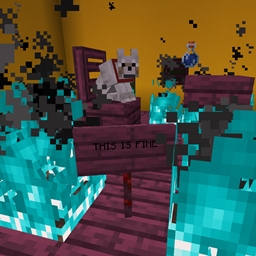
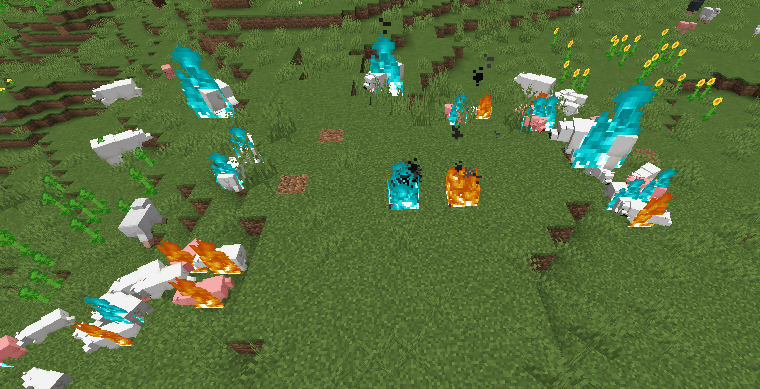
Змушує вогонь душі підпалювати сутності синім полум'ям замість звичайного нудного жовтого полум'я, коли вони займаються від джерела вогню душі.
- Вогонь душі, коли підпалює гравця або сутність, змушує сутність горіти синім полум'ям
- Зомбі, що горить синім полум'ям і підпалює інших сутностей, змусить цих сутностей також горіти синім
- Підтримка модифікованих рідин, які підпалюють гравця
Зміна, додана цим модом, є суто візуальною.
Мод потрібен на обох сторонах.
Приходьте до Discord, якщо вам потрібна допомога або у вас є запитання: https://discord.gg/69YVMbvhTC
Під час створення цього моду постраждало багато білих ведмедів
Як встановити Blue Flame Burning
With Millida Launcher
Install Millida Launcher
The launcher is free: download it at millida.net/launcher and sign in with any nickname.
Click “Install” on this page
The launcher opens and installs the mod for Minecraft 1.18.2–1.21.1 on Forge or NeoForge automatically.
Launch the game
A profile with it appears in the launcher: click “Play”.
Manually
Install Forge or NeoForge
The loader must match the game version of the mod file, for example Minecraft 1.21.1. After installing it, a separate profile appears in your launcher.
Download the file for your version
In the version list above, pick the file blueflame-1.21.1-1.1.1.jar (18 KB) for your game version and loader.
Put it in the mods folder
The folder is inside .minecraft (Windows: %appdata%\.minecraft\mods). If it does not exist, create it.
Launch the loader profile
Open “Mods” in the main menu: Blue Flame Burning should be in the list.
Minecraft 1.21.1 runs on Java 21: with a different Java version the game may close right after launch.
Версії
Із залежностями
| Minecraft | Завантажувач | Файл | Дата | Дії |
|---|---|---|---|---|
| 1.21.1 | NeoForge | blueflame-1.21.1-1.1.1.jar17.5 КБ 1 | ||
| 1.20.1 | NeoForge, Forge | blueflame-1.20.0-1.0.3.jar26 КБ | ||
| 1.18.2 | Forge | blueflame-1.18.2-0.1.0.0.jar26.2 КБ |
Часті питання
Which Minecraft versions does Blue Flame Burning work on?
There are files for 1.21.1, 1.20.1, 1.20, 1.18.2. The newest is 1.21.1.
Is Blue Flame Burning for Forge or Fabric?
There are files for Forge: 1.18.2–1.20.1 and for NeoForge: 1.20–1.21.1. There are no files for Fabric: a mod for another loader will not start.
Does Blue Flame Burning need other mods?
The author lists no required dependencies: the Forge or NeoForge loader is enough.
Which Java does Blue Flame Burning need?
Minecraft 1.21.1 runs on Java 21. If the game closes right after launch, the usual cause is the wrong Java version in the profile settings.
Where can I download Blue Flame Burning safely?
On this page: the file blueflame-1.21.1-1.1.1.jar (18 KB) is stored on Millida’s server, with no link shorteners. SHA-1 checksum: 0e78defafd6cf08759c656a54f8a33315e3ab924.
Відгуки
Станьте першим, хто оцінить Blue Flame Burning


