
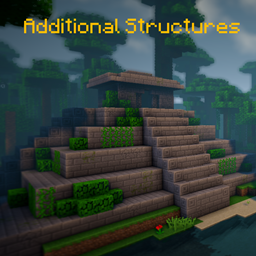
Additional Structures Мод для Minecraft 1.20.1, 1.12.2
Додає понад 250 нових структур, які ідеально вписуються у ваш світ!
 NeoForge
 Forge
Forge📖 Опис
Цей мод додає близько 250 нових малих і середніх структур у гру, щоб розширити ваш світ!
- підтримує моди генерації біомів, як-от Terralith, Traverse, Biomes O' Plenty, Biome Bundle та інші!
- Інтеграція з Mystcraft (MC 1.12)
- з параметрами конфігурації для зміни значень появи кожного типу структур! (MC 1.12)
- працює з командою /locate
- з перевіркою оновлень
- різні структури генеруються у ванільних і модифікованих біомах у звичайному світі та Енді!
- Config Datapack
Хочете змінити чи відредагувати деякі значення структур на 1.18+? Ось як це зробити!
Тут ви можете знайти всі структури поточної версії!
Використовуєте Fabric чи Quilt? Тоді використовуйте цю версію!
📷 Презентація
🗃️ Залежності
Обов'язкові:
- Magma Core [≥ MC 1.21.5]
- Надає базовий код і функції, як-от перевірка оновлень
- CurseForge | Modrinth
Підтримувані:
- Mystcraft [MC 1.12]
- Додано символи функцій структур AS
- CurseForge | Modrinth
- Antique Atlas [≥ MC 1.21]
- Маркер на карті для деяких структур
- CurseForge | Modrinth
Як встановити Additional Structures
With Millida Launcher
Install Millida Launcher
The launcher is free: download it at millida.net/launcher and sign in with any nickname.
Click “Install” on this page
The launcher opens and installs the mod for Minecraft 1.12–1.21.10 on Forge or NeoForge automatically.
Launch the game
A profile with it appears in the launcher: click “Play”.
Manually
Install Forge or NeoForge
The loader must match the game version of the mod file, for example Minecraft 1.21.10. After installing it, a separate profile appears in your launcher.
Download the file for your version
In the version list above, pick the file AdditionalStructures-1.21.10-(v.8.1.1-NEO).jar (1.5 MB) for your game version and loader.
Put it in the mods folder
The folder is inside .minecraft (Windows: %appdata%\.minecraft\mods). If it does not exist, create it.
Launch the loader profile
Open “Mods” in the main menu: Additional Structures should be in the list.
Minecraft 1.21.10 runs on Java 21: with a different Java version the game may close right after launch.
Версії
Із залежностями
| Minecraft | Завантажувач | Файл | Дата | Дії |
|---|---|---|---|---|
| 1.21.9 | NeoForge | AdditionalStructures v.8.1.1-NEO1.5 МБ 1 | ||
| 1.20.2 | Forge | Additional Structures v.4.2.21.5 МБ 24 | ||
| 1.12.1 | — | Additional Structures v.2.2.2782 КБ 5 |
Часті питання
Which Minecraft versions does Additional Structures work on?
There are files for 1.12–1.21.10, 12 versions in total. The newest is 1.21.10.
Is Additional Structures for Forge or Fabric?
There are files for Forge: 1.20–1.20.6 and for NeoForge: 1.21.9–1.21.10. There are no files for Fabric: a mod for another loader will not start.
Does Additional Structures need other mods?
The author lists no required dependencies: the Forge or NeoForge loader is enough.
Which Java does Additional Structures need?
Minecraft 1.21.10 runs on Java 21. If the game closes right after launch, the usual cause is the wrong Java version in the profile settings.
Where can I download Additional Structures safely?
On this page: the file AdditionalStructures-1.21.10-(v.8.1.1-NEO).jar (1.5 MB) is stored on Millida’s server, with no link shorteners. SHA-1 checksum: 05bfd35a858149e7e18e7eecd841f14dee9e504b.
Відгуки
Станьте першим, хто оцінить Additional Structures


