

Smooth-MC Збірка для Minecraft 1.12.2, 1.18.2
Клієнтський модпак, зосереджений виключно на покращенні продуктивності Minecraft.
- переглядів
- 26 переглядів
- Оновлено
- Оновлено 04.09.2026
- 1.12.2 — 1.18.2
 Forge
Forge- Клієнт
Про збірку модів Smooth-MC
This clientside modpack improves minecrafts performance in the most popular versions. Shaders are supported. Do not update any mod or things may break!
Download Acedium for additional Performance here (for Forge only): Acedium

Before and After (Fabric 1.21):
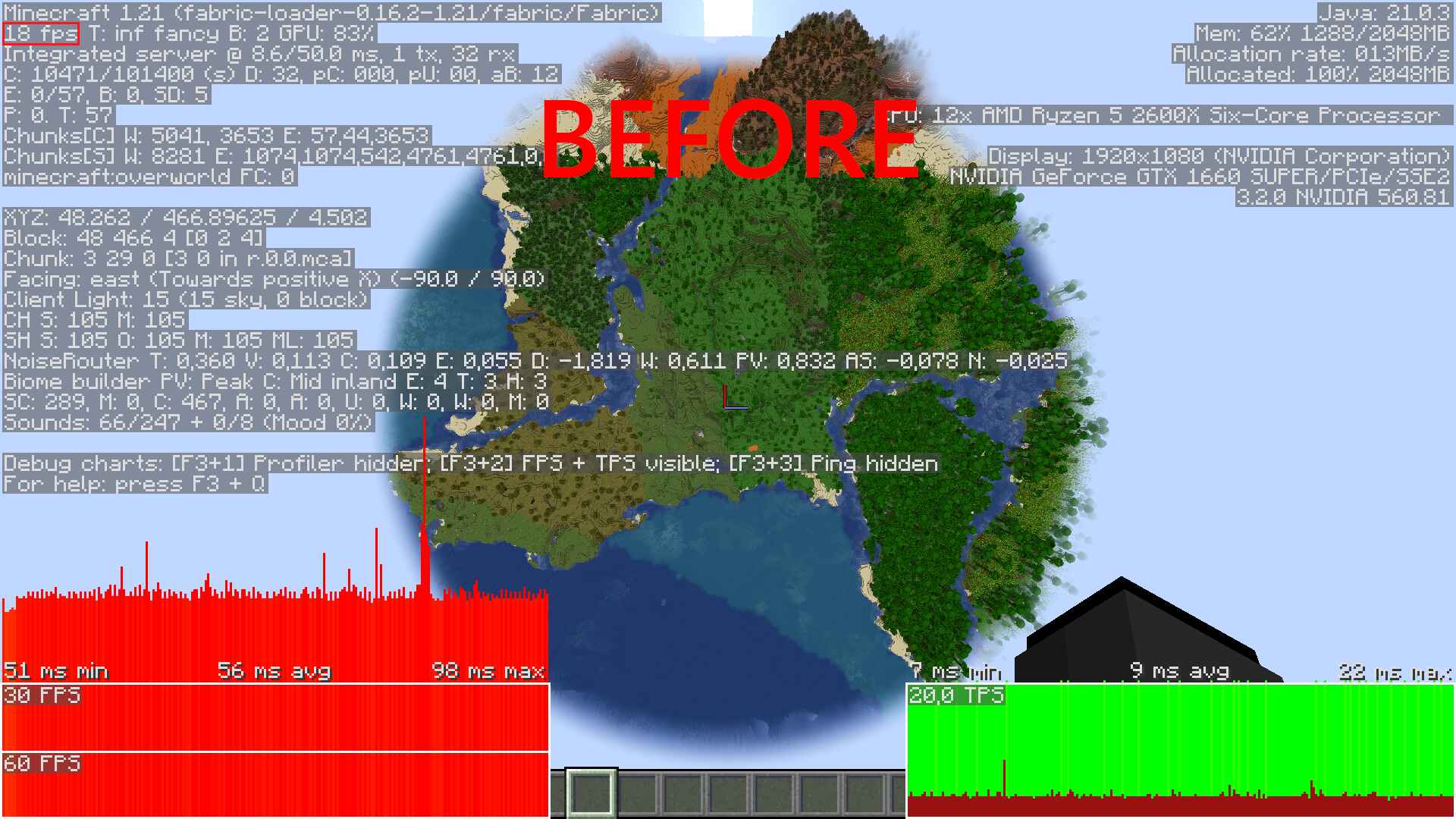
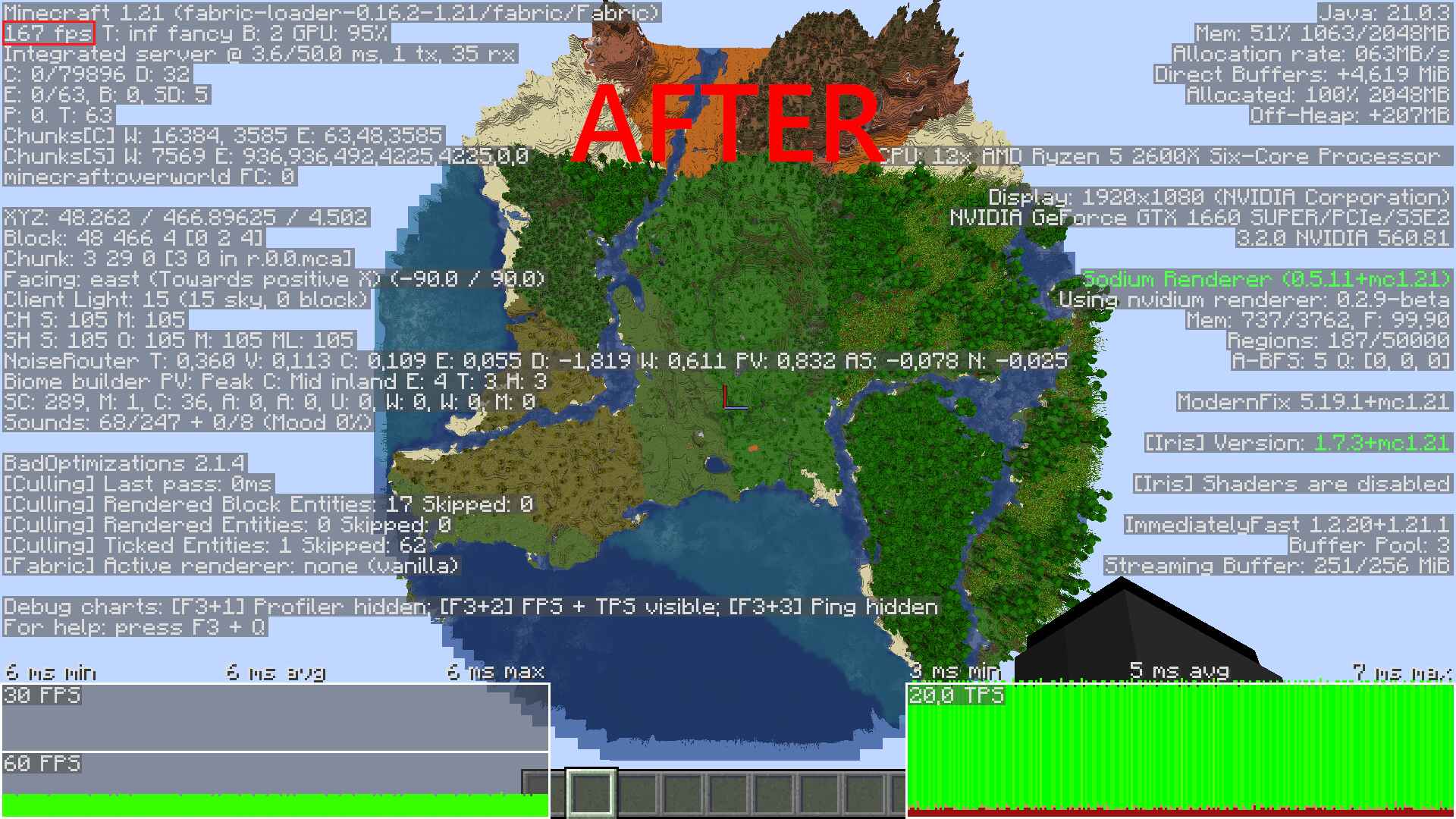
Mods used:
Alfheim Lighting Engine
C2ME
Canary
Censored ASM
Cloth Config
Fast IP Ping
FastBoot
FastSuite
FoamFix
Had Enough Items
ImmediatelyFast
Krypton
Krypton Reforged
Ksyxis
Lazy DFU
Memory Leak Fix
MixinBootstrap
Mixin 0.7-0.8 Compatibility
MixinBooter
More Culling
Noisium
Nvidium
Optifine 1.12.2 HD U G5
Particle Culling
Performant
Placebo
Red Core
[Redirector [Modern]](https://www.curseforge.com/minecraft/mc-mods/redirector)
[Redirector [Retro]](https://legacy.curseforge.com/minecraft/mc-mods/redirectionor-retro)
Remove Reloading Screen
RenderLib
StutterFix
Video Tape
Xenon
Disclaimer:
I do not own or claim any rights to the mods in this modpack. Full credit and ownership belong to the original creators. Please support the mod authors by visiting their official pages for more information and updates.
Як встановити Smooth-MC
With Millida Launcher
Install Millida Launcher
The launcher is free: download it at millida.net/launcher and sign in with any nickname.
Click “Install” on this page
The launcher opens and installs the modpack for Minecraft 1.12.2–1.18.2 on Forge automatically.
Launch the game
A profile with it appears in the launcher: click “Play”.
Manually
Download the modpack archive
In the version list above, pick the file SmoothMC 1.18.2 Forge 1.1.0.mrpack (214 KB).
Import it into a launcher
A launcher that supports modpacks (Millida Launcher, Prism) takes the archive via “Add modpack”, then “From file”. No need to unpack it yourself.
Allocate memory
Modpacks need more memory than the plain game: set 4–6 GB in the profile settings.
Minecraft 1.18.2 runs on Java 17: with a different Java version the game may close right after launch.
Версії
Із залежностями
| Minecraft | Завантажувач | Файл | Дії |
|---|---|---|---|
| 1.18.2 | Forge | 1.18.2214 КБ | |
| 1.12.2 | Forge | 1.12.23.1 МБ |
Що потрібно для запуску
- Ksyxisуже включено
- Dependencyуже включено
- Dependencyуже включено
- Cloth Config APIуже включено
- MixinBooterуже включено
- Oculusуже включено
- Entity Cullingуже включено
- Memory Leak Fixуже включено
- Dependencyуже включено
- Dependencyуже включено
- FoamFixуже включено
- Dependencyуже включено
- Dependencyуже включено
- Embeddiumуже включено
- Dependencyуже включено
- FerriteCoreуже включено
Часті питання
Which Minecraft versions does Smooth-MC work on?
There are files for 1.18.2, 1.12.2. The newest is 1.18.2.
Is Smooth-MC for Forge or Fabric?
Only for Forge: 1.12.2–1.18.2.
Which mods are in the Smooth-MC modpack?
Mods in the modpack include Ksyxis, Dependency, Cloth Config API, MixinBooter, Oculus, Entity Culling, Memory Leak Fix, FoamFix and 2 more.
Which Java does Smooth-MC need?
Minecraft 1.18.2 runs on Java 17. If the game closes right after launch, the usual cause is the wrong Java version in the profile settings.
How do I download Smooth-MC?
With Millida Launcher: it installs Smooth-MC into a modpack by itself, for the right game version and loader. The launcher is free.
Відгуки
Станьте першим, хто оцінить Smooth-MC


