

Skyblock Optimized Збірка для Minecraft 1.8.9
Оптимізований модпак для Forge 1.8.9, створений, щоб мінімізувати лаги та просідання FPS у Hypixel Skyblock.
- завантажень
- 2 завантажень
- переглядів
- 119 переглядів
- Оновлено
- Оновлено 26.08.2026
- 1.8 — 1.8.9
 Forge
Forge- Клієнт
🌟 Skyblock Optimized – The Ultimate Hypixel Skyblock Experience!
Skyblock Optimized is a carefully curated Forge 1.8.9 modpack designed to enhance performance, improve quality of life, and optimize gameplay for Hypixel Skyblock. Whether your running dungeons, mining or doing the rift, this modpack ensures a smooth and efficient experience without breaking Hypixel's rules.
✨ Features:
✅ FPS Boost & Performance Enhancements – Say goodbye to lag with mods that optimize rendering, memory usage, and client stability.
✅ Skyblock QoL Mods – Essential utilities for dungeons, farming, and general gameplay improvements.
✅ Customizable HUD & UI Enhancements – Stay informed with better overlays, timers, and status indicators.
✅ Fair Play & Hypixel Compliant – All included mods are allowed on Hypixel, ensuring a safe and ban-free experience.
✅ Lightweight & Easy to Use – No unnecessary bloat—just the best mods for a seamless Skyblock session.
📥 Download & Installation
1️⃣Firstly install Skyblock Optimized through the Modrinth App
2️⃣Then download Optifine off this link: https://optifine.net/adloadx?f=OptiFine_1.8.9_HD_U_M5.jar
3️⃣Next, tap on the three dots next to the settings cog.
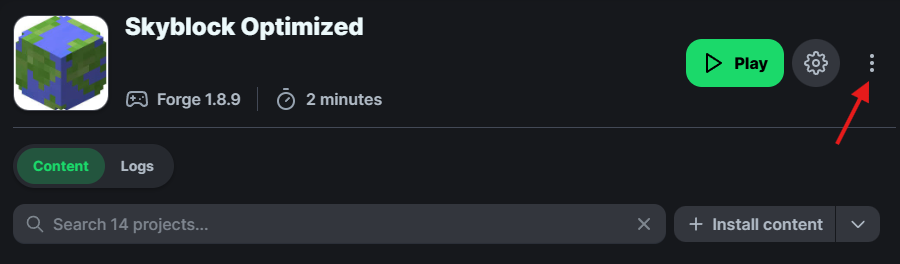
4️⃣Click on Open folder.
5️⃣Drag your OptiFine_1.8.9_HD_U_M5.jar file, into your mods folder.
Як встановити Skyblock Optimized
With Millida Launcher
Install Millida Launcher
The launcher is free: download it at millida.net/launcher and sign in with any nickname.
Click “Install” on this page
The launcher opens and installs the modpack for Minecraft 1.8–1.8.9 on Forge automatically.
Launch the game
A profile with it appears in the launcher: click “Play”.
Manually
Download the modpack archive
In the version list above, pick the file Skyblock Optimized 6.0.0.mrpack (42 MB).
Import it into a launcher
A launcher that supports modpacks (Millida Launcher, Prism) takes the archive via “Add modpack”, then “From file”. No need to unpack it yourself.
Allocate memory
Modpacks need more memory than the plain game: set 4–6 GB in the profile settings.
Minecraft 1.8.9 runs on Java 8: with a different Java version the game may close right after launch.
Версії
Із залежностями
| Minecraft | Завантажувач | Файл | Дії |
|---|---|---|---|
| 1.8.9 | Forge | 1.8.941.9 МБ 2 |
Часті питання
Which Minecraft versions does Skyblock Optimized work on?
There are files for 1.8.9, 1.8. The newest is 1.8.9.
Is Skyblock Optimized for Forge or Fabric?
Only for Forge: 1.8–1.8.9.
Which Java does Skyblock Optimized need?
Minecraft 1.8.9 runs on Java 8. If the game closes right after launch, the usual cause is the wrong Java version in the profile settings.
Where can I download Skyblock Optimized safely?
On this page: the file Skyblock Optimized 6.0.0.mrpack (42 MB) is stored on Millida’s server, with no link shorteners. SHA-1 checksum: 804285fc83d77b76b04d1c80b93cfb0f6129c57f.
Відгуки
Станьте першим, хто оцінить Skyblock Optimized


