
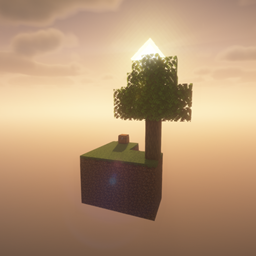
Sky Block Default! Мапа для Minecraft 26.2
Виживайте на крихітному плавучому острові з обмеженими ресурсами! Розширюйтесь, займайтесь фермерством і крафтом на шляху до перемоги в цьому класичному випробуванні Skyblock — ідеально для одиночних чи багатокористувацьких пригод.
☁️ Skyblock Survival Map
Can you turn a tiny island in the middle of nowhere into a massive survival empire?
Start with only a handful of resources and an endless void beneath your feet. Every block matters, every resource is valuable, and one wrong move could cost everything.
🌟 Features
- Classic Skyblock gameplay
- Tiny starter island suspended above the void
- Carefully balanced progression
- Solo and multiplayer friendly
- Beginner-friendly while still challenging
- Endless opportunities for creativity and expansion
🎯 Your Goal
- Gather limited resources
- Build a cobblestone generator
- Expand your island block by block
- Create farms and renewable resource systems
- Complete survival challenges
- Transform a small floating island into a thriving sky kingdom
What begins as a simple tree and a few blocks quickly becomes an adventure of strategy, patience, and creativity. Discover new ways to survive, optimize resources, and push your island further than you ever thought possible.
Whether you're a Skyblock veteran or trying it for the first time, this map delivers the classic survival experience that has challenged millions of players.
The sky is your world. The void is your enemy. How far can you survive?
📱 Looking for more Minecraft Bedrock content?
Try Minekits by ModWorldStudio for a growing collection of maps, skins, and addons designed for Bedrock Edition players.
More maps. More adventures. One place.


Як встановити Sky Block Default!
With Millida Launcher
Install Millida Launcher
The launcher is free: download it at millida.net/launcher and sign in with any nickname.
Click “Install” on this page
The launcher opens and installs the map for Minecraft 26.1–26.2 automatically.
Launch the game
A profile with it appears in the launcher: click “Play”.
Manually
Download the map archive
Pick the file Sky Block Default.zip (1.0 MB).
Unpack it into the saves folder
The world folder (with level.dat inside) must sit directly in .minecraft/saves.
Open the world
“Singleplayer”: the map will be in your world list.
On a server
Replace the world folder
Stop the server and put the map folder in place of world (or set its name in level-name).
Use the “To server” button
On Millida Hosting, the button at the top of the page uploads the file to your server and restarts it for you.
Версії
Із залежностями
| Minecraft | Завантажувач | Файл | Дата | Дії |
|---|---|---|---|---|
| 26.1 | — | Sky Block Default.zip1 МБ 4 |
Часті питання
Which Minecraft versions does Sky Block Default! work on?
There are files for 26.2, 26.1.2, 26.1.1, 26.1. The newest is 26.2.
Where can I download Sky Block Default! safely?
On this page: the file Sky Block Default.zip (1.0 MB) is stored on Millida’s server, with no link shorteners. SHA-1 checksum: ffc5f4880627c7f0072d2467471dc8b3e1b8b756.
Відгуки
Станьте першим, хто оцінить Sky Block Default!



