

Medieval Town Мапа для Minecraft 1.21, 1.21.82
Насолоджуйтеся величним теплим середньовічним селом біля річки. Використовуйте його для своєї безмежної уяви або для дослідження з друзями! Розігруйте рольові сценки в приголомшливому маленькому містечку або розширюйте його та створюйте місто своєї мрії! Ваша уява — це межа.
Про карту Medieval Town
Enjoy a majestic warm riverside Medieval Village, use it for your endless imagination or to explore with friends! Roleplay in a stunning small town or expand and create the city of your dreams! Your imagination is the limit. BC Studios present Medieval Trading Post the second of many creations by our team, Our team Consisting of just 2 members, YaBoiBillyBoi & LordMole88. This map has been meticulously created with lots of detail, despite its small but mighty stance. We aimed to create a warm aesthetic with medieval buildings and shops. We hope you enjoy!Please note all pictures were taken at a specific time of the Minecraft day and with shaders. Looks may not be exactly as they seem in game.
Enjoy a majestic warm riverside Medieval Village, use it for your endless imagination or to explore with friends! Roleplay in a stunning small town or expand and create the city of your dreams! Your imagination is the limit.
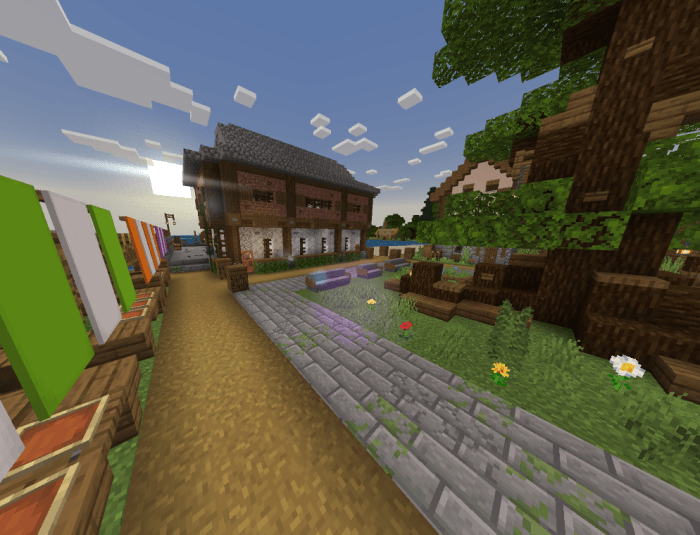
This world can be used as an expansive survival world with endless opportunities, a creative world to expand on for times to come!
All we ask is a little recognition, when downloading you are supporting our team who devote their time and effort to these projects, we aim to release an expansive world next, So support and praise is appreciated!
Please feel free to share.
<figure class="image"> </figure> <figure class="image"> </figure> <figure class="image"> </figure> <figure class="image"> </figure> <figure class="image"> </figure> <figure class="image"> </figure> <figure class="image"> </figure>
Як встановити Medieval Town
With Millida Launcher
Install Millida Launcher
The launcher is free: download it at millida.net/launcher and sign in with any nickname.
Click “Install” on this page
The launcher opens and installs the map for Minecraft 1.21–1.21.82 automatically.
Launch the game
A profile with it appears in the launcher: click “Play”.
Manually
Download the map archive
Pick the file Medieval_Town__BC_Studios.mcworld (1.9 MB).
Unpack it into the saves folder
The world folder (with level.dat inside) must sit directly in .minecraft/saves.
Open the world
“Singleplayer”: the map will be in your world list.
On a server
Replace the world folder
Stop the server and put the map folder in place of world (or set its name in level-name).
Use the “To server” button
On Millida Hosting, the button at the top of the page uploads the file to your server and restarts it for you.
Версії
Із залежностями
| Minecraft | Завантажувач | Файл | Дата | Дії |
|---|---|---|---|---|
| 1.21.30 | — | Medieval_Town__BC_Studios.mcworld1.9 МБ |
Часті питання
Which Minecraft versions does Medieval Town work on?
There are files for 1.21–1.21.82, 20 versions in total. The newest is 1.21.82.
Where can I download Medieval Town safely?
On this page: the file Medieval_Town__BC_Studios.mcworld (1.9 MB) is stored on Millida’s server, with no link shorteners. SHA-1 checksum: 15e5ceb2768017e13c37369a4760316124d259b2.
Відгуки
Станьте першим, хто оцінить Medieval Town



