
Minecraft 1.12.2 için Entity Culling Mod
Gizli varlıkların işlenmesini atla
- indirme
- 7 indirme
- görüntülenme
- 24 görüntülenme
- Güncellendi
- Güncellendi 17.10.2026
- 1.12.2
 Forge
Forge
Entity Culling modu hakkında
Entity Culling - 1.16.5 - 2.1.4 ve daha yeni sürümler yalnızca Optifine G8 ile uyumludur! Entity Culling - 1.16.5 - 2.1.3 ve daha eski sürümler yalnızca Optifine G7 ile uyumludur! Entity Culling - 1.12.2 - 2.0.8 ve daha yeni sürümler yalnızca Optifine G5 ile uyumludur! Entity Culling - 1.12.2 - 2.0.7 ve daha eski sürümler yalnızca Optifine F5 ile uyumludur!
Bu modun çalışması için MixinBootstrap (curseforge, modrinth) ve RenderLib (curseforge, modrinth) gereklidir (yalnızca MC 1.12.2)! Mixin 0.7-0.8 Compatibility (curseforge, modrinth), başka bir mod daha eski bir mixin sürümü kullandığında ve bu yüzden oyunu başlatamadığınızda yardımcı olabilir (yalnızca MC 1.12.2).
Entity Culling, gizli (tile-)entity'lerin render edilmesini atlamayı amaçlayan istemci tarafı bir performans modudur. Vanilla'da, oyuncunun görüş alanındaki tüm (tile-)entity'ler render edilir. Bu, yüzlerce (tile-)entity fps'inizi tüketirken, bir duvarın arkasında gizlendikleri için onları göremeseniz bile bunun yaşanabileceği anlamına gelir.
Gizli Entity'lerin Culling'i Varsayılan olarak bu mod, yalnızca bir kare gecikmeyle ve çok küçük bir ek yükle piksel mükemmelliğinde sınırlayıcı kutu culling'i sağlayan bir OpenGL occlusion culling uygulaması kullanır.
Donanımınız OpenGL 4.3'ü desteklemiyorsa bu mod bir raytraced culling uygulaması kullanır. Raytraced culling daha çok CPU yoğunken OpenGL culling daha çok GPU yoğundur ve bu nedenle donanımınıza bağlı olarak birini diğerine tercih edebilirsiniz. Bu, ekranda çok sayıda (tile-)entity olduğunda ancak görünmedikleri için büyük FPS iyileştirmeleri sağlayabilir.
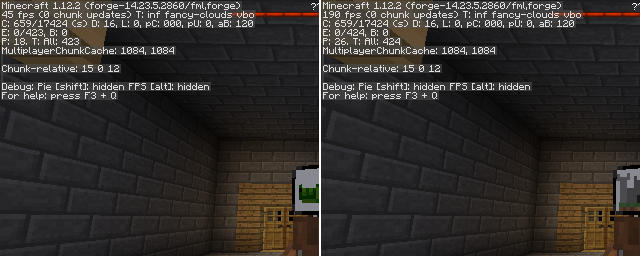
EntityCulling-1.12.2-6.0.2 ile Chocolate Quest Repoured zindanında ekranda yaklaşık 200 entity varken yapılan test büyük iyileştirmeler gösteriyor!
Entity Culling nasıl kurulur
With Millida Launcher
Install Millida Launcher
The launcher is free: download it at millida.net/launcher and sign in with any nickname.
Click “Install” on this page
The launcher opens and installs the mod for Minecraft 1.12.2 on Forge automatically.
Launch the game
A profile with it appears in the launcher: click “Play”.
Manually
Install Forge
The loader must match the game version of the mod file, for example Minecraft 1.12.2. After installing it, a separate profile appears in your launcher.
Download the file for your version
In the version list above, pick the file EntityCulling-1.12.2-6.5.0.jar (62 KB) for your game version.
Put it in the mods folder
The folder is inside .minecraft (Windows: %appdata%\.minecraft\mods). If it does not exist, create it.
Launch the loader profile
Open “Mods” in the main menu: Entity Culling should be in the list.
Minecraft 1.12.2 runs on Java 8: with a different Java version the game may close right after launch.
Sürümler
Bağımlılıklarla
| Minecraft | Yükleyici | Dosya | Tarih | İşlemler |
|---|---|---|---|---|
| 1.12.2 | Forge | EntityCulling-1.12.2-6.5.0.jar62.4 KB 6 | ||
| 1.12.2 | — | EntityCulling-1.12.2-6.3.1.jar64.4 KB 1 | ||
| 1.12.2 | — | EntityCulling-1.12.2-6.0.2.jar54.1 KB |
SSS
Which Minecraft versions does Entity Culling work on?
Only Minecraft 1.12.2: there are no files for other versions.
Is Entity Culling for Forge or Fabric?
Only for Forge: 1.12.2. There are no files for Fabric or NeoForge: a mod for another loader will not start.
Does Entity Culling need other mods?
The author lists no required dependencies: the Forge loader is enough.
Which Java does Entity Culling need?
Minecraft 1.12.2 runs on Java 8. If the game closes right after launch, the usual cause is the wrong Java version in the profile settings.
Where can I download Entity Culling safely?
On this page: the file EntityCulling-1.12.2-6.5.0.jar (62 KB) is stored on Millida’s server, with no link shorteners. SHA-1 checksum: cf4a4a6b11b1721fbda1edeb32bdc3b1ac3a8560.
Yorumlar
Entity Culling için ilk puanı sen ver


