

SCAN Šejderi za Minecraft 1.20.1, 1.21.1
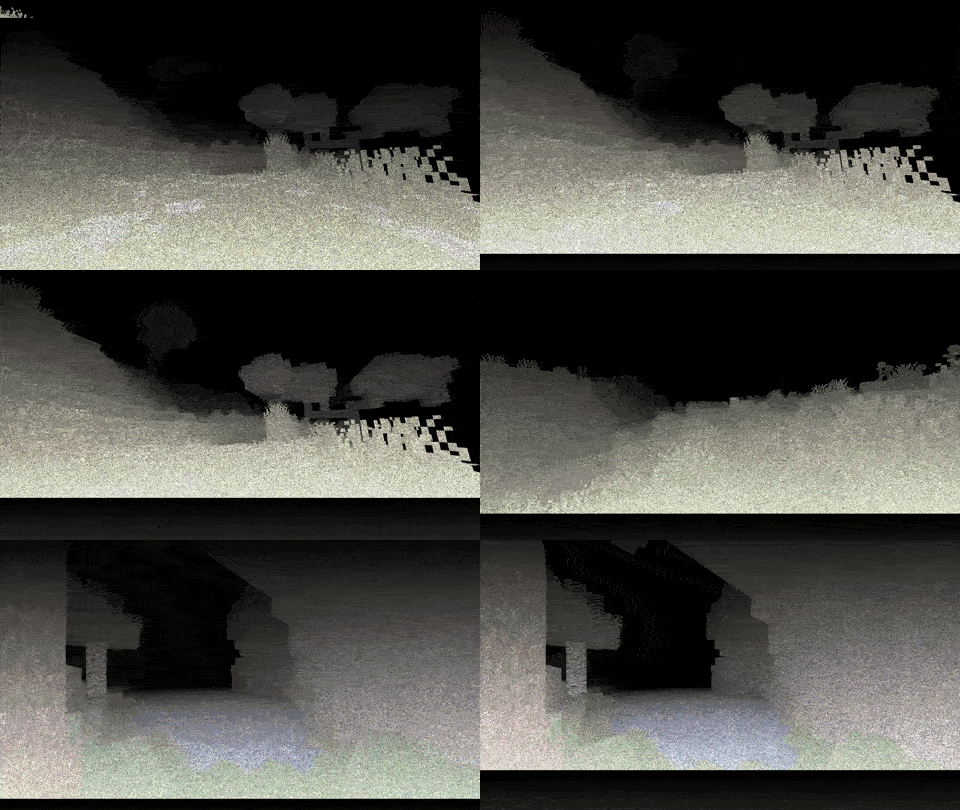
Skeniraj prostor oko sebe - svaki puls svetlosti ti pokazuje gde se nalaziš...
 Fabric
 OptiFine
ABOUT:
My unusual attempt to create an oppressive atmosphere and fear due to the poor visibility of the device. Every 2 seconds, the device's update bar moves from top to bottom, illuminating the surrounding space, which helps you orient yourself at least a little. You can see more details in the GIF.
The ideological heir: LiDAR

Inspired by the game Scanner Sombr.
GIF:
LINKS:
- Discord (Discuss, Bug Reports, Etc.)
- YouTube
- Telegram

INSTALL THE SHADERS
- Download Client Which Supports Installing Shaders Such As Optifine And Iris
- Download The Shaders
- Copy Shaders to /.minecraft/shaderpacks
- Launch Minecraft, Go To Options --> Video Settings --> Shaders
- Choose SCAN
Kako instalirati SCAN
With Millida Launcher
Install Millida Launcher
The launcher is free: download it at millida.net/launcher and sign in with any nickname.
Click “Install” on this page
The launcher opens and installs the shaders for Minecraft 1.8.9–26.2 automatically.
Launch the game
A profile with it appears in the launcher: click “Play”.
Manually
Install Iris or OptiFine
Without a shader mod the game cannot see shaders. Install it for the same Minecraft version.
Download the shader archive
Pick the file §f§lSC§c§k§lA§f§lN§f - §8A0.0.2.zip (17 KB) and do not unpack it.
Put it in the shaderpacks folder
“Options”, then “Video Settings”, then “Shader Packs”, then “Open Shader Pack Folder”, and drag the archive there.
Select the shaders
In the same window, click the pack name and “Apply”.
Verzije
Sa zavisnostima
| Minecraft | Loader | Fajl | Datum | Akcije |
|---|---|---|---|---|
| 1.17.1 | Iris, OptiFine | 1.17.116.8 KB 2 | ||
| 1.15.2 | Iris, OptiFine | 1.15.216.8 KB | ||
| 1.14.4 | Iris, OptiFine | 1.14.416.8 KB | ||
| 26.2 | Iris, OptiFine | 26.216.8 KB 2 | — | |
| 26.1 | Iris, OptiFine | 26.116.8 KB | — | |
| 1.21.11 | Iris, OptiFine | 1.21.1116.8 KB | — | |
| 1.21 | Iris, OptiFine | 1.2116.8 KB | — | |
| 1.20.1 | Iris, OptiFine | 1.20.116.8 KB | — |
Česta pitanja
Which Minecraft versions does SCAN work on?
There are files for 1.8.9–26.2, 65 versions in total. The newest is 26.2.
What do I need to run SCAN?
Shaders are loaded through Iris or OptiFine: without one of them the game cannot see them.
Where can I download SCAN safely?
On this page: the file §f§lSC§c§k§lA§f§lN§f - §8A0.0.2.zip (17 KB) is stored on Millida’s server, with no link shorteners. SHA-1 checksum: 3e936eaa67ca5b3999e74885fb9dc7fe95364049.
Recenzije
Budi prvi koji će oceniti SCAN


