

Foxy shader za Minecraft 1.20.1, 1.21.1
Shader u razvoju sa globalnim ray tracingom i nekim zanimljivim funkcijama.
 Fabric
 OptiFine
O Foxy shader šejderima
Foxy — evoking agility and nimbleness — aims for a high degree of stylistic choice and all-round versatility.
The ray tracing feature must be manually enabled and its presets switched in the GUI

Features:
Supports global ray tracing (must be enabled manually), a complete IRC-SVGF denoising system, screen-space path tracing (SSPT), pure irradiance GI, and various hybrid global-illumination combinations such as screen space + irradiance cache; also supports hardware-ray-tracing-style shading presets.

Includes a real-time, volumetrically rendered black hole driven entirely by ray tracing within a relativistic framework (with a certain performance cost), highly customizable physical parameters, support for player flight-based exploration (must be enabled manually in the settings), and a four-dimensional easter egg near the singularity inspired by Interstellar.
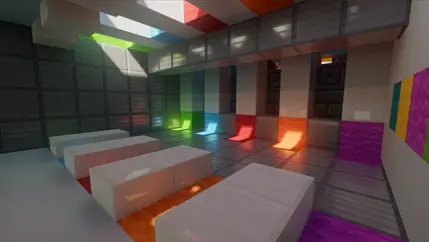

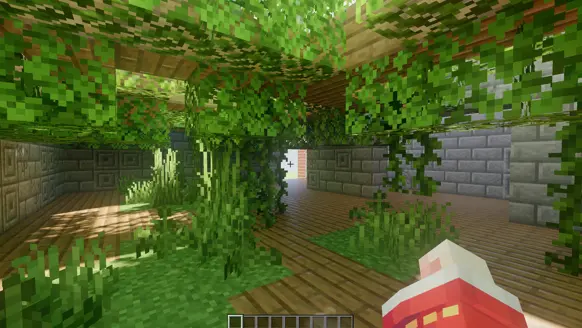

Basic Features:
Volumetric clouds, atmospheric scattering, volumetric light, volumetric fog, weather changes, the four seasons, held light sources, motion blur, the option to manually replace the sun/moon with a real-time rendered black hole, temporal anti-aliasing with adjustable strength, TAAU (feels fairly gimmicky), tone mapping, manual color grading (AGX, ACES, ACES2), depth of field, essentially complete material support (some ultra-high-resolution materials may show moiré), material specular reflection, material rough reflection (reflections can be off-screen), no mineral/ore glow for now (just add an emissive resource pack), parallax (smooth parallax planned for the future), colorwheel, Voxy, DH compatibility, and basic compatibility with Aeronautics (physics structures generally show no serious rendering issues under ray tracing / AO); SR mod compatibility will be considered later depending on how things go.

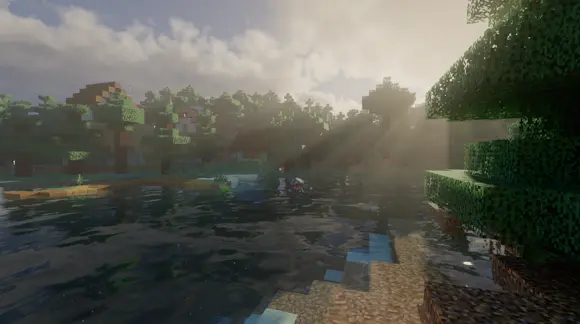
Recommended Specs:
RTX 3060 / RX 5600 or above (with ray tracing enabled)

GT 960 / RX 470 or above (playing without ray tracing)
Integrated graphics / mobile (worth a try)
Compatibility: Iris 1.20.1 through 26.1; Oculus still untested (so far, test 1.20.1 + Oculus shades correctly).

Kako instalirati Foxy shader
With Millida Launcher
Install Millida Launcher
The launcher is free: download it at millida.net/launcher and sign in with any nickname.
Click “Install” on this page
The launcher opens and installs the shaders for Minecraft 1.20.1–26.1 automatically.
Launch the game
A profile with it appears in the launcher: click “Play”.
Manually
Install Iris or OptiFine
Without a shader mod the game cannot see shaders. Install it for the same Minecraft version.
Download the shader archive
Pick the file Foxy shader 1.2.3 beta.zip (73 MB) and do not unpack it.
Put it in the shaderpacks folder
“Options”, then “Video Settings”, then “Shader Packs”, then “Open Shader Pack Folder”, and drag the archive there.
Select the shaders
In the same window, click the pack name and “Apply”.
Verzije
Sa zavisnostima
| Minecraft | Loader | Fajl | Datum | Akcije |
|---|---|---|---|---|
| 26.1 | Iris | 26.173.4 MB | ||
| 26.1 | Iris | 26.173.4 MB | ||
| 26.1 | Iris | 26.172.9 MB | ||
| 26.1 | Iris | 26.161.8 MB 1 | ||
| 26.1 | Iris | 26.161.8 MB | ||
| 26.1 | Iris | 26.161.8 MB | ||
| 26.1 | Iris | 26.161.8 MB | ||
| 26.1 | Iris | 26.161.8 MB |
Česta pitanja
Which Minecraft versions does Foxy shader work on?
There are files for 1.20.1–26.1, 19 versions in total. The newest is 26.1.
What do I need to run Foxy shader?
Shaders are loaded through Iris or OptiFine: without one of them the game cannot see them.
How do I download Foxy shader?
With Millida Launcher: it installs Foxy shader into a modpack by itself, for the right game version and loader. The launcher is free.
Recenzije
Budi prvi koji će oceniti Foxy shader


