

Exposa Shaders za Minecraft 1.20.1, 1.21.1
Šejderi koji teže lepoj mešavini prirodnog i fantastičnog.
 Fabric
 OptiFine
O Exposa Shaders šejderima
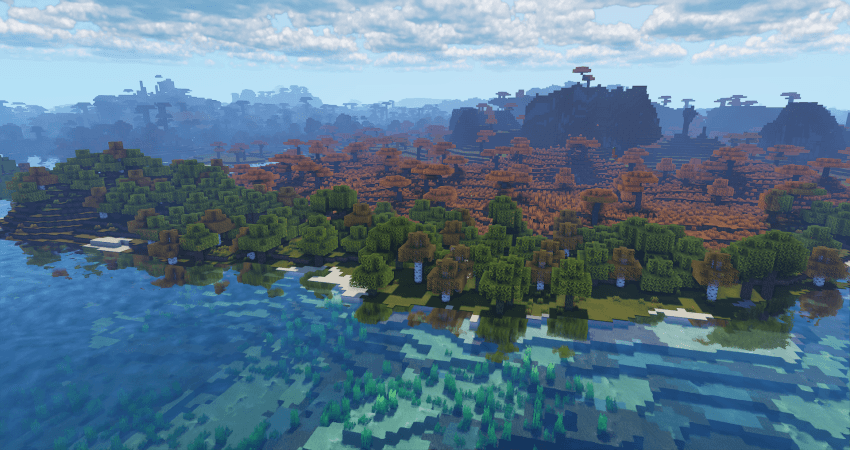
Cinematic Showcase
(PSST, you should use this shaderpack while listening to this upcoming song, presave it its awesome and its also mine! Yes I am promoting my song... Yes I am desperate.) Awesome Song To Listen 2 While using Exposa

Description
Hello! This is Exposa! Used to be known as Exposa Unique Shaders. This project is a shaderpack that aims for both a natural and a fantasy style.
Compatibility
It is compatible with Optifine and Iris, unknown about other mods and clients. It is also recommended to be used for versions 1.17x and above. It works well with AMD and NVIDIA and INTEL .
Nether and End support are full ATM. For custom dimensions support, please let me know what dimensions you would like to see supported.
License
For the most, I use the all rights reserved license, but I really wouldn't recommend using my code (I did not intend it for the use of being edited). If you'd like to edit anyway, you can ask me here!
Features
- rough reflections
- water reflections
- shadows
- motion blur
- depth of field
- puddles
- temporal anti aliasing
- HDR
- bloom
- tonemapping
- lightshafts
- volumetric clouds
- Seasonal Colors (Autumn, Winter, Spring, Summer)
- Shooting Stars
- Proper weather & translucent support
- Nether & End support
- Ambient SSS
- SSAO
- Directional Lightmaps
- VL Mist / Smokey Fog!
- Nether VL Swirly Fog
- Better TAA
- Better Puddles
Some Credits
RRe36 (https://www.curseforge.com/members/rre36) - Lots of help with clouds, volumetric fog, bloom and etc. Capt Tatsu (https://www.curseforge.com/members/capttatsu) - Gave me permission to use the reflections functions and even helped me apply them, let me use and modify bloom, motion blur, dof, volumetric fog and etc.
Unicorn Blood (https://www.curseforge.com/members/dakotah2468) - Letting me use and modify fog.
Xenith - Help with shadows method.
Jesse/L - In my older versions, he gave me a tonemap to use.
Belmu - Has helped me set up some things like rough reflections, you can support him here! (https://www.curseforge.com/minecraft/customization/noblert-shaders))
HardTop for the french translation: https://hardtopnet.ovh
Espen for many things (I only remember providing me with the minimum & maximum depth functions): https://modrinth.com/shader/bloop-shaders/versions
Xonk for many things (I only remember SSAO & SSS tricks and reflections LOD trick atm ;\_;): https://github.com/X0nk/Bliss-Shader
Zombye for cool TAA tricks: https://github.com/zombye/spectrum/tree/master/shaders/program
Eldeston & Chocapic13 for previous coordinates transformation: https://modrinth.com/user/Eldeston, https://www.curseforge.com/minecraft/shaders/chocapic13-shaders
Random Noise website: https://www.pcg-random.org/
sRGB & Linear color space conversions: https://www.shadertoy.com/view/4tXcWr
Kako instalirati Exposa Shaders
With Millida Launcher
Install Millida Launcher
The launcher is free: download it at millida.net/launcher and sign in with any nickname.
Click “Install” on this page
The launcher opens and installs the shaders for Minecraft 1.16.5–1.21.7 automatically.
Launch the game
A profile with it appears in the launcher: click “Play”.
Manually
Install Iris or OptiFine
Without a shader mod the game cannot see shaders. Install it for the same Minecraft version.
Download the shader archive
Pick the file exposa 5 release new.zip (3.7 MB) and do not unpack it.
Put it in the shaderpacks folder
“Options”, then “Video Settings”, then “Shader Packs”, then “Open Shader Pack Folder”, and drag the archive there.
Select the shaders
In the same window, click the pack name and “Apply”.
Verzije
Sa zavisnostima
| Minecraft | Loader | Fajl | Datum | Akcije |
|---|---|---|---|---|
| 1.21.7 | Iris | 1.21.73.7 MB 12 | ||
| 1.20.4 | Iris, OptiFine | 1.20.44.2 MB | ||
| 1.17.1 | Iris, OptiFine | 1.17.14.1 MB | ||
| 1.21.1 | Iris | 1.21.13.7 MB | — | |
| 1.21 | Iris | 1.213.7 MB | — | |
| 1.20.1 | Iris | 1.20.13.7 MB | — | |
| 1.19.2 | Iris, OptiFine | 1.19.24.2 MB | — | |
| 1.18.2 | Iris, OptiFine | 1.18.24.2 MB | — |
Česta pitanja
Which Minecraft versions does Exposa Shaders work on?
There are files for 1.16.5–1.21.7, 26 versions in total. The newest is 1.21.7.
What do I need to run Exposa Shaders?
Shaders are loaded through Iris or OptiFine: without one of them the game cannot see them.
Where can I download Exposa Shaders safely?
On this page: the file exposa 5 release new.zip (3.7 MB) is stored on Millida’s server, with no link shorteners. SHA-1 checksum: 055a425641462f3dc68f23eb0872666829f4c2dc.
Recenzije
Budi prvi koji će oceniti Exposa Shaders


