

Waystones Mod za Minecraft 1.20.1, 1.21.1
Teleportuj se od waystone-a do waystone-a ili napravi magične svitke za teleportaciju.
 NeoForge
 Fabric
 Forge
ForgeO Waystones modu
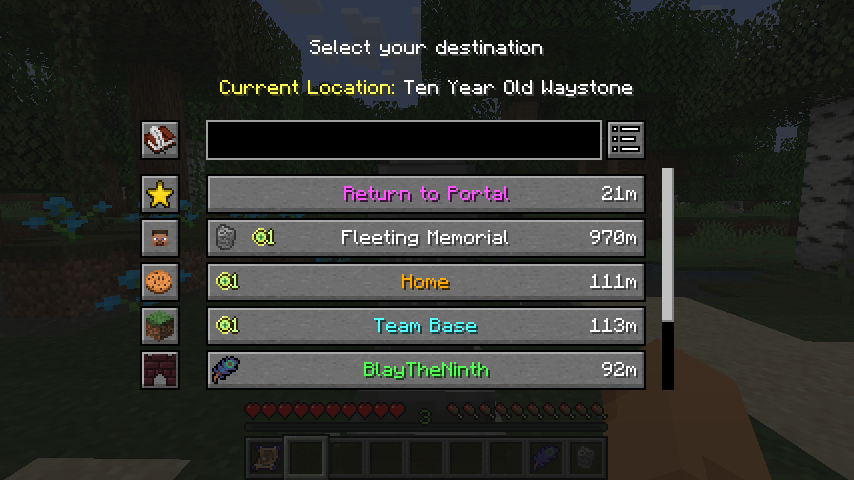
Ovaj mod dodaje blokove putokaza (waystone) na koje igrač može da se vrati nakon što su aktivirani, bilo putem Warp Scroll-a, punjivog Warp Stone-a ili korišćenjem postojećeg putokaza za prebacivanje s jednog na drugi.
Može se koristiti u Survival modu, za avanturističke mape ili na serverima za više igrača kao alternativa komandama /warp i /home. Putokazi mogu biti globalno dostupni svim igračima, a može se podesiti i dugme u inventaru koje omogućava teleportovanje bez ikakvih dodatnih predmeta.

Ovaj mod zahteva Balm, koji mora biti instaliran zajedno sa modom.
Na Minecraft-u 26.1 i novijim verzijama zahteva i Shogi, koji pokreće visoko podesive uslove za teleportovanje i mnoge druge konfiguracije zasnovane na pravilima u mojim modovima.
- Izradljivi putokazi, Warp Plates i Warp Scrolls
- Teleportovanje s jednog mesta na drugo pomoću putokaza
- Globalni putokazi za zajedničke centre ili deljenje s prijateljima
- Opciono dugme za teleportovanje u inventaru
- Struktura putokaza u selima
Prikaz moda od Krzair-a
Ikonice predmeta Return Scroll i Warp Stone koje su uključene su delo @JoeCreates i javno su objavljene pod licencom CC-BY-SA 3.0 ovde.

Kako instalirati Waystones
With Millida Launcher
Install Millida Launcher
The launcher is free: download it at millida.net/launcher and sign in with any nickname.
Click “Install” on this page
The launcher opens and installs the mod for Minecraft 1.16.5–26.3 on Fabric, Forge or NeoForge automatically, together with its dependencies: Balm, Fabric API, Dependency.
Launch the game
A profile with it appears in the launcher: click “Play”.
Manually
Install Fabric, Forge or NeoForge
The loader must match the game version of the mod file, for example Minecraft 26.3. After installing it, a separate profile appears in your launcher.
Download the file for your version
In the version list above, pick the file waystones-neoforge-26.3-26.3.0.1.jar (1.1 MB) for your game version and loader.
Put it in the mods folder
The folder is inside .minecraft (Windows: %appdata%\.minecraft\mods). If it does not exist, create it. Required dependencies go there too: Balm, Fabric API, Dependency.
Launch the loader profile
Open “Mods” in the main menu: Waystones should be in the list.
On a server
A server on Fabric, Forge or NeoForge
The mod only works on a server with the same loader and game version, for example 26.3.
File goes into the server’s mods folder
Stop the server, put the mod file into the mods folder and start the server again.
Use the “To server” button
On Millida Hosting, the button at the top of the page uploads the file to your server and restarts it for you.
Verzije
Sa zavisnostima
| Minecraft | Loader | Fajl | Datum | Akcije |
|---|---|---|---|---|
| 1.21.1 | NeoForge | 1.21.11.2 MB 90 | ||
| 1.21.1 | Fabric | 1.21.11.2 MB 43 | ||
| 1.21.1 | Forge | 1.21.11.2 MB 18 | ||
| 26.3 | NeoForge | 26.31.1 MB 7 | ||
| 26.3 | Fabric | 26.31.2 MB 117 | ||
| 1.21.1 | NeoForge | 1.21.11.2 MB 1 | ||
| 1.21.1 | Forge | 1.21.11.2 MB | ||
| 1.21.1 | Fabric | 1.21.11.2 MB |
Šta je potrebno za pokretanje
- Balmobavezno
- Fabric APIobavezno
- Dependencyobavezno
Sadržaj koji ga zahteva
Česta pitanja
Which Minecraft versions does Waystones work on?
There are files for 1.16.5–26.3, 14 versions in total. The newest is 26.3.
Is Waystones for Forge or Fabric?
There are files for Fabric: 1.18–26.3, for Forge: 1.16.5–1.21.1 and for NeoForge: 1.21–26.3.
What does Waystones need to work?
Required: Balm, Fabric API, Dependency. Without them the mod will not start: dependencies go into the same mods folder.
Does Waystones work on a server?
Yes. Waystones works both in singleplayer and on a server.
Where can I download Waystones safely?
On this page: the file waystones-neoforge-26.3-26.3.0.1.jar (1.1 MB) is stored on Millida’s server, with no link shorteners. SHA-1 checksum: c30ff7476f23e87dcd20e1577c003e084c01ba76.
Recenzije
Budi prvi koji će oceniti Waystones


