
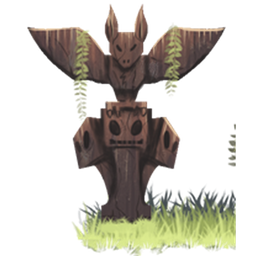
Totemic Mod za Minecraft 1.20.1, 1.21.1
Mod sa fokusom na toteme, muziku i prirodu
 NeoForge
 Forge
ForgeO Totemic modu
Ovo je magični mod o Totem Polovima, prirodi i moći muzike.
Glavni fokus moda leži na Totem Polovima. Oni mogu da daju pasivne blagodati igračima u blizini, ali još važnije, oni su centralni deo Ceremonija: Plesanje oko Totem Pola i sviranje raznih muzičkih instrumenata za prizivanje snažnih efekata i manipulisanje svetom.
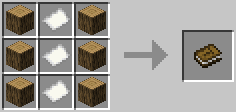
Patchouli se preporučuje kako biste dobili Totempedia, vodič u igri kroz sadržaj moda.
Imamo Discord kanal, pridružite nam se ovde: https://discord.gg/4dZFZrE
Trenutno su podržani samo Forge/NeoForge, ali ZestyBlaze radi na Fabric verziji. Ostanite tu za to.
Totemic ima ugrađenu integraciju sa KubeJS u 1.20.1+, nije potreban dodatni mod (iako se to može promeniti u budućnosti). Pogledajte KubeJS wiki za dokumentaciju.
Modpacks:
Slobodno možete uključiti mod u modpack.
Zasluge:
- Pokefenn za originalno kreiranje moda
- Sunconure11 za teksture, modele i mnoge ideje
- nojustgavin, Dylan Kaizer i Poppycocks za kreiranje mnogih tekstura za mod
- Nefilto za modele Totem Pola
- Kerri Lake za zvukove flaute, blago promenjene visine tona i isečene iz overblow.mp3, korišćene pod CC BY 3.0.
- Kirindave, Wayoftime, Joshie i Emoniph pomogli su sa kodom i idejama
- Vazkii za većinu (legacy) Totempedia koda, zasnovanog na Botania
- wiiv za model Tipija
- BigBadChris za logo
- CyanideX za model vetrenih zvona
Kako instalirati Totemic
With Millida Launcher
Install Millida Launcher
The launcher is free: download it at millida.net/launcher and sign in with any nickname.
Click “Install” on this page
The launcher opens and installs the mod for Minecraft 1.7.10–1.21.1 on Forge or NeoForge automatically.
Launch the game
A profile with it appears in the launcher: click “Play”.
Manually
Install Forge or NeoForge
The loader must match the game version of the mod file, for example Minecraft 1.21.1. After installing it, a separate profile appears in your launcher.
Download the file for your version
In the version list above, pick the file Totemic-neoforge-1.21.1-0.12.19.jar (1.2 MB) for your game version and loader.
Put it in the mods folder
The folder is inside .minecraft (Windows: %appdata%\.minecraft\mods). If it does not exist, create it.
Launch the loader profile
Open “Mods” in the main menu: Totemic should be in the list.
Minecraft 1.21.1 runs on Java 21: with a different Java version the game may close right after launch.
Verzije
Sa zavisnostima
| Minecraft | Loader | Fajl | Datum | Akcije |
|---|---|---|---|---|
| 1.21.1 | NeoForge | Totemic-neoforge-1.21.1-0.12.19.jar1.2 MB | ||
| 1.7.10 | Forge | Totemic-1.7.10-0.7.1.jar1.6 MB | ||
| 1.20.1 | Forge, NeoForge | Totemic-forge-1.20.1-0.12.18.jar1.2 MB | ||
| 1.21.1 | NeoForge | Totemic-neoforge-1.21.1-0.12.18.jar1.1 MB | ||
| 1.20.1 | NeoForge, Forge | Totemic-forge-1.20.1-0.12.17.jar1.1 MB | ||
| 1.21.1 | NeoForge | Totemic-neoforge-1.21.1-0.12.17.jar1.1 MB | ||
| 1.12.2 | — | Totemic-1.12.2-0.11.6.jar1.1 MB | ||
| 1.12.2 | — | Totemic-1.12.2-0.11.5.jar1.1 MB |
Česta pitanja
Which Minecraft versions does Totemic work on?
There are files for 1.21.1, 1.20.1, 1.12.2, 1.7.10. The newest is 1.21.1.
Is Totemic for Forge or Fabric?
There are files for Forge: 1.7.10–1.20.1 and for NeoForge: 1.20.1–1.21.1. There are no files for Fabric: a mod for another loader will not start.
Does Totemic need other mods?
The author lists no required dependencies: the Forge or NeoForge loader is enough.
Which Java does Totemic need?
Minecraft 1.21.1 runs on Java 21. If the game closes right after launch, the usual cause is the wrong Java version in the profile settings.
Where can I download Totemic safely?
On this page: the file Totemic-neoforge-1.21.1-0.12.19.jar (1.2 MB) is stored on Millida’s server, with no link shorteners. SHA-1 checksum: ea04d92b0a368c05a32e6a7ae4a76d300345e047.
Recenzije
Budi prvi koji će oceniti Totemic


