

Status Effect Bars Mod za Minecraft 26.2
Dodaje prilagodljive trake na prikaz statusnih efekata koje pokazuju preostalo trajanje efekata.
 Fabric
 Quilt
QuiltO Status Effect Bars modu
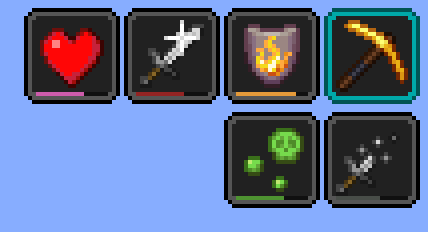
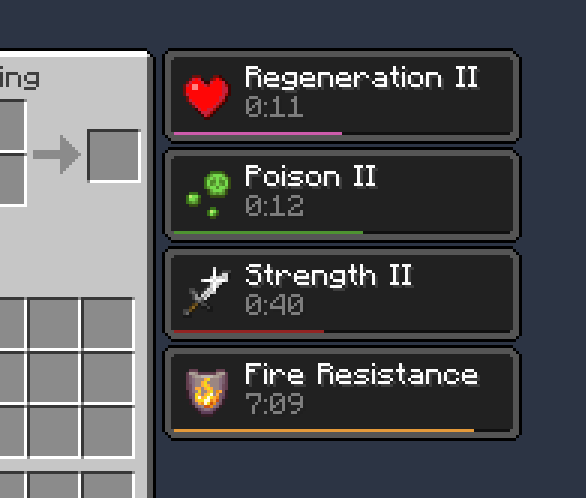
Klijentski Fabric mod koji dodaje male prilagodljive trake na prikaz statusnih efekata i u inventar da bi prikazao preostalo trajanje efekata.
Karakteristike:

- Slatke male trake
- Ekran za konfiguraciju za uređivanje boja i pozicija traka
- Trake mogu biti automatski sakrivene u nekim specifičnim slučajevima da bi se smanjio nered (npr. efekti svetionika i efekti sa veoma dugim trajanjem)
Zahteva [Cloth Config]. Ekranu za konfiguraciju može se pristupiti preko Mod Menu.
Zasluge
- Potencijalno inspirisan SkyUI aktivnim efektima HUD-a
- Ekran za konfiguraciju pokreće [Cloth Config]
- ptbr prevod od FITFC
Linkovi: CurseForge · GitHub · Modrinth
[Cloth Config]: https://modrinth.com/mod/cloth-config

Kako instalirati Status Effect Bars
With Millida Launcher
Install Millida Launcher
The launcher is free: download it at millida.net/launcher and sign in with any nickname.
Click “Install” on this page
The launcher opens and installs the mod for Minecraft 1.21.11–26.2 on Fabric or Quilt automatically.
Launch the game
A profile with it appears in the launcher: click “Play”.
Manually
Install Fabric or Quilt
The loader must match the game version of the mod file, for example Minecraft 26.2. After installing it, a separate profile appears in your launcher.
Download the file for your version
In the version list above, pick the file status-effect-bars-1.0.12.jar (44 KB) for your game version and loader.
Put it in the mods folder
The folder is inside .minecraft (Windows: %appdata%\.minecraft\mods). If it does not exist, create it.
Launch the loader profile
Open “Mods” in the main menu: Status Effect Bars should be in the list.
Status Effect Bars works on the player’s side only: there is no need to install it on a server.
Verzije
Sa zavisnostima
| Minecraft | Loader | Fajl | Akcije |
|---|---|---|---|
| 26.2 | Fabric, Quilt | 26.243.9 KB 17 | |
| 26.1 | Fabric, Quilt | 26.147.4 KB 6 | |
| 1.21.11 | Fabric, Quilt | 1.21.1146.6 KB 60 |
Česta pitanja
Which Minecraft versions does Status Effect Bars work on?
There are files for 26.2, 26.1.2, 26.1.1, 26.1, 1.21.11. The newest is 26.2.
Is Status Effect Bars for Forge or Fabric?
There are files for Fabric: 1.21.11–26.2 and for Quilt: 1.21.11–26.2. There are no files for Forge or NeoForge: a mod for another loader will not start.
Does Status Effect Bars need other mods?
The author lists no required dependencies: the Fabric or Quilt loader is enough.
Do I need to install Status Effect Bars on a server?
No. Status Effect Bars works on the player’s side only: there is no need to install it on a server.
Where can I download Status Effect Bars safely?
On this page: the file status-effect-bars-1.0.12.jar (44 KB) is stored on Millida’s server, with no link shorteners. SHA-1 checksum: f29719c3101ebe009dae76bca5215cf7482f8b9c.
Recenzije
Budi prvi koji će oceniti Status Effect Bars


