

Sodium Options Mod Compat za Minecraft 1.20.1, 1.21.1
Dodaje kompatibilnost za razne modove kroz Sodium Options API
 Fabric
 NeoForge
 Forge
ForgeO Sodium Options Mod Compat modu

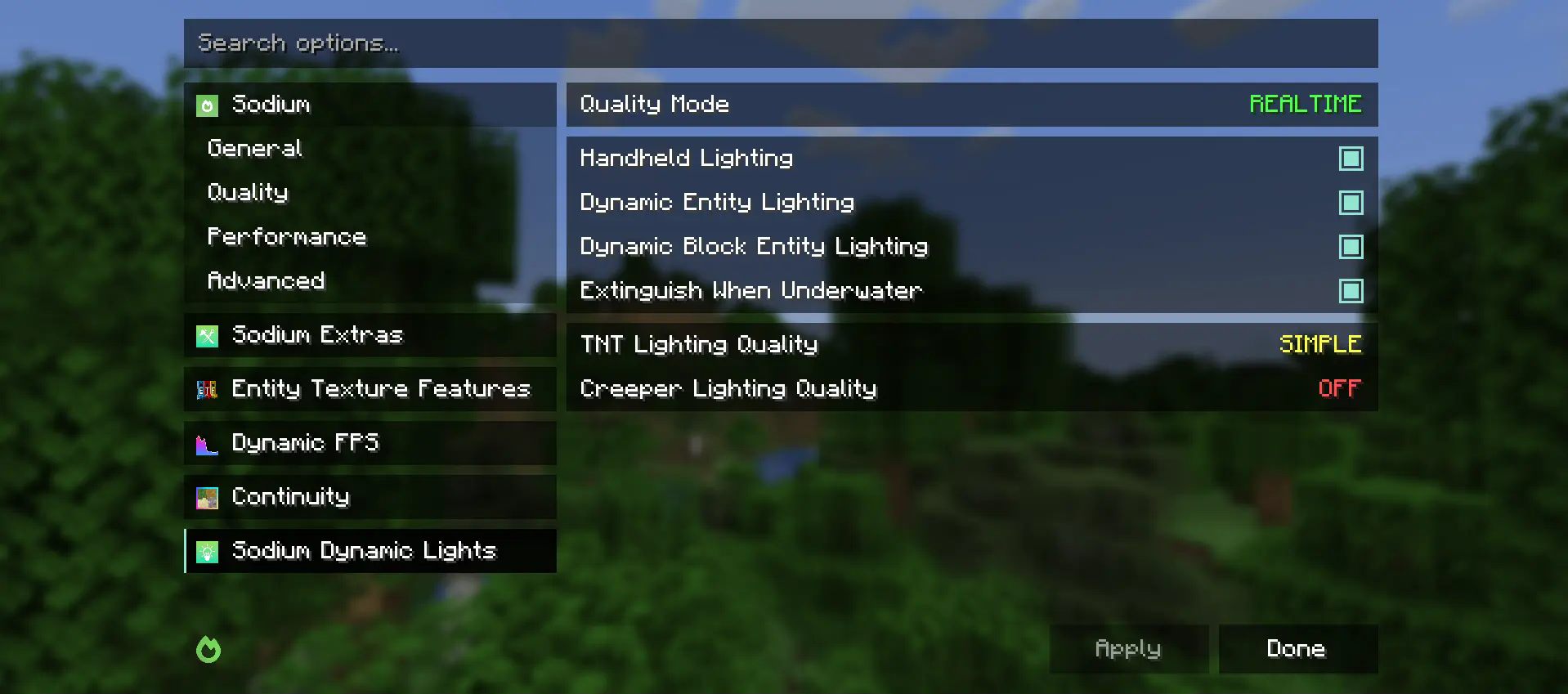
Sodium Options Mod Compat dodaje Sodium video podešavanja za razne modove koji ih nemaju.
Trenutno sledeći modovi imaju kompatibilnost:
- Entity Texture Features
- Entity Model Features
- DynamicFPS
- Continuity (nativno na Fabric-u i preko Connector-a na Forge-u)
Ovaj mod je delimično port EmbeddiumUI, sa dodatnom podrškom za modove, i portovan je da koristi cross-platform Sodium Options API radi podrške za sledeće verzije:
- Embeddium na Forge-u
- Fabric Sodium 0.5 na 1.20.1
- Fabric/NeoForge Sodium 0.6 na 1.21.1
Ako imate predlog za mod vezan za renderovanje koji biste želeli da vidite dodat u Sodium video podešavanja, molimo vas da otvorite Github Issue za zahtev za funkciju.
Kako instalirati Sodium Options Mod Compat
With Millida Launcher
Install Millida Launcher
The launcher is free: download it at millida.net/launcher and sign in with any nickname.
Click “Install” on this page
The launcher opens and installs the mod for Minecraft 1.20–1.21.4 on Fabric, Forge or NeoForge automatically, together with its dependencies: Sodium Options API, Fabric API.
Launch the game
A profile with it appears in the launcher: click “Play”.
Manually
Install Fabric, Forge or NeoForge
The loader must match the game version of the mod file, for example Minecraft 1.21.4. After installing it, a separate profile appears in your launcher.
Download the file for your version
In the version list above, pick the file sodiumoptionsmodcompat-fabric-1.0.0-1.21.4.jar (846 KB) for your game version and loader.
Put it in the mods folder
The folder is inside .minecraft (Windows: %appdata%\.minecraft\mods). If it does not exist, create it. Required dependencies go there too: Sodium Options API, Fabric API.
Launch the loader profile
Open “Mods” in the main menu: Sodium Options Mod Compat should be in the list.
Sodium Options Mod Compat works on the player’s side only: there is no need to install it on a server.
Minecraft 1.21.4 runs on Java 21: with a different Java version the game may close right after launch.
Verzije
Sa zavisnostima
| Minecraft | Loader | Fajl | Datum | Akcije |
|---|---|---|---|---|
| 1.21.1 | Fabric | 1.21.1832 KB 3 | ||
| 1.20.1 | Fabric | 1.20.1591 KB | ||
| 1.21.1 | NeoForge | 1.21.1176 KB 24 | ||
| 1.20.1 | Forge | 1.20.1177 KB 30 | ||
| 1.21.4 | Fabric | 1.21.4846 KB 6 | ||
| 1.21.1 | NeoForge | 1.21.1177 KB 1 | ||
| 1.20.1 | Fabric | 1.20.1592 KB | ||
| 1.21.4 | NeoForge | 1.21.4177 KB 1 |
Šta je potrebno za pokretanje
- Sodium Options APIobavezno
- Fabric APIobavezno
Česta pitanja
Which Minecraft versions does Sodium Options Mod Compat work on?
There are files for 1.21.4, 1.21.1, 1.20.1, 1.20. The newest is 1.21.4.
Is Sodium Options Mod Compat for Forge or Fabric?
There are files for Fabric: 1.20–1.21.4, for Forge: 1.20–1.20.1 and for NeoForge: 1.21.1–1.21.4.
What does Sodium Options Mod Compat need to work?
Required: Sodium Options API, Fabric API. Without them the mod will not start: dependencies go into the same mods folder.
Do I need to install Sodium Options Mod Compat on a server?
No. Sodium Options Mod Compat works on the player’s side only: there is no need to install it on a server.
Which Java does Sodium Options Mod Compat need?
Minecraft 1.21.4 runs on Java 21. If the game closes right after launch, the usual cause is the wrong Java version in the profile settings.
Where can I download Sodium Options Mod Compat safely?
On this page: the file sodiumoptionsmodcompat-fabric-1.0.0-1.21.4.jar (846 KB) is stored on Millida’s server, with no link shorteners. SHA-1 checksum: 9c5ab3b6ba0e096567b60b0c5c74b8e570205da9.
Recenzije
Budi prvi koji će oceniti Sodium Options Mod Compat


