
Sit Mod za Minecraft 1.20.1, 26.3
Omogućava vam da sedite na pločama i stepenicama.
 NeoForge
 Forge
ForgeO Sit modu
Fabric verzija ovde.

Funkcionalnost
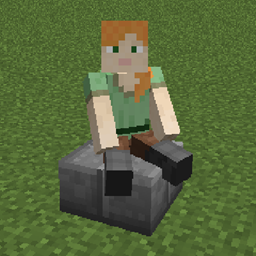
Sit omogućava korišćenje ploča i stepenica kao stolica. Jednostavno kliknite desnim tasterom miša na gornju stranu pravilno okrenute ploče ili bloka stepenica sa praznom rukom da biste seli na njih. Za izlazak pritisnite taster koji koristite za izlazak iz rudarskih kolica (podrazumevano SHIFT). Polovični kreveti (krevet gde je prisutna samo jedna polovina) takođe rade. Obično su podržane ploče/stepenice iz drugih modova, ali ako neke ne rade, kontaktirajte me.
Mod mora biti instaliran i na klijentu i na serveru da bi radio u multiplayer-u.
Konfiguracija
Postoji samo jedna opcija konfiguracije: blockreachdistance. Ona definiše na koliko blokova igrač može biti udaljen od ploče/stepenica da bi i dalje mogao da sedne na njih.
Dozvoljeno vam je da koristite ovaj mod u bilo kom modpack-u.
Pridružite mi se na Discord-u! https://discord.gg/kgZUAxK
Pratite me na Twitter-u za ažuriranja modova i druge šale! https://twitter.com/bl4ckscor3
Kako instalirati Sit
With Millida Launcher
Install Millida Launcher
The launcher is free: download it at millida.net/launcher and sign in with any nickname.
Click “Install” on this page
The launcher opens and installs the mod for Minecraft 1.20.1–26.3 on Forge or NeoForge automatically.
Launch the game
A profile with it appears in the launcher: click “Play”.
Manually
Install Forge or NeoForge
The loader must match the game version of the mod file, for example Minecraft 26.3. After installing it, a separate profile appears in your launcher.
Download the file for your version
In the version list above, pick the file sit-neoforge-26.1.2-1.5.2.jar (68 KB) for your game version and loader.
Put it in the mods folder
The folder is inside .minecraft (Windows: %appdata%\.minecraft\mods). If it does not exist, create it.
Launch the loader profile
Open “Mods” in the main menu: Sit should be in the list.
Verzije
Sa zavisnostima
| Minecraft | Loader | Fajl | Datum | Akcije |
|---|---|---|---|---|
| 26.1.2 | NeoForge | sit-neoforge-26.x-1.5.2.jar68.3 KB 17 | ||
| 1.20.1 | NeoForge, Forge | sit-1.20.1-1.3.5.jar14.2 KB 22 |
Česta pitanja
Which Minecraft versions does Sit work on?
There are files for 26.3, 26.2, 26.1.2, 1.20.1. The newest is 26.3.
Is Sit for Forge or Fabric?
There are files for Forge: 1.20.1 and for NeoForge: 1.20.1–26.3. There are no files for Fabric: a mod for another loader will not start.
Does Sit need other mods?
The author lists no required dependencies: the Forge or NeoForge loader is enough.
Where can I download Sit safely?
On this page: the file sit-neoforge-26.1.2-1.5.2.jar (68 KB) is stored on Millida’s server, with no link shorteners. SHA-1 checksum: a06b8ca43e311e1ab57dfc38a5ab07a30bba6262.
Recenzije
Budi prvi koji će oceniti Sit


