

Server Tab Info Mod za Minecraft 1.20.1, 1.12.2
Klijentski i/ili serverski mod koji pruža lep način da vidite prosečno vreme ticka i tikove po sekundi (TPS) igre
 NeoForge
 Forge
ForgeO Server Tab Info modu
Trebalo bi da se zapravo zove Tab Info, jer sada radi i u singleplayeru!
Uvod
Ovo je mod koji može da se instalira i na klijentu i na serveru bez izazivanja grešaka o nedostajućim modovima za klijente bez moda ili servere bez moda. Kada je povezan na server, mod radi samo kada server takođe ima mod. Verzija na serveru ne mora da se poklapa sa verzijom na klijentu, ali ako se klijent poveže na server sa previše starom verzijom, neke funkcije će nedostajati.
Prikaz funkcija
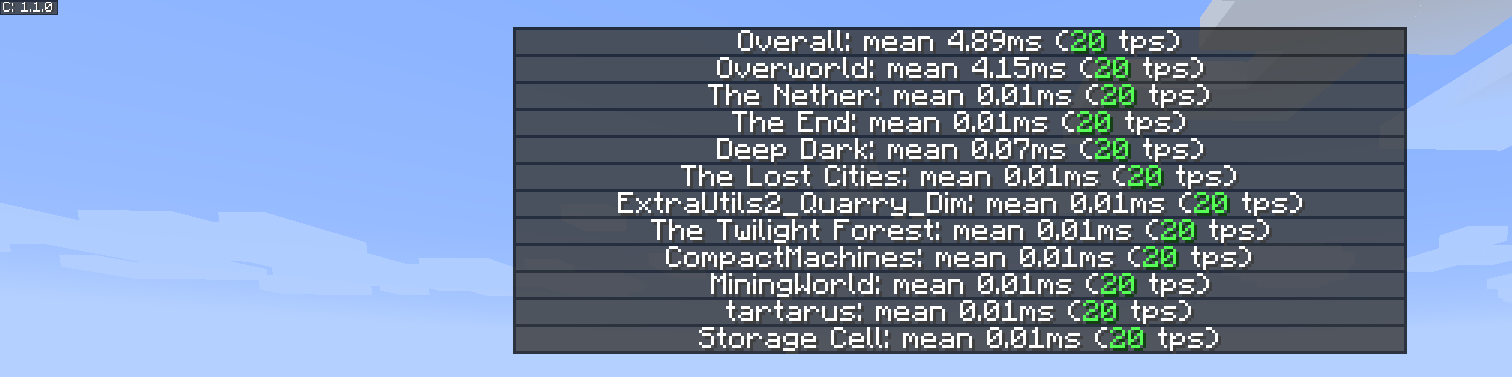
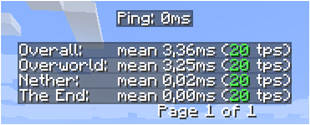
Nova i poboljšana lista tps po dimenzijama
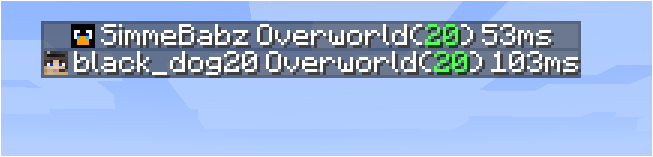
Nova lista igrača

Inspiracija
Inspiracija za mod i prezentacija zasnovani su na maloj funkciji iz MineTogether, gde ako je opcioni mod instaliran na serveru i funkcija upita bila aktivna, mogli ste da vidite informacije kao što su tps i entiteti u svetu. Te informacije bi prikazivao kao listu igrača na tabu, kada pritisnete Tab + Ctrl.
Iskra za mene je bila to što je prestalo da radi, pa sam napravio ovaj mali mod da vidim tps za sve dimenzije.
Da biste aktivirali grafički interfejs, pritisnite Tab + Ctrl (standardno, ali podesivo u podešavanjima tastera), a zatim vam se prikazuje ukupni tps za server i za svaku dimenziju.
Poznati problemi
- Ako je MineTogether instaliran i siv integracija je omogućena, a ServerInfoProvider nije instaliran, možete imati probleme sa kašnjenjem kada koristite prečicu za stranicu tps, jer koriste iste prečice.
Da biste rešili ovaj problem, ili onemogućite siv integraciju pod MineTogether ili promenite prečicu za stranicu tps.
Kako instalirati Server Tab Info
With Millida Launcher
Install Millida Launcher
The launcher is free: download it at millida.net/launcher and sign in with any nickname.
Click “Install” on this page
The launcher opens and installs the mod for Minecraft 1.12–1.20.4 on Forge or NeoForge automatically.
Launch the game
A profile with it appears in the launcher: click “Play”.
Manually
Install Forge or NeoForge
The loader must match the game version of the mod file, for example Minecraft 1.20.4. After installing it, a separate profile appears in your launcher.
Download the file for your version
In the version list above, pick the file ServerTabInfo-1.20.4-1.3.8.jar (109 KB) for your game version and loader.
Put it in the mods folder
The folder is inside .minecraft (Windows: %appdata%\.minecraft\mods). If it does not exist, create it.
Launch the loader profile
Open “Mods” in the main menu: Server Tab Info should be in the list.
Minecraft 1.20.4 runs on Java 17: with a different Java version the game may close right after launch.
Verzije
Sa zavisnostima
| Minecraft | Loader | Fajl | Datum | Akcije |
|---|---|---|---|---|
| 1.20.4 | NeoForge | ServerTabInfo-1.20.4-1.3.8.jar109 KB | ||
| 1.20.1 | Forge | ServerTabInfo-1.20-1.3.8.jar101 KB | ||
| 1.17.1 | Forge | ServerTabInfo-1.17.1-1.3.4-b2.jar102 KB | ||
| 1.16.1 | Forge | ServerTabInfo-1.16.1-1.2.7-alpha.jar71.3 KB | ||
| 1.12.1 | — | ServerTabInfo-1.12.2-1.2.6.jar53.5 KB | ||
| 1.13.2 | — | ServerTabInfo-1.13.2-1.2.4-beta.jar51.5 KB |
Česta pitanja
Which Minecraft versions does Server Tab Info work on?
There are files for 1.12–1.20.4, 9 versions in total. The newest is 1.20.4.
Is Server Tab Info for Forge or Fabric?
There are files for Forge: 1.16.1–1.20.1 and for NeoForge: 1.20.4. There are no files for Fabric: a mod for another loader will not start.
Does Server Tab Info need other mods?
The author lists no required dependencies: the Forge or NeoForge loader is enough.
Which Java does Server Tab Info need?
Minecraft 1.20.4 runs on Java 17. If the game closes right after launch, the usual cause is the wrong Java version in the profile settings.
Where can I download Server Tab Info safely?
On this page: the file ServerTabInfo-1.20.4-1.3.8.jar (109 KB) is stored on Millida’s server, with no link shorteners. SHA-1 checksum: 10b7839c442bfb1d3ba61870a11344b0db072e3e.
Recenzije
Budi prvi koji će oceniti Server Tab Info


