
Satchel Slots Mod za Minecraft 1.21.11
Satchel Slots je mod fokusiran na "fizičko" proširenje inventara (dodavanje slotova) opremanjem različitih torbi koje daju različite pogodnosti/benefite.
 Fabric
 Quilt
QuiltO Satchel Slots modu

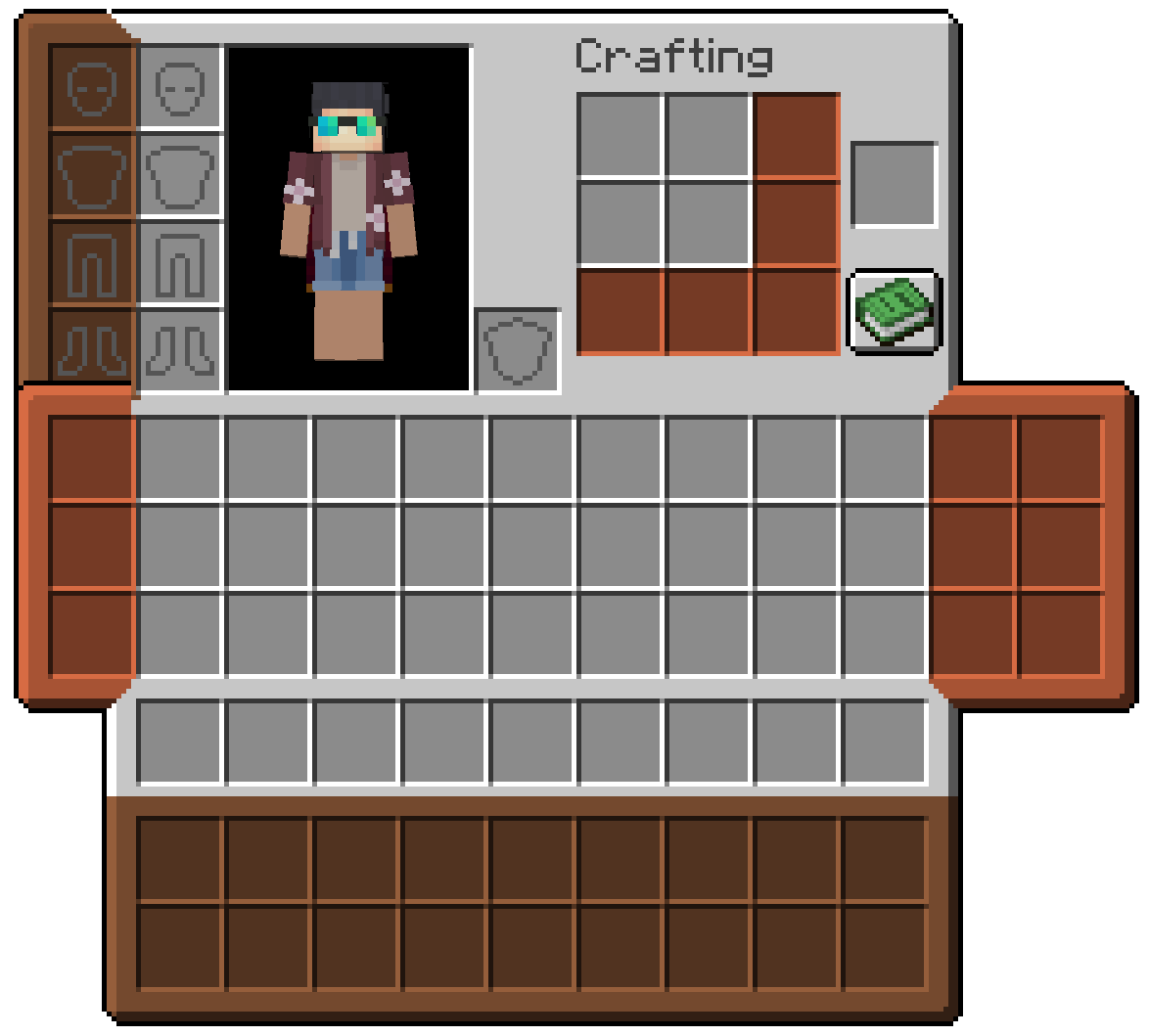
Wear real extra inventory slots on your character. Satchels, pouches, a crafter's bindle, and a cosmetic sheath each equip into a dedicated Trinkets slot and open as part of your inventory screen. Items live inside the bag itself, travel with the item, and work like normal container slots.
Inspired by Scout by Cynosphere and Satchels by makamys.
Features
- Dedicated Trinkets slots for each bag type. Equip a bag, open your inventory, and use the extra columns that appear beside it.
- Satchel on the back (chest/back). Holds 9 items by default, or 18 when upgraded.
- Pouch on each leg (legs/pouch). Holds 3 items per pouch by default, or 6 when upgraded. You can wear one on the left, one on the right, or both.
- Crafter's Bindle on the chest (chest/bindle). Adds a 3×3 crafting grid to your inventory so you can craft away from a table.
- Sheath on the head (head/sheath). Adds four cosmetic armor slots (head, chest, legs, feet) that change how you look without replacing your real armor or stats.
- Item storage on the bag. Contents are saved on the bag item stack and persist through death unless you change that with other mods or gamerules.
- Smithing upgrades. Upgrade a Satchel or Pouch at a smithing table with a Netherite Upgrade Smithing Template and a diamond.
- Advancements for crafting each bag and the materials that lead up to them.
Bag slots are disabled in Creative mode so creative inventory stays uncluttered.
Wearing a bag
- Craft or obtain a bag item.
- Equip it in the matching Trinkets slot (back, leg, chest, or head).
- Open your survival inventory. The bag's slots appear in the extended UI next to your player.
Only one Satchel, Bindle, or Sheath can be worn at a time. Up to two Pouches (left and right) can be worn together.
Satchel
The Satchel sits on your back and adds a row of storage below your main inventory in the player screen.
Item Capacity Slot
Satchel 9 slots chest/back
Upgraded Satchel 18 slots chest/back
Craft a Satchel Strap and Tanned Leather, then shape a Satchel from leather, string, and a stone button. Upgrade it at a smithing table.
Pouch
Pouches clip to your legs and add vertical columns beside your inventory — one column per leg slot.
Item Capacity Slot
Pouch 3 slots legs/pouch (left or right)
Upgraded Pouch 6 slots legs/pouch (left or right)
Craft a Pouch from leather, string, and a stone button. Upgrade it at a smithing table.
When a Sheath is also equipped, the left pouch uses a matching frame texture so the two columns line up cleanly.
Crafter's Bindle
The Crafter's Bindle adds a portable 3×3 crafting grid to your inventory screen, built from a crafting table, tanned leather, and a satchel strap.
While the bindle is equipped, the recipe book button moves down to sit with the extension row. Craft as you would at a table, without placing a block in the world.
Sheath
The Sheath adds cosmetic armor slots in a column beside your armor area. Place armor pieces (or compatible cosmetics) in the sheath to override your appearance on that layer only.
Slot Purpose
Head Cosmetic helmet appearance
Chest Cosmetic chest appearance
Legs Cosmetic leggings appearance
Feet Cosmetic boots appearance
Your real armor slots are untouched. Other players see the cosmetic pieces you put in the sheath.
Materials
Item How to get it
Tanned Leather Cook leather on a campfire
Satchel Strap Tanned leather and string
Most bag recipes use tanned leather, string, and stone buttons in familiar shaped patterns. Check the recipe book after you pick up the materials.
Dependencies
Loader Required
Fabric Fabric API & Trinkets Updated
Kako instalirati Satchel Slots
Install Millida Launcher
The launcher is free: download it at millida.net/launcher and sign in with any nickname.
Click “Install” on this page
The launcher opens and installs the mod for Minecraft 1.21.11 on Fabric or Quilt automatically.
Launch the game
A profile with it appears in the launcher: click “Play”.
Minecraft 1.21.11 runs on Java 21: with a different Java version the game may close right after launch.
Verzije
Sa zavisnostima
| Minecraft | Loader | Fajl | Datum | Akcije |
|---|---|---|---|---|
| 1.21.11 | Fabric, Quilt | Satchel Slots - MC1.21.11 - v2.1.2118 KB |
Recenzije
Budi prvi koji će oceniti Satchel Slots


