
Raw's Visual keybinder Mod za Minecraft 1.21.1, 1.19.2
Vizuelno rešenje za dodeljivanje tastera.
 NeoForge
 Forge
ForgeO Raw's Visual keybinder modu
Ovaj mod je rešenje za velike modpakete sa mnogo prečica na tastaturi.
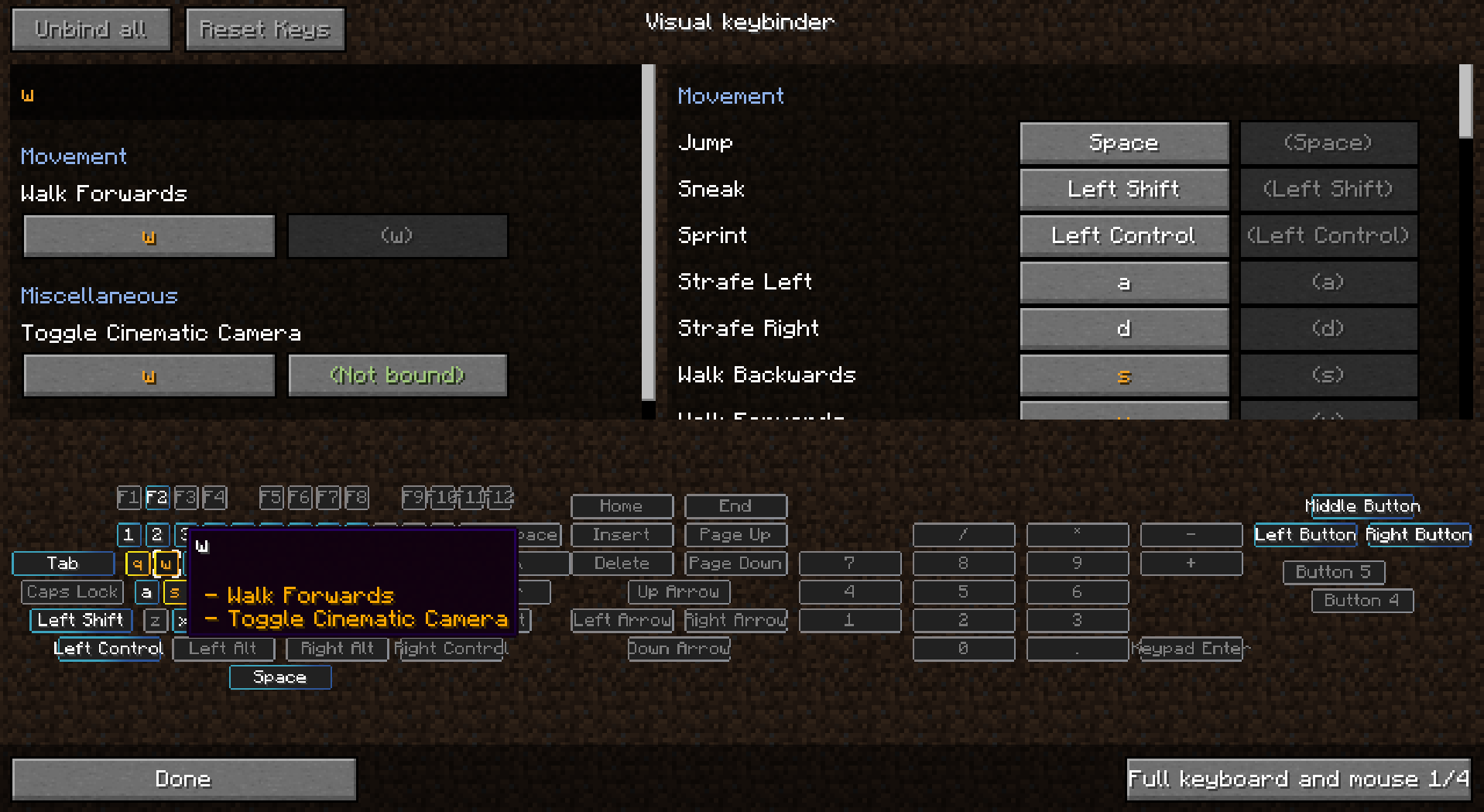
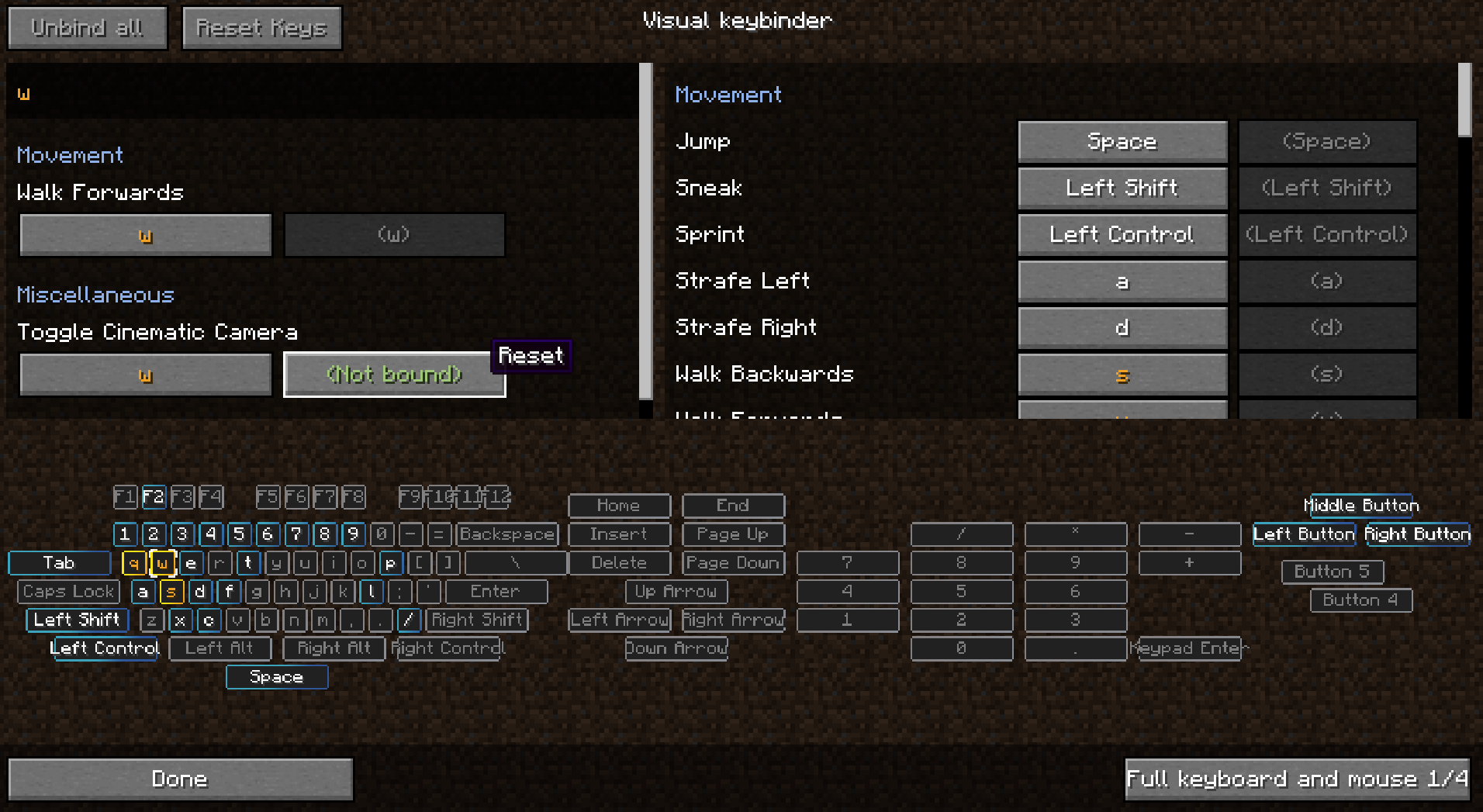
Dodaje dodatni način za upravljanje prečicama. Pruža dodatni ekran kojem se pristupa preko dugmeta pored podrazumevanog dugmeta za izmenu prečica u meniju opcija.
Ekran ima raspored poput tastature sa svim konfliktnim i iskorišćenim dugmadima istaknutim. Na taj način igrači imaju odličan pregled toga koje su tipke još dostupne i kojima treba posvetiti pažnju.
Kao sporedni efekat pravljenja ovog moda, možete koristiti i modifikatore sa dugmadima miša kao što je Shift+levi klik. To može, a i ne mora, biti korisno u nekim situacijama.
Dostupno je više rasporeda, a rasporedi se mogu menjati ili dodavati u konfiguraciji.
Klijentski mod. Ne mora biti na serveru.
Pogledajte slike za nekoliko snimaka ekrana.
Preseti
Preseti se mogu učitavati i čuvati. Čuvaju se u .minecraft folderu pod 'keybinding presets'.
Brzo prebacujte između preseta podešavanjem prečice za svoje omiljene presete.
Kako da se preset učita pri prvom pokretanju
Koristite 'presettoloadonfirststartup.txt' da navedete prečicu koja treba da se učita pri pokretanju. Te veze će se zatim učitati pri pokretanju. Datoteka initialized.dat će biti napravljena kada igrač prvi put pokrene igru. Kada je ova datoteka prisutna, preset u presettoloadonfirststartup.txt neće biti učitan.
Kako da preset bude samo za čitanje
Kada otvorite preset u notepad-u, možete dodati tekst 'readonly' u prvi red i zatim sačuvati.
Isporuka prečica uz modpaket
- uverite se da izvezete folder keybinding preset
- NE izvozite keybinding presets/initialized.dat
- sačuvajte preset u igri
- izmenite napravljenu datoteku u notepad-u
- na početku datoteke ubacite novi red sa tekstom: readonly
- ništa više ništa manje
- zatim u datoteci presettoloadonfirststartup.txt, u drugom redu upišite ime svog preseta, što je ime datoteke bez preset.txt koje se nalazi na kraju imena datoteke.
Možete isporučiti svoj modpaket sa više preseta, ali samo jedan preset može biti učitan pri pokretanju. Moguće je koristiti velika slova u imenu datoteke.
Korišćenje u modpaketu je dozvoljeno bez pitanja
Zahvaljujemo Radimous-u za backport na 1.18.2!
Zahvaljujemo Bubin7766 za port na 1.21.1 Neoforge!
Kako instalirati Raw's Visual keybinder
With Millida Launcher
Install Millida Launcher
The launcher is free: download it at millida.net/launcher and sign in with any nickname.
Click “Install” on this page
The launcher opens and installs the mod for Minecraft 1.19.2–1.21.1 on Forge or NeoForge automatically.
Launch the game
A profile with it appears in the launcher: click “Play”.
Manually
Install Forge or NeoForge
The loader must match the game version of the mod file, for example Minecraft 1.21.1. After installing it, a separate profile appears in your launcher.
Download the file for your version
In the version list above, pick the file visual_keybinder-1.21.1-0.1.13-neoforge.jar (345 KB) for your game version and loader.
Put it in the mods folder
The folder is inside .minecraft (Windows: %appdata%\.minecraft\mods). If it does not exist, create it.
Launch the loader profile
Open “Mods” in the main menu: Raw's Visual keybinder should be in the list.
Minecraft 1.21.1 runs on Java 21: with a different Java version the game may close right after launch.
Verzije
Sa zavisnostima
| Minecraft | Loader | Fajl | Datum | Akcije |
|---|---|---|---|---|
| 1.19.2 | Forge | visual_keybinder-1.19.2 - 0.1.12.jar252 KB | ||
| 1.21.1 | NeoForge | visual_keybinder-1.21.1-0.1.13-neoforge.jar345 KB 8 |
Česta pitanja
Which Minecraft versions does Raw's Visual keybinder work on?
There are files for 1.21.1, 1.19.2. The newest is 1.21.1.
Is Raw's Visual keybinder for Forge or Fabric?
There are files for Forge: 1.19.2 and for NeoForge: 1.21.1. There are no files for Fabric: a mod for another loader will not start.
Does Raw's Visual keybinder need other mods?
The author lists no required dependencies: the Forge or NeoForge loader is enough.
Which Java does Raw's Visual keybinder need?
Minecraft 1.21.1 runs on Java 21. If the game closes right after launch, the usual cause is the wrong Java version in the profile settings.
Where can I download Raw's Visual keybinder safely?
On this page: the file visual_keybinder-1.21.1-0.1.13-neoforge.jar (345 KB) is stored on Millida’s server, with no link shorteners. SHA-1 checksum: 58204c60c8f8b983dcb184b6104193ebf488b79f.
Recenzije
Budi prvi koji će oceniti Raw's Visual keybinder


