
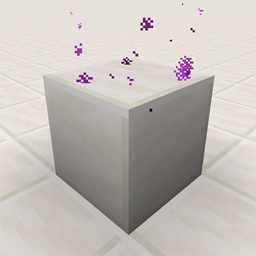
Quartz Elevator Mod za Minecraft 1.21.11
Fabric mod koji dodaje kvarcne liftove
- preuzimanja
- 3 preuzimanja
- pregleda
- 20 pregleda
- Ažurirano
- Ažurirano 24.10.2026
- 1.21.9 — 1.21.11
 Fabric
Quartz Elevator
Mod Quartz Elevator je inspirisan OpenBlocks Elevators i Simple Elevators. Dodaje Quartz Elevator i Smooth Quartz Elevator.
Možeš da se teleportuješ između liftova sa istim (x, z) koordinatama: skoči da ideš gore i čučni da ideš dole.
Zahteva
Mod Quartz Elevator zahteva:
- Fabric Loader
- Fabric API
Recept
Quartz Elevator
- [Kreftovanje] Brock of Quartz x1 + Ender Pearl x1 (kreftovanje bez oblika)
- [Kreftovanje] Nether Quartz x4 + Ender Pearl x1 (kreftovanje sa oblikom kao na slici ispod)
- može se iskopati bilo kojim pijukom. Ako se iskopa bez pijuka, ne ispušta ništa.
Smooth Quartz Elevator
- [Kreftovanje] Smooth Quartz Block x1 + Ender Pearl x1 (kreftovanje bez oblika)
- [Topljenje] Quartz Elevator x1 + bilo koje gorivo
- može se iskopati bilo kojim pijukom. Ako se iskopa bez pijuka, ne ispušta ništa.
Podešavanja
Maksimalna distanca teleportacije
- "Quartz Elevator": 16 blokova
- "Smooth Quartz Elevator": 64 bloka
Ovo su podrazumevane vrednosti i mogu se podesiti.
Mešanje tipova (verzija 1.2.0+)
Ne možeš da se krećeš između različitih tipova liftova po podrazumevanim podešavanjima, ali to može da se podesi.
Filter entiteta
Vrednost "Player Only" je podrazumevano false. Ako je "Player Only" true, samo entiteti igrača mogu da se teleportuju.
Prikaz čestica (verzija 2.1.0+/1.3.0+)
Vrednost "Display Particles" je podrazumevano true. Ako je "Display Particles" false, čestice quartz elevatora se ne prikazuju.
ModMenu integracija
Gore navedene vrednosti mogu se podesiti preko ModMenu GUI ekrana.
Kako instalirati Quartz Elevator
With Millida Launcher
Install Millida Launcher
The launcher is free: download it at millida.net/launcher and sign in with any nickname.
Click “Install” on this page
The launcher opens and installs the mod for Minecraft 1.21.9–1.21.11 on Fabric automatically.
Launch the game
A profile with it appears in the launcher: click “Play”.
Manually
Install Fabric
The loader must match the game version of the mod file, for example Minecraft 1.21.11. After installing it, a separate profile appears in your launcher.
Download the file for your version
In the version list above, pick the file quartz-elevator-2.3.7+1.21.11.jar (1.0 MB) for your game version.
Put it in the mods folder
The folder is inside .minecraft (Windows: %appdata%\.minecraft\mods). If it does not exist, create it.
Launch the loader profile
Open “Mods” in the main menu: Quartz Elevator should be in the list.
Minecraft 1.21.11 runs on Java 21: with a different Java version the game may close right after launch.
Verzije
Sa zavisnostima
| Minecraft | Loader | Fajl | Datum | Akcije |
|---|---|---|---|---|
| 1.21.9 | Fabric | Quartz Elevator v2.3.7+1.21.111 MB 3 | ||
| — | Fabric | Quartz Elevator v2.1.2 for 1.19-rc21009 KB | ||
| — | Fabric | Quartz Elevator v1.2.5 for 1.18 Experimental Snapshot 1897 KB |
Recenzije
Budi prvi koji će oceniti Quartz Elevator


